SQL Server Reporting Services
A SQL Server technology that supports the creation, management, and delivery of both traditional, paper-oriented reports and interactive, web-based reports.
This browser is no longer supported.
Upgrade to Microsoft Edge to take advantage of the latest features, security updates, and technical support.
' cx='32' cy='32' r='32' /%3E%3Ctext x='50%25' y='55%25' dominant-baseline='middle' text-anchor='middle' fill='%23FFF' %3EJ%3C/text%3E%3C/svg%3E)
Morning,
When I drag elements around the SSRS report designer in VS 2019, as I get close to another object a small tooltip pops up and shows the distance between the two as "# points". As I close the gap the # becomes closer to 0. (screenshot below of what I mean)
Another member of my team does not see these tooltip popups when interacting with elements inside the report designer. I'm wondering where is the setting to enable this? We have tried exporting my VS settings and having my colleague import those but this did not solve the issue. I'm not sure what the right term is to google to try and find this setting.
Does anyone have any ideas?
Thank you!
-JL
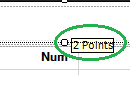
A SQL Server technology that supports the creation, management, and delivery of both traditional, paper-oriented reports and interactive, web-based reports.
' cx='32' cy='32' r='32' /%3E%3Ctext x='50%25' y='55%25' dominant-baseline='middle' text-anchor='middle' fill='%23FFF' %3EI1%3C/text%3E%3C/svg%3E)
Hi @JL ,
I tested on my local vs 2013 or vs 2019 ,they both have the distance tooltips,and even on report builder 3.0, so I think this feature exists from the beginning,and I didn't find any setting refrence to this feature.
Maybe there is something wrong with the visual studio by your friend, how about reinstall the visual studio to see if it helps.
Best Regards,
Isabella
If the answer is the right solution, please click "Accept Answer" and upvote it. If you have extra questions about this answer, please click "Comment".
Note: Please follow the steps in our documentation to enable e-mail notifications if you want to receive the related email notification for this thread.