Share via

Qualcomm drivers reinstalation issue

Anonymous
2022-05-04T09:27:53+00:00

Hello,

I would like to use a specific Qualcomm driver on my win 10 DELL laptop (HS-USB Android DIAG 9018). I open the "Device Manager", right-click on the device -> update driver -> Browse my computer. I have downloaded the driver so I pick the folder and instead of proceeding my PC just tells me that "Best drives are already installed".

How can I resolve this really odd situation?

Windows for home | Windows 10 | Devices and drivers

Locked Question. This question was migrated from the Microsoft Support Community. You can vote on whether it's helpful, but you can't add comments or replies or follow the question.

0 comments No comments

3 answers

Sort by: Most helpful
  1. Anonymous
    2022-05-04T10:59:38+00:00

    Hi MadCharlie,

    I'm Paul and I'm here to help you with your concern.

    Can you check the Hardware ID of that specific device?

    Open Device Manager > Right-click the device > click Properties > click Details tab > under 'Property', select Hardware Id's > Copyand paste the topmost Hardware ID under 'Value' here.

    Thanks.

    4 people found this answer helpful.
    0 comments No comments
  2. Anonymous
    2022-05-05T12:03:40+00:00

    Hello MadCharlie,

    I am Jaspreet Singh.

    The only way to remove the drivers is to delete the device they are installed for from the device manager. This either removes the driver directly or gives you a popup to remove them.

    ** You seem to be trying to install an incompatible driver which will revert to the officially installed one so you may want to check for the compatibility of the drivers you are trying to install with your device.

    2 people found this answer helpful.
    0 comments No comments
  3. Anonymous
    2022-05-04T11:36:58+00:00

    Hello Paul,

    I am not sure this will help :D
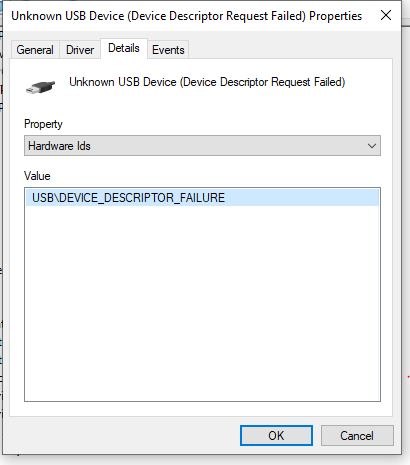
    I am trying to connect ONEPLUS 8 phone with all the diagnostic ports and to tell the truth I have already messed with the drivers before, so all this could be my fault.

    Usual way for me how to solve this is by going Device Manager -> properties -> driver -> update driver -> browse my computer -> let my pick ->

    Then I am usually able to pick HS-USB Android DIAG 9018 from the list. But on this laptop, there are just USB composite device drivers.
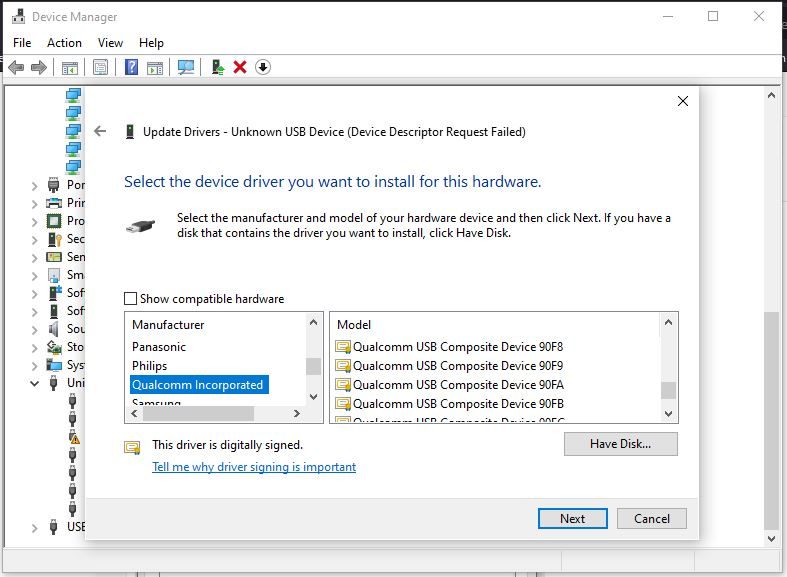
    So I believe I have some sort of driver issues with the QUALCOMM devices... I reinstalled the QUALCOMM driver again in hope this would fix the issue, but no luck there. Is there any way how to uninstall the QUALCOMM drivers so I can install them again? I have tried to uninstall the device, but it did nothing with the driver.

    I really appreciate any help :)

    2 people found this answer helpful.
    0 comments No comments
