Thanks, Greg. I opened Notepad, expanded that window, then opened my Clipboard Manager (CM). When I click on a clip, nothing happens. I can't copy/paste it into Notepad, nor can I drag it into Notepad. When I click on the 3 dots by the clip, my only option is to Delete. I thought I would be able to copy it but that is not an option.
Is the workaround saying I have to open Notepad every time I want to use a clip? Or, that by resizing the Notepad window, somehow that will make the Clipboard Manager window expand to the same size as the Notepad? Either way, I still can't use the CM as it currently is.
Any other ideas? I really appreciate your suggestions.
Donna
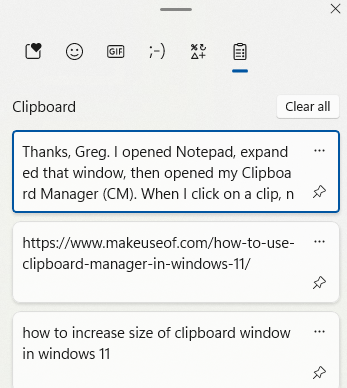
P.S. I just looked more carefully and saw I was supposed to "pin" the clip in order to Copy, and then I was able to Paste into Notepad. Below is the size of my CM window and I would like for the whole window to be about half of my 17" screen size.
' cx='32' cy='32' r='32' /%3E%3Ctext x='50%25' y='55%25' dominant-baseline='middle' text-anchor='middle' fill='%23FFF' %3EA%3C/text%3E%3C/svg%3E)
