Azure IoT Hub
An Azure service that enables bidirectional communication between internet of things (IoT) devices and applications.
This browser is no longer supported.
Upgrade to Microsoft Edge to take advantage of the latest features, security updates, and technical support.
' cx='32' cy='32' r='32' /%3E%3Ctext x='50%25' y='55%25' dominant-baseline='middle' text-anchor='middle' fill='%23FFF' %3EA%3C/text%3E%3C/svg%3E)
I want to add a new device but this error showed up.
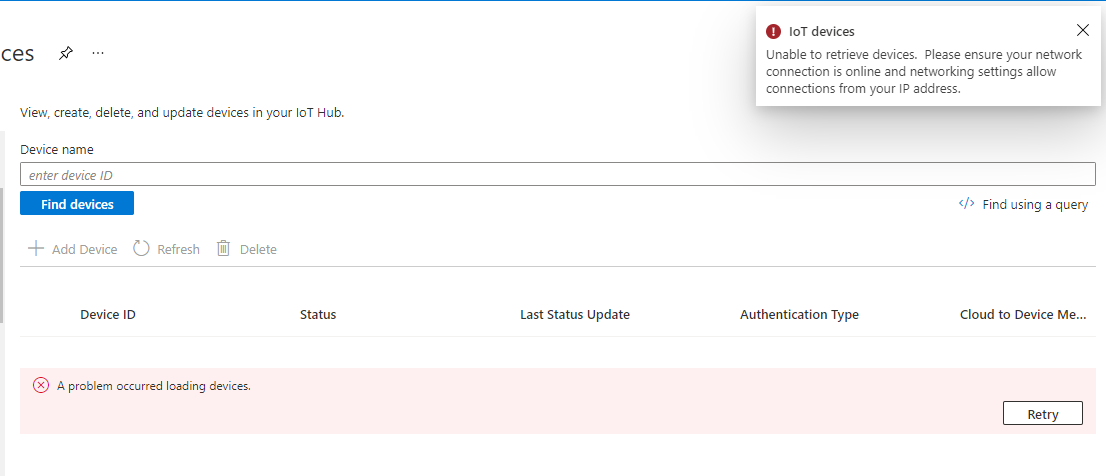
I've tried changing the connection but the still not working
An Azure service that enables bidirectional communication between internet of things (IoT) devices and applications.
' cx='32' cy='32' r='32' /%3E%3Ctext x='50%25' y='55%25' dominant-baseline='middle' text-anchor='middle' fill='%23FFF' %3EAM%3C/text%3E%3C/svg%3E)
@Alwan Wanted to follow up with you to understand whether the below information helped. Please let us know if there are any other queries.
If below suggestions answers your query, do click Accept Answer and Up-Vote for the same. And, if you have any further query do let us know.

Hello @Saïda BEN SLIMEN ,
your IoT Hub seems not to able to show the list of devices.
I cannot reproduce your issue on my IoT Hubs but I've seen this same issue in the past. Then, I just had to wait a few hours and then it worked again.
I remember this was only an Azure portal issue in my case.
Which region is this? Did you check the Service health page already? (Search for service health within the portal)
I was still able to eg. create a new device using the command line (az) interface:
az iot hub device-identity create -n {iothub_name} -d {device_id} --ee false
This then results in a new device.
Using the AZ command on the azure command prompt, you can also list available devices.
If you want to contact Microsoft about this, you can start with sending a message to Azure Support on Twitter or submit a support request.
Ya, I've seen the previous post about this problem. It was solved back then but now that same problem happened to me.
I'm in SE Asia region.
Let me try the azure interface method, I'll let you know the results.