Share via

99% of the RAM memory being use when no app is running ,pc lagging

Anonymous
2022-06-30T14:42:55+00:00

in my pc , i got the new windows 11 home , from few days my pc is randomly showing 99% usadge of memory i.e ram in the task manager ,and the pc is hagging alot due to which i am not able to do anything , i have no apps or broweser aur anything open ,still its showing 99% of memory being used ,i dont know where that memory is being used ,please help

Windows for home | Windows 11 | Performance and system failures

Locked Question. This question was migrated from the Microsoft Support Community. You can vote on whether it's helpful, but you can't add comments or replies or follow the question.

0 comments No comments

12 answers

Sort by: Most helpful
  1. Anonymous
    2022-07-01T08:52:27+00:00

    I do not understand why MVP and Independent Advisor always use this kind of method. When there is error always request the user to perform repair which I deem very unnecessary.

    The cause of Memory to go for 99%.

    1. How much RAM does this PC have? - This information is needed to decide if the RAM is insufficient to run Windows 11.
    2. What application is running, and which one use memory the most. You haven't get that information and you ask user to perform repair.

    This is not the way to troubleshoot! Please MVP and Independent Advisor do not provide answer if you do not have sufficient information!!!

    If his PC have only 4 GB of RAM, even if he perform a infinite repair, it will never solve his RAM problem!!!

    Windows Task Manager is enough to analyze RAM usage which later can be use to further troubleshoot by deactivating certain apps.

    Please provide a solution that ends the problem, not adding unnecessary steps that adds complexity in troubleshooting!

    30+ people found this answer helpful.
    0 comments No comments
  2. Anonymous
    2022-07-01T10:55:27+00:00

    thats the problem it dont show any application using memory in large amount ,it just shows 99% memory being ,i am not able to find out where is the memory being used and by which application , i coudnt take screen shot becoz the pc was hagging alot and nothing was working , after every one hour it start and the memory usadge itself goes to 99% and i have to restart ,idk how but this is happening while i do anything like while watching a movie ,using browser ,downloading files anything

    10+ people found this answer helpful.
    0 comments No comments
  3. Anonymous
    2022-07-01T14:14:50+00:00

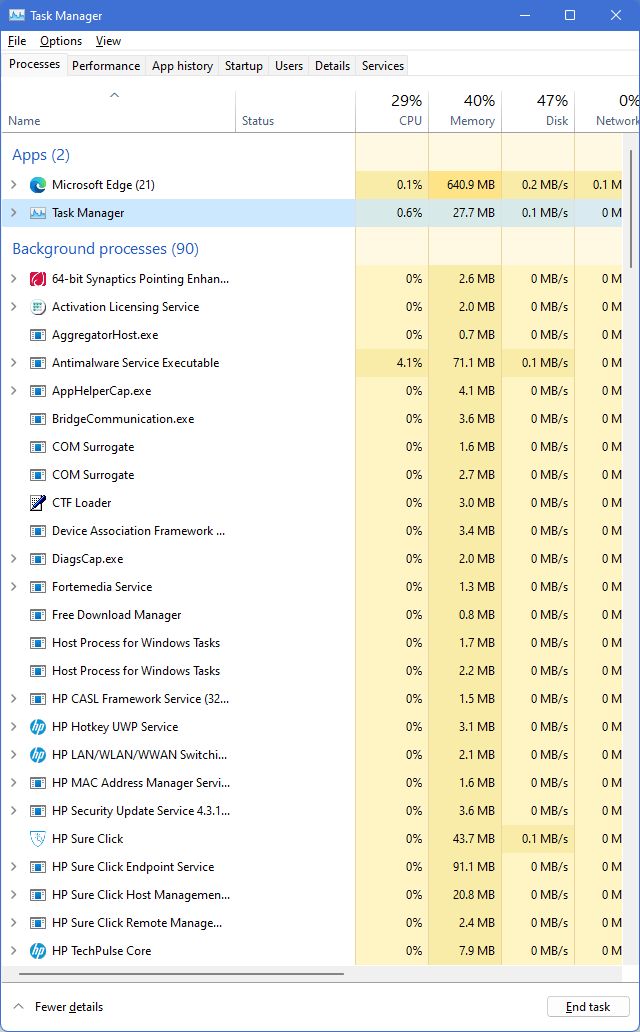
    Image

    As you can see I have RAM of about 16GB, after startup my RAM usage is about 38% which is approximately 6 GB in the start. After running Microsoft Edge to write this reply it go up to 40%. My best opinion is you should upgrade your RAM to 12GB or best at 16GB.

    If you read this article Windows 11 System Requirements (microsoft.com), it stated that your need minimum of 4GB to run the OS. Base on my past experience with Windows:

    • Windows XP minimum RAM requirement is 64MB. With many internet service disabled Windows XP can run well with 128MB of RAM, but with internet service enabled it will only run well with 256MB or more RAM.
    • Windows 7 Pro x64 minimum requirement is 1 GB of RAM, after full install of applications and some tweaks my windows 7 Pro x64 run at 1.5 GB of RAM at start up. I cannot imagine if I use 2 GB of RAM, for browsing and running various application.
    • Windows 10 Pro x64 minimum requirement is 2GB of RAM. But in my experience, Windows 10 Pro x64 will only run well with 8GB of RAM.

    To be exactly, Microsoft do not take driver, application and feature into their "minimum" specification, this is why many people are frustrated when they install a new OS base on RAM minimum requirement. 2x RAM requirements I still considered as low. In my experience you will need at least 4x RAM minimum requirement if you wish for a full feature.

    In the mean time while waiting for RAM upgrades, I suggest you to do these temporary:

    1. Disable some non-critical application in the start-up.
    2. Disable some Windows Services. You can disable services such as Background Intelligent Transfer Service, Windows Update, and other non-critical Services. If you're unsure, you can leave the service startup type as manual if you're unsure
    3. Disable some scheduled task that run on during log-on
    4. Don't use any other antivirus. Just let Microsoft Defender do the job.
    5. You may add some virtual memory. But this is not recommended as high read-write operation during swapping may shorten the SSD life-span.

    If the RAM chips are soldered into the board and upgrading your RAM is not an option, then downgrading to Windows 10 will be the best option.

    As for browser I suggest you to use Microsoft Edge, as it uses the smallest memory compared to Google Chrome.

    I hope my answer helps.

    7 people found this answer helpful.
    0 comments No comments
  4. Anonymous
    2022-07-01T03:43:08+00:00

    yes i did installed some third party apps ,but i do have quick heal antivirus so it didnt detected any virus ,and also after this problem i deleted those apps still the problem is being faced at random after every 1 hour and i have to restart to get it back to noraml everytime ,i will pin an picture down , you can see no app is being run still its showing 97 % memory being used ,and not only randomly without opening any apps this also happens after i start to download anything from the interent ,i tried downloading my files from google drive when it start to download the pc laggs and shows 99% memory being used ,this was not happening before it started just few days earlier

    7 people found this answer helpful.
    0 comments No comments
  5. Anonymous
    2022-06-30T15:20:57+00:00

    Good day! I'm Raniel, a Microsoft user like you. I understand your frustration regarding this issue but I'll do my best to help.

    Just to clarify, did you make any changes to your machine before encountering this issue(like installing third party apps, recent updates, etc..)? do you also encounter the issue when you access your account via safe mode?. Please see the steps under "From the sign-in screen": https://support.microsoft.com/help/12376/window...

    Double-check if your machine doesn't have any pending security patches: Go to Start > Settings > Windows Update > Check for Updates. Also ensure that the necessary drivers for your machine are properly updated by getting them from the manufacturer's website. You may refer to this guide:

    https://support.microsoft.com/windows/update-dr...

    I also suggest that you perform the additional steps on these articles to improve the performance of your machine:

    https://support.microsoft.com/windows/tips-to-i...

    I hope this helps. Good luck!

    4 people found this answer helpful.
    0 comments No comments
