Hello,
I'm asking for help with my computer. I have audio pops and cracklings, with a small persistent background noise which really looks like interferencies (I hear it louder when I move my mouse).
I am using a headset wired with a jack 3.5 cable, so I hear the interferences, but not with other headsets wired on USB port, though the cracklings and pops still appear whether I am wired on USB or jack port.
I did a check with LatencyMon which resulted in high latency in every field mesured as you can see before :
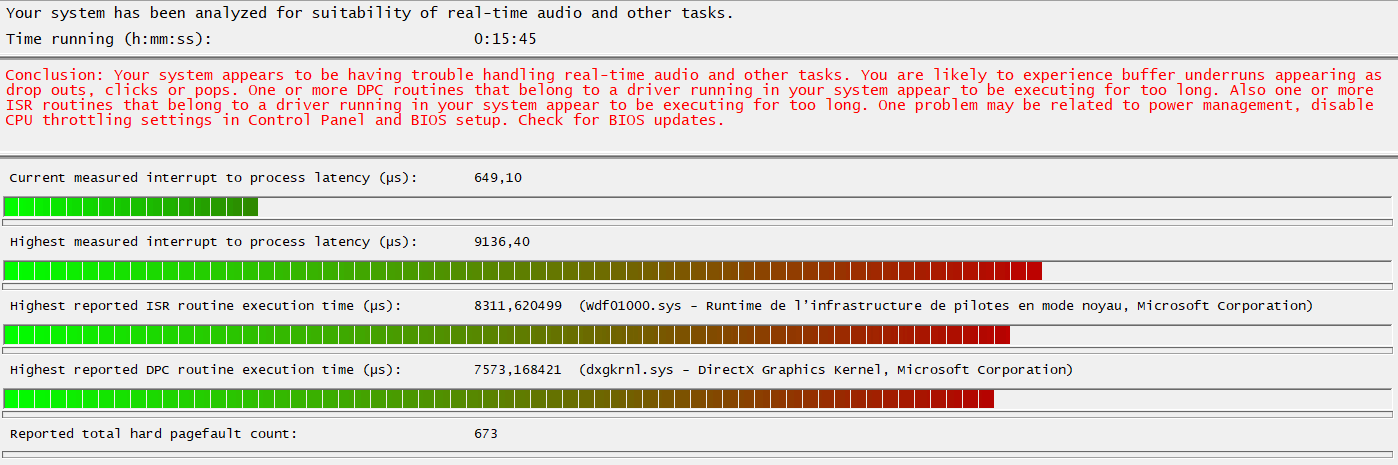
Here is the complete result log :
_________________________________________________________________________________________________________
CONCLUSION
_________________________________________________________________________________________________________
Your system appears to be having trouble handling real-time audio and other tasks. You are likely to experience buffer underruns appearing as drop outs, clicks or pops. One or more DPC routines that belong to a driver running in your system appear to be executing for too long. Also one or more ISR routines that belong to a driver running in your system appear to be executing for too long. One problem may be related to power management, disable CPU throttling settings in Control Panel and BIOS setup. Check for BIOS updates.
LatencyMon has been analyzing your system for 0:15:45 (h:mm:ss) on all processors.
_________________________________________________________________________________________________________
SYSTEM INFORMATION
_________________________________________________________________________________________________________
Computer name: SLOTH
OS version: Windows 11, 10.0, version 2009, build: 22000 (x64)
Hardware: OMEN by HP 45L Gaming Desktop GT22-0xxx, HP
BIOS: F.21
CPU: GenuineIntel 12th Gen Intel(R) Core(TM) i7-12700K
Logical processors: 20
Processor groups: 1
Processor group size: 20
RAM: 32525 MB total
_________________________________________________________________________________________________________
CPU SPEED
_________________________________________________________________________________________________________
Reported CPU speed (WMI): 3610 MHz
Reported CPU speed (registry): 3610 MHz
Note: reported execution times may be calculated based on a fixed reported CPU speed. Disable variable speed settings like Intel Speed Step and AMD Cool N Quiet in the BIOS setup for more accurate results.
_________________________________________________________________________________________________________
MEASURED INTERRUPT TO USER PROCESS LATENCIES
_________________________________________________________________________________________________________
The interrupt to process latency reflects the measured interval that a usermode process needed to respond to a hardware request from the moment the interrupt service routine started execution. This includes the scheduling and execution of a DPC routine, the signaling of an event and the waking up of a usermode thread from an idle wait state in response to that event.
Highest measured interrupt to process latency (µs): 9136,40
Average measured interrupt to process latency (µs): 7,872447
Highest measured interrupt to DPC latency (µs): 9130,30
Average measured interrupt to DPC latency (µs): 2,577180
_________________________________________________________________________________________________________
REPORTED ISRs
_________________________________________________________________________________________________________
Interrupt service routines are routines installed by the OS and device drivers that execute in response to a hardware interrupt signal.
Highest ISR routine execution time (µs): 8311,620499
Driver with highest ISR routine execution time: Wdf01000.sys - Runtime de l’infrastructure de pilotes en mode noyau, Microsoft Corporation
Highest reported total ISR routine time (%): 0,002540
Driver with highest ISR total time: Wdf01000.sys - Runtime de l’infrastructure de pilotes en mode noyau, Microsoft Corporation
Total time spent in ISRs (%) 0,002545
ISR count (execution time <250 µs): 49249
ISR count (execution time 250-500 µs): 0
ISR count (execution time 500-1000 µs): 0
ISR count (execution time 1000-2000 µs): 0
ISR count (execution time 2000-4000 µs): 10
ISR count (execution time >=4000 µs): 0
_________________________________________________________________________________________________________
REPORTED DPCs
_________________________________________________________________________________________________________
DPC routines are part of the interrupt servicing dispatch mechanism and disable the possibility for a process to utilize the CPU while it is interrupted until the DPC has finished execution.
Highest DPC routine execution time (µs): 7573,168421
Driver with highest DPC routine execution time: dxgkrnl.sys - DirectX Graphics Kernel, Microsoft Corporation
Highest reported total DPC routine time (%): 0,010445
Driver with highest DPC total execution time: dxgkrnl.sys - DirectX Graphics Kernel, Microsoft Corporation
Total time spent in DPCs (%) 0,033443
DPC count (execution time <250 µs): 838210
DPC count (execution time 250-500 µs): 0
DPC count (execution time 500-10000 µs): 388
DPC count (execution time 1000-2000 µs): 3
DPC count (execution time 2000-4000 µs): 1
DPC count (execution time >=4000 µs): 4
_________________________________________________________________________________________________________
REPORTED HARD PAGEFAULTS
_________________________________________________________________________________________________________
Hard pagefaults are events that get triggered by making use of virtual memory that is not resident in RAM but backed by a memory mapped file on disk. The process of resolving the hard pagefault requires reading in the memory from disk while the process is interrupted and blocked from execution.
NOTE: some processes were hit by hard pagefaults. If these were programs producing audio, they are likely to interrupt the audio stream resulting in dropouts, clicks and pops. Check the Processes tab to see which programs were hit.
Process with highest pagefault count: systemsettings.exe
Total number of hard pagefaults 673
Hard pagefault count of hardest hit process: 164
Number of processes hit: 43
_________________________________________________________________________________________________________
PER CPU DATA
_________________________________________________________________________________________________________
CPU 0 Interrupt cycle time (s): 31,684120
CPU 0 ISR highest execution time (µs): 2259,232133
CPU 0 ISR total execution time (s): 0,204257
CPU 0 ISR count: 24908
CPU 0 DPC highest execution time (µs): 5193,433795
CPU 0 DPC total execution time (s): 1,242105
CPU 0 DPC count: 336007
_________________________________________________________________________________________________________
CPU 1 Interrupt cycle time (s): 16,098252
CPU 1 ISR highest execution time (µs): 0,0
CPU 1 ISR total execution time (s): 0,0
CPU 1 ISR count: 0
CPU 1 DPC highest execution time (µs): 714,367313
CPU 1 DPC total execution time (s): 0,262843
CPU 1 DPC count: 24959
_________________________________________________________________________________________________________
CPU 2 Interrupt cycle time (s): 19,761547
CPU 2 ISR highest execution time (µs): 0,0
CPU 2 ISR total execution time (s): 0,0
CPU 2 ISR count: 0
CPU 2 DPC highest execution time (µs): 7573,168421
CPU 2 DPC total execution time (s): 1,294077
CPU 2 DPC count: 110705
_________________________________________________________________________________________________________
CPU 3 Interrupt cycle time (s): 13,071578
CPU 3 ISR highest execution time (µs): 45,492521
CPU 3 ISR total execution time (s): 0,022524
CPU 3 ISR count: 2156
CPU 3 DPC highest execution time (µs): 500,679778
CPU 3 DPC total execution time (s): 0,045121
CPU 3 DPC count: 3116
_________________________________________________________________________________________________________
CPU 4 Interrupt cycle time (s): 13,302617
CPU 4 ISR highest execution time (µs): 2304,307479
CPU 4 ISR total execution time (s): 0,068756
CPU 4 ISR count: 6335
CPU 4 DPC highest execution time (µs): 147,367867
CPU 4 DPC total execution time (s): 0,173117
CPU 4 DPC count: 46996
_________________________________________________________________________________________________________
CPU 5 Interrupt cycle time (s): 14,095988
CPU 5 ISR highest execution time (µs): 0,0
CPU 5 ISR total execution time (s): 0,0
CPU 5 ISR count: 0
CPU 5 DPC highest execution time (µs): 292,724654
CPU 5 DPC total execution time (s): 0,183458
CPU 5 DPC count: 16827
_________________________________________________________________________________________________________
CPU 6 Interrupt cycle time (s): 15,695989
CPU 6 ISR highest execution time (µs): 0,0
CPU 6 ISR total execution time (s): 0,0
CPU 6 ISR count: 0
CPU 6 DPC highest execution time (µs): 1162,277562
CPU 6 DPC total execution time (s): 0,526263
CPU 6 DPC count: 47473
_________________________________________________________________________________________________________
CPU 7 Interrupt cycle time (s): 12,822803
CPU 7 ISR highest execution time (µs): 68,385042
CPU 7 ISR total execution time (s): 0,010603
CPU 7 ISR count: 750
CPU 7 DPC highest execution time (µs): 92,992244
CPU 7 DPC total execution time (s): 0,017656
CPU 7 DPC count: 1418
_________________________________________________________________________________________________________
CPU 8 Interrupt cycle time (s): 15,001709
CPU 8 ISR highest execution time (µs): 8311,620499
CPU 8 ISR total execution time (s): 0,160005
CPU 8 ISR count: 13632
CPU 8 DPC highest execution time (µs): 5465,837673
CPU 8 DPC total execution time (s): 0,389327
CPU 8 DPC count: 43778
_________________________________________________________________________________________________________
CPU 9 Interrupt cycle time (s): 17,022988
CPU 9 ISR highest execution time (µs): 0,0
CPU 9 ISR total execution time (s): 0,0
CPU 9 ISR count: 0
CPU 9 DPC highest execution time (µs): 1042,766205
CPU 9 DPC total execution time (s): 0,680977
CPU 9 DPC count: 63595
_________________________________________________________________________________________________________
CPU 10 Interrupt cycle time (s): 16,877869
CPU 10 ISR highest execution time (µs): 0,0
CPU 10 ISR total execution time (s): 0,0
CPU 10 ISR count: 0
CPU 10 DPC highest execution time (µs): 793,608864
CPU 10 DPC total execution time (s): 1,155530
CPU 10 DPC count: 105376
_________________________________________________________________________________________________________
CPU 11 Interrupt cycle time (s): 15,088656
CPU 11 ISR highest execution time (µs): 36,401108
CPU 11 ISR total execution time (s): 0,000086
CPU 11 ISR count: 5
CPU 11 DPC highest execution time (µs): 496,162881
CPU 11 DPC total execution time (s): 0,055225
CPU 11 DPC count: 10021
_________________________________________________________________________________________________________
CPU 12 Interrupt cycle time (s): 11,621449
CPU 12 ISR highest execution time (µs): 41,508033
CPU 12 ISR total execution time (s): 0,009428
CPU 12 ISR count: 640
CPU 12 DPC highest execution time (µs): 2150,354571
CPU 12 DPC total execution time (s): 0,031158
CPU 12 DPC count: 3636
_________________________________________________________________________________________________________
CPU 13 Interrupt cycle time (s): 12,636521
CPU 13 ISR highest execution time (µs): 0,0
CPU 13 ISR total execution time (s): 0,0
CPU 13 ISR count: 0
CPU 13 DPC highest execution time (µs): 140,586150
CPU 13 DPC total execution time (s): 0,007011
CPU 13 DPC count: 1037
_________________________________________________________________________________________________________
CPU 14 Interrupt cycle time (s): 13,132451
CPU 14 ISR highest execution time (µs): 0,0
CPU 14 ISR total execution time (s): 0,0
CPU 14 ISR count: 0
CPU 14 DPC highest execution time (µs): 535,130194
CPU 14 DPC total execution time (s): 0,163368
CPU 14 DPC count: 15834
_________________________________________________________________________________________________________
CPU 15 Interrupt cycle time (s): 12,767137
CPU 15 ISR highest execution time (µs): 0,0
CPU 15 ISR total execution time (s): 0,0
CPU 15 ISR count: 0
CPU 15 DPC highest execution time (µs): 255,942936
CPU 15 DPC total execution time (s): 0,005362
CPU 15 DPC count: 963
_________________________________________________________________________________________________________
CPU 16 Interrupt cycle time (s): 12,815957
CPU 16 ISR highest execution time (µs): 41,612742
CPU 16 ISR total execution time (s): 0,005146
CPU 16 ISR count: 820
CPU 16 DPC highest execution time (µs): 96,121884
CPU 16 DPC total execution time (s): 0,021765
CPU 16 DPC count: 1359
_________________________________________________________________________________________________________
CPU 17 Interrupt cycle time (s): 13,703126
CPU 17 ISR highest execution time (µs): 0,0
CPU 17 ISR total execution time (s): 0,0
CPU 17 ISR count: 0
CPU 17 DPC highest execution time (µs): 460,692521
CPU 17 DPC total execution time (s): 0,052919
CPU 17 DPC count: 4054
_________________________________________________________________________________________________________
CPU 18 Interrupt cycle time (s): 12,069722
CPU 18 ISR highest execution time (µs): 0,0
CPU 18 ISR total execution time (s): 0,0
CPU 18 ISR count: 0
CPU 18 DPC highest execution time (µs): 367,341828
CPU 18 DPC total execution time (s): 0,010467
CPU 18 DPC count: 1010
_________________________________________________________________________________________________________
CPU 19 Interrupt cycle time (s): 12,170409
CPU 19 ISR highest execution time (µs): 32,800554
CPU 19 ISR total execution time (s): 0,000255
CPU 19 ISR count: 14
CPU 19 DPC highest execution time (µs): 63,723546
CPU 19 DPC total execution time (s): 0,003484
CPU 19 DPC count: 442
_________________________________________________________________________________________________________
The main drivers that are executing for too long are graphic drivers, and more rarely network drivers :

Currently I haven't solved it after trying a lot of possible resolutions that I will try to list below :
- did a clean factory reset of Windows 11
- disabled CPU throttling
- manually updated all drivers on the computer
- disabling devices that may cause the problem like Intel; Realtek or NVIDIA drivers
- tried modifying some settings like setting my main GPU as default GPU, setting high performance modes (in NVIDIA control panel and in the power settings of windows) and some others that I forgot (but none of these have worked so far).
I can try to do a check with windows SDK but I never did it so I will have to check for it.
I am using a studio headset so I don't know if the problem can be caused by a hardware issue on the motherboard (I don't have any sound card) and if I should buy one or some device to control the sound output without capturing the interferences, or if it is a software issue.
I have found a lot of topics about this issue but never found any relevant or reliable solution, so I'll try there, hope someone will be able to help me (I am not an expert with all that concerns drivers or system files so I prefer not to try modifying registries or others sensible elements).
I still can return it but I prefer to do it as a last resort.
Thanks by advance if you can help.
' cx='32' cy='32' r='32' /%3E%3Ctext x='50%25' y='55%25' dominant-baseline='middle' text-anchor='middle' fill='%23FFF' %3EA%3C/text%3E%3C/svg%3E)

' cx='32' cy='32' r='32' /%3E%3Ctext x='50%25' y='55%25' dominant-baseline='middle' text-anchor='middle' fill='%23FFF' %3EJ%3C/text%3E%3C/svg%3E)