Hello everyone, i'm having an issue with my laptop and i've been trying to fix it for the past few days with no luck. Basically every time i install windows 10 Pro it works fine up until it asks for a restart in order to install the most recent updates. After the update i am getting a Blue screen error: 0xc000000d Stop Code: Inaccessible_Boot_Device.
Laptop specs:
Model: ASUS ROG Strix SCAR 17 G733QS
CPU: AMD Ryzen™ 9 5900HX
GPU: NVIDIA® GeForce RTX™ 3080 16GB
RAM: 32 GB
2TB SSD
More details about my issue:
My PC was working fine for half a year or so until it asked to restart to install the new updates, after the restart i got the blue screen i mentioned above, so i tried the "Startup Repair" function and i got an error saying "Windows couldn't repair this PC" . So then i tried to "Uninstall feature & quality updates", i got an error saying "Windows couldn't uninstall the updates". After that i tried the reset function, both "Keep my files" and "Delete everything", windows pretty much reinstalled itself and during the startup i got the same blue screen again.
So then i tried to start my PC in Safe Mode (option 5, "Start pc in safe mode with networking"), i got the same Blue screen during startup. Then i made a USB stick (Windows 10 installation media), i hit the "recover using a USB stick" option, and i got the Blue screen again. I booted from the USB stick, hit the "Startup repair" option, i got an error again: "Startup repair couldn't fix the problem". Losing my mind i opened CMD and i tried:
bootrec /fixmbr - "The operation completed successfully"
bootrec /fixboot - "Access is denied"
Being completely stuck at this point, i read on the internet that i needed to repair the EFI bootloader, so i did this in CMD:
diskpart
sel disk 0
list vol
sel vol 0 (in my case)
assign letter= V
exit
V:
bcdboot C:\windows /s V: /f UEFI
That did nothing.
Then i simply decided to do a clean install of windows using the Windows 10 installation media, after that the system booted up normally and worked fine up until it asked to restart in order to install the new recent updates.
So i restarted my PC and while it was updating itself (windows update 32%) the screen went dark, restarted itself, then i got greeted by the same blue screen again. Now i am stuck in a loop, i reinstall windows, works normally, asks to update, i restart, blue screen. Repeat, over and over again.
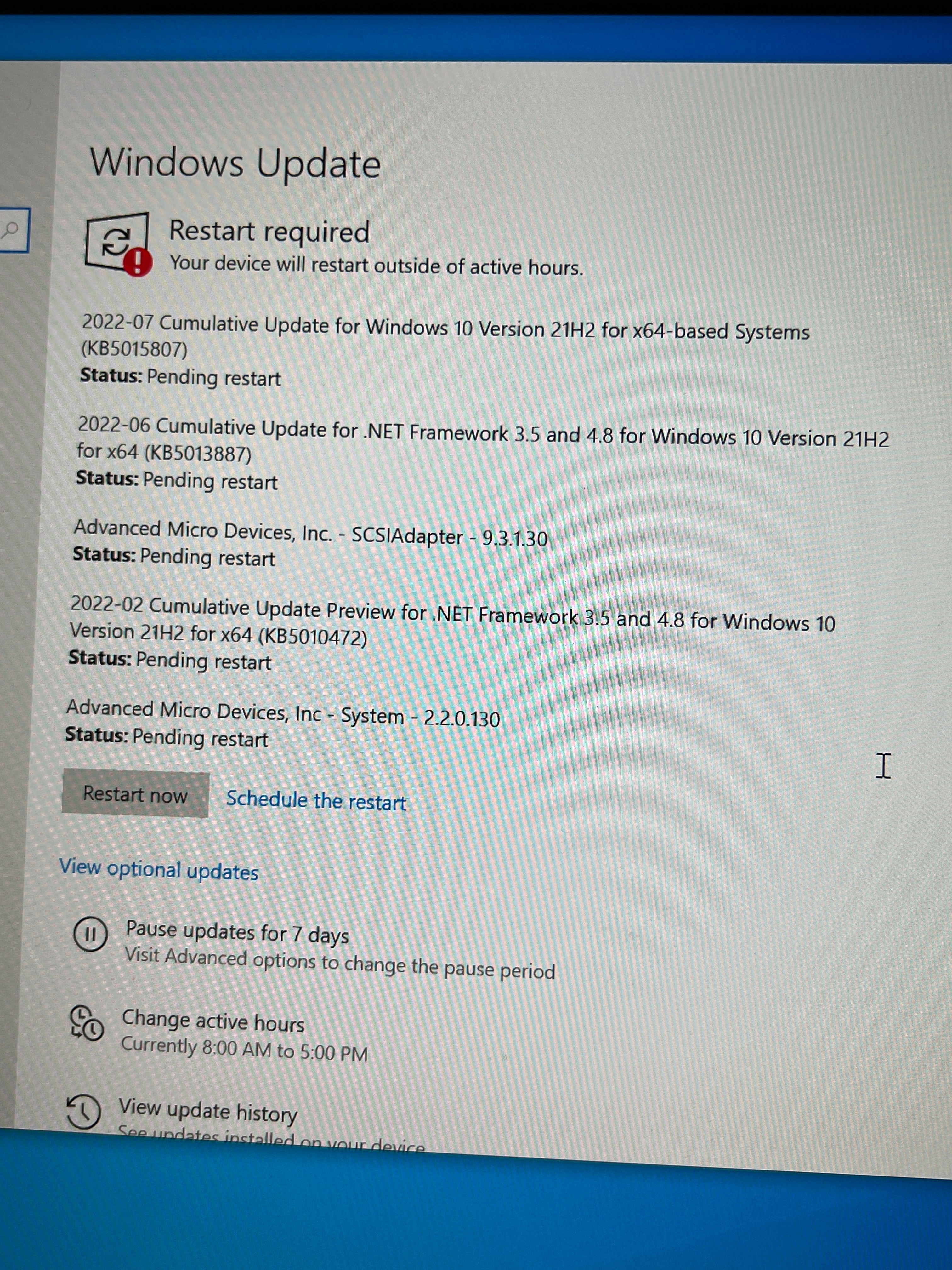
I took a picture of the updates windows was trying to install right before i clicked "Restart now" and got the blue screen again, so i believe that one of these updates is causing issues, unfortunately i don't know which one:
Update:
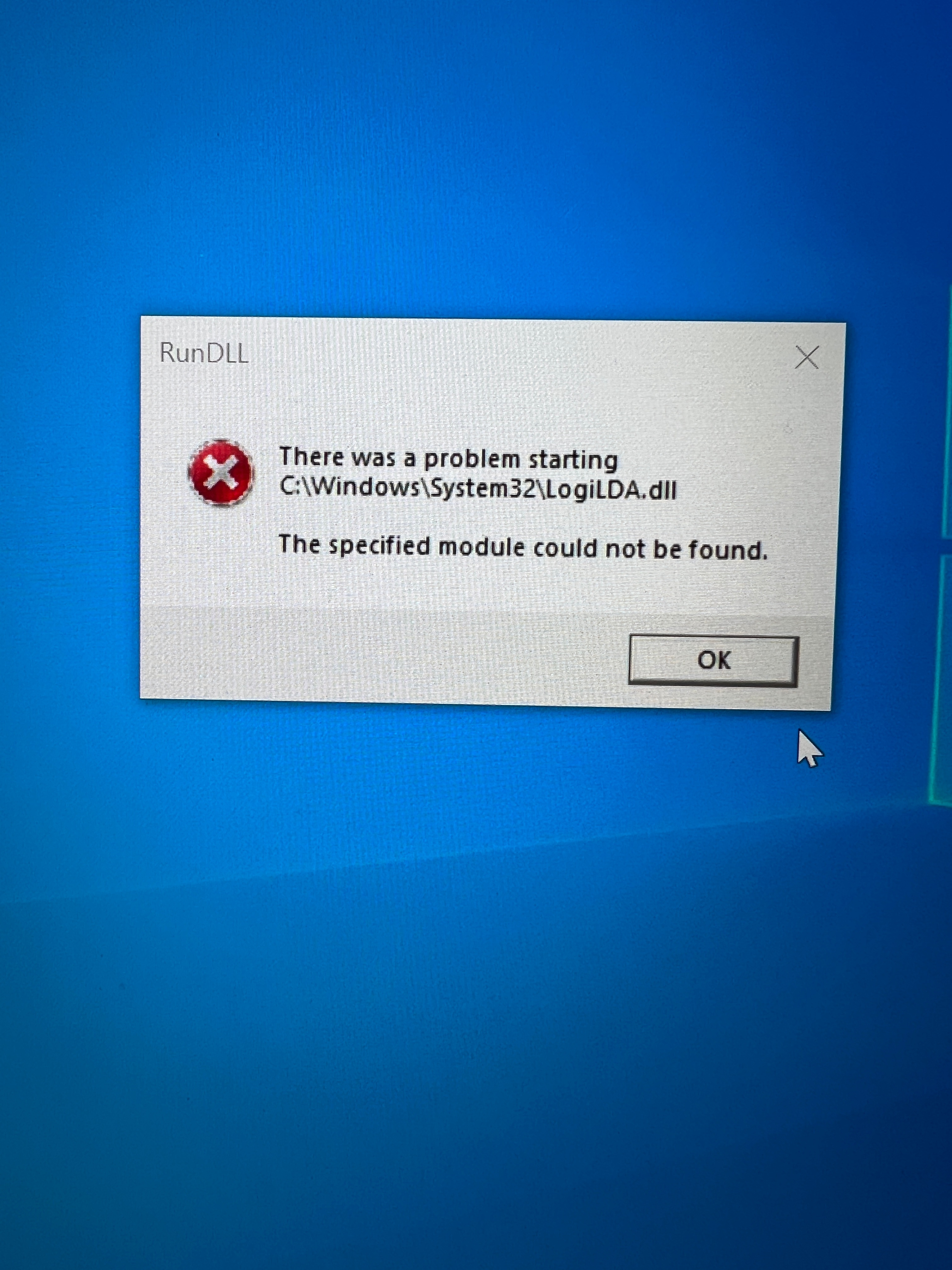
While writing this my PC managed to finally boot up normally and and i got this notification: "We removed some recently installed updates to recover your device from a startup failure". Also i got this error message on my screen:
Now, i don't know how to check which one of the updates has been automatically uninstalled by windows, but if someone could let me know how to do it then we can find the cause of this issue and fix it. Thank you for reading this crazy long and boring text, but i tried to give as many details as possible, hoping that someone knows what to do.
' cx='32' cy='32' r='32' /%3E%3Ctext x='50%25' y='55%25' dominant-baseline='middle' text-anchor='middle' fill='%23FFF' %3EA%3C/text%3E%3C/svg%3E)


' cx='32' cy='32' r='32' /%3E%3Ctext x='50%25' y='55%25' dominant-baseline='middle' text-anchor='middle' fill='%23FFF' %3ERA%3C/text%3E%3C/svg%3E)