Share via

Dedicated GPU not used no matter the graphics settings

Anonymous
2022-09-18T01:26:21+00:00

Hello,

I open this question as I have a persistant problem of integrated GPU selected instead of the dedicated GPU when I play games on my Laptop :

CPU : Intel(R) Core(TM) i7-7700HQ CPU @ 2.80GHz 2.81 GHz

RAM : 16 GB

Integrated GPU : Intel(R) HD Graphics 630

Dedicated GPU : NVIDIA GeForce GTX 1050 Ti

OS : Windows 10 home

Manufacturer: Asus

I tried many solutions to fix this : updating the drivers of both GPU, updating the BIOS, checking Windows update, setting the dedicated GPU as the main GPU in the NVIDIA control panel (but I learned that this panel does not work anymore), setting the high performance GPU in Windows graphics setting, etc. None of these works...

At one point it seemed to be very close to work since the GPU was used normally while playing (~90% usage) but only if the computer was unplugged : as soon as I plugged it, the dGPU stopped being used (usage below 5%) and the game slowed down drastically. Now even this does not work anymore : the GPU is almost never used so every game is slow.

I found two similar questions asked here : https://answers.microsoft.com/en-us/windows/forum/all/game-not-using-high-performance-gpu-despite/713f8f8e-243c-4d18-a369-136dfab69ef3

This one seems like the exact same problem:

https://answers.microsoft.com/en-us/windows/forum/all/games-wont-use-my-gpu-even-if-i-force-them-from/2dcee483-4f24-468d-8df1-5d75d3e6580c

Is there any way to fix this ?

Windows for home | Windows 10 | Gaming

Locked Question. This question was migrated from the Microsoft Support Community. You can vote on whether it's helpful, but you can't add comments or replies or follow the question.

0 comments No comments

3 answers

Sort by: Most helpful
  1. Anonymous
    2022-09-18T07:38:31+00:00

    I've no idea why your Nvidia was only working when running on battery. The other way around is more common, but

    have you monitored the Nvidia gpu temps on those occasions it does get used with a game ?

    "(but I learned that this panel does not work anymore)"

    • I don't know why it wouldn't, but I don't install the Geforce Experience, so that may interfere with Control Panel if installed ?
    • If you downloaded your driver from the Nvidia site you may find the driver provided by ASUS for you model machine may

    be more suitable. Even if it is older than the current driver from Nvidia.

    .

    1 person found this answer helpful.
    0 comments No comments
  2. Anonymous
    2022-09-19T08:51:30+00:00
    • Ah! I forgot that laptops tend to have this cut-down Nvidia Control Panel (no Display or Video section). Anyway...

    I've never used a laptop so I don't know how Optimus works, but you may find someone who knows what may cause

    your Nvidia to not perform optimally when running from a mains power socket at the Nvidia, or possibly the ASUS forums.

    • I see that when your machine is unplugged the Nvidia and cpu clock speeds are not boosting, which may account for the higher usage,

    and that may result in smoother performance even when both tests are running at 29fps.

    What I may be seeing here is you are using too low graphics settings for the capabilities of the Nvidia gpu. Using too low settings

    has been known to cause games to shift processing to the cpu. Have you monitored cpu use while plugged and unplugged ?

    If cpu use is higher while plugged in, set all in games setting to the max, or try using a high DSR resolution (Hopefully available

    in your NV Control Panel) in the games settings to put more stress on the system.

    • I reckon your cpu may be getting pretty close to it's thermal throttling temp in both tests, but probably not connected to

    your current issue, as the temp is 1C higher while plugged in and running the boosted clock speed.

    .

    0 comments No comments
  3. Anonymous
    2022-09-18T13:51:41+00:00

    Hi BossDweeb, thank you for your reply. I read somewhere that Windows graphic settings override the Nvidia control panel ones. But maybe not on my computer since I do not have the message in the nvidia control panel saying it. You can see this message in this video :

    https://youtu.be/Rqj7Qn57Ku8?t=121

    So I went to ASUS' page for my computer :

    https://www.asus.com/FR/supportonly/GL553VE/HelpDesk_Download/

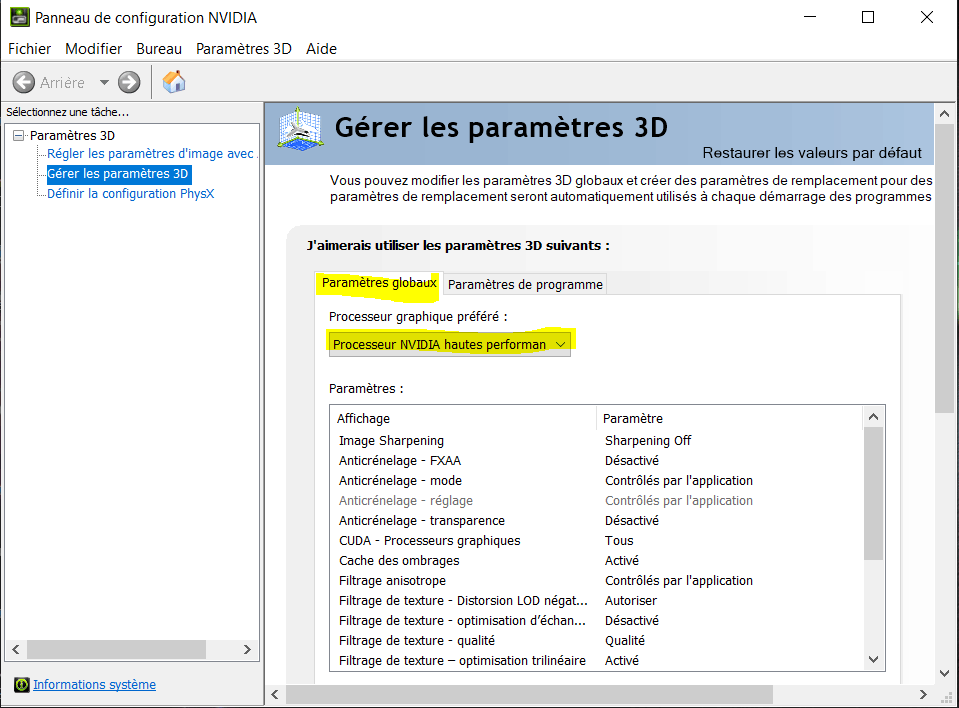
    And tried all the Nvidia drivers proposed, the best working one is Version V26.21.14.4193. With this one I am back to my GPU being used only when the laptop is unplugged. See for instance, what I have in my nvidia control panel for Naruto Storm 4 :
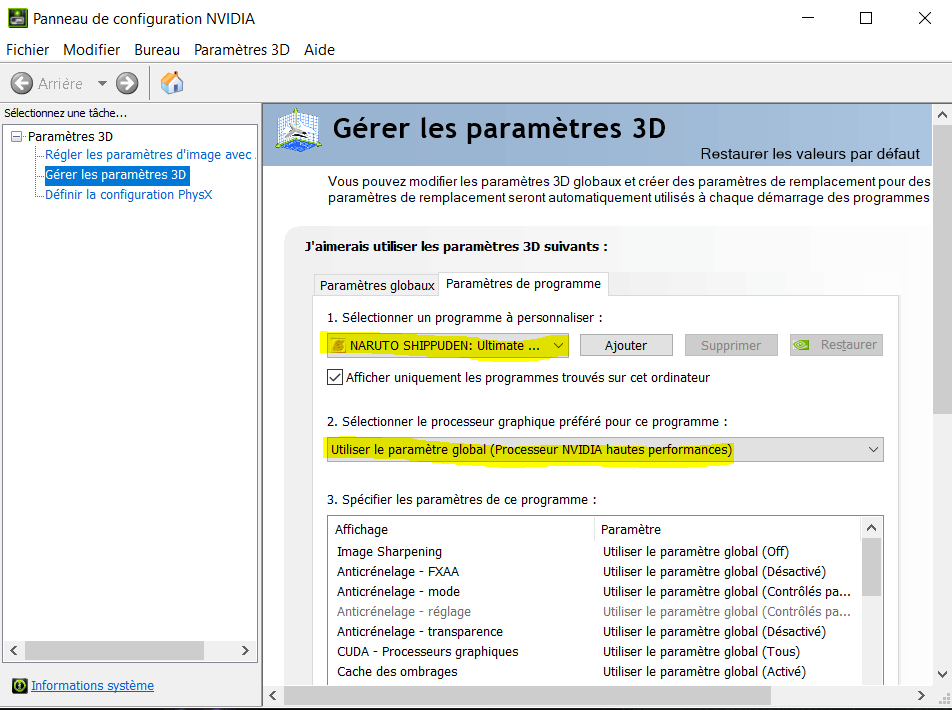
    Image

    And the global parameters :

    Image

    So I specified that I want to always use the dedicated GPU. Now Windows graphic parameters :
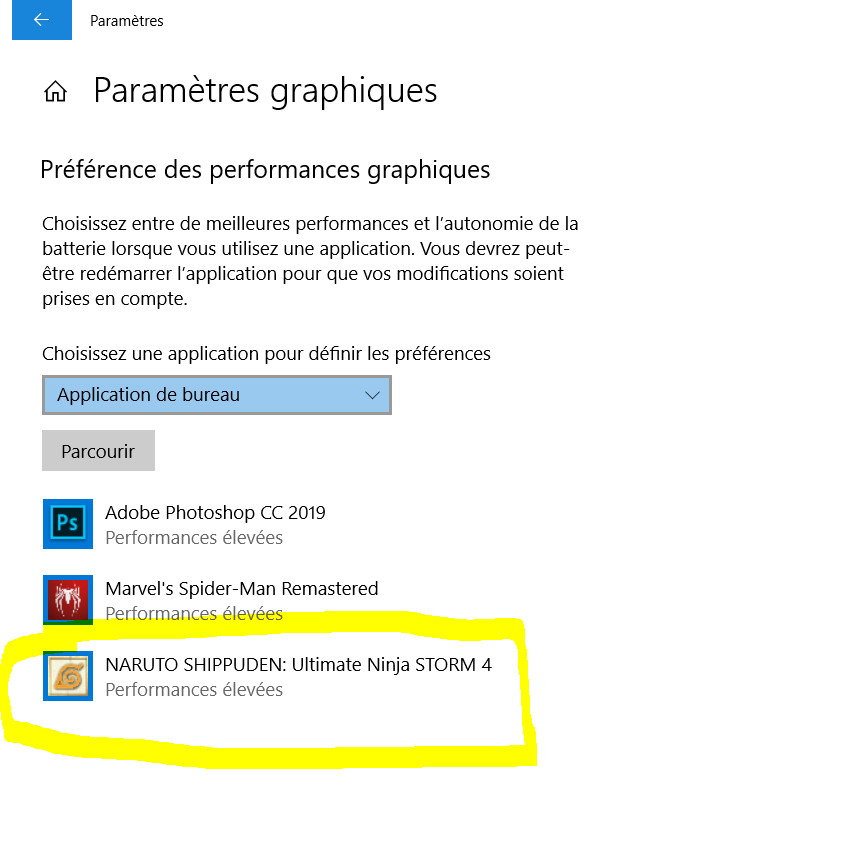
    Image

    Here I selected high performances for this game : the dedicated GPU again. But when in game, using MSI afterburner I monitored the usage of GPU 1 (Nvidia) and GPU 2 (Intel). Here what I can see when I am plugged :
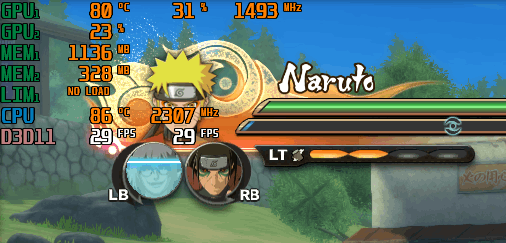
    Image

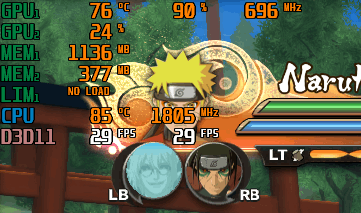
    And when I unplugged :

    Image

    As you can see GPU 1's usage is much better when I am unplugged (90% and the game works fine). When plugged it seems like both GPUs are used equally at 30%, but this is not enough for the game so it quickly starts slowing down even if here the FPS diaplyed by MSI seem fine : in reality I have like 5 FPS...

    0 comments No comments