Hi, my device is slowing down and the CPU cooler is very loud, I opened the Task Manager and saw Windows Modules Installer Worker using a lot of the CPU, and not that much disk (probably because I use an SSD). When running a game, the framerate drops from 240FPS (Framerate Per Second) to about 30-70. This is how my task manager looks like. I apologize if you cannot read this language, but it's only important to look at the process itself and the CPU load.
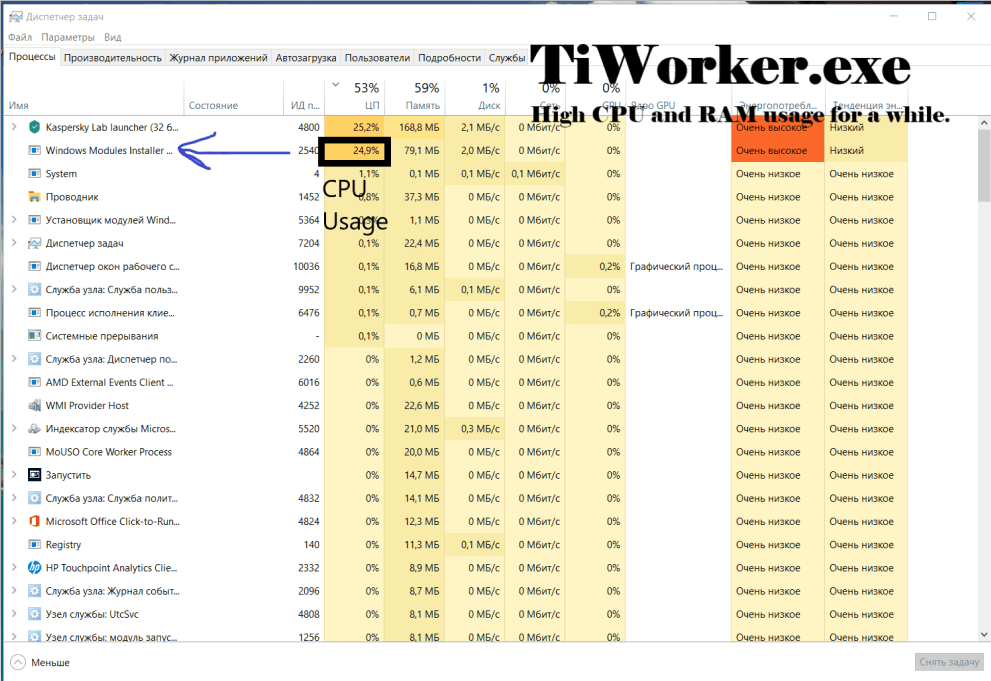
The process is located under Windows Component Store (C:\Windows\WinSxS...), and has an argument of -Embedding only, so it's not a virus or malware. There are no duplicate names of this process running, and the digital signatures, copyrights are from Microsoft Corporation.
My question is: why is it using so many system resources? Is my system unstable, or this is normal? I tried to search about this, and found nothing useful.
' cx='32' cy='32' r='32' /%3E%3Ctext x='50%25' y='55%25' dominant-baseline='middle' text-anchor='middle' fill='%23FFF' %3EA%3C/text%3E%3C/svg%3E)
