Share via

After 22H2 Implace Upgrade Window Store & Windows Search stopped working 0x800700B7

Anonymous
2022-09-29T13:55:23+00:00

Hey there,

After a lot of troubleshooting I found a way to get the store working again, its a batch which is installing all neccesary packages for the store & the store it self but its an old Version of the Store. (Microsoft.WindowsStore_12004.1001.113.0_neutral_~_8wekyb3d8bbwe.AppxBundle)

But the working state doesn't hold for long after a restart it stopps working again.
I have to remove the store with powershell & run the batch again to get the store working again.

Some Apps of the store are able to update but most of them are getting the 0x800700B7 error, especially the update for the store itself.

I guess I tried most of the guides around the web about fixiing this issue....with no success :(

Windows Search is also not working (Start menu & Files Explorer)
Snipping tools is also not working....

sfc /scannow & dism cant find any corrupt files.

Just made a implace Upgrade but nothings has changed.
Unfortunetly I cant go back anymore to 21h2 but with this version I had none of this issues.

Expect this Issues everything else is working fine.

Any Ideas how to fix these Issues ?

Windows for home | Windows 11 | Microsoft Store

Locked Question. This question was migrated from the Microsoft Support Community. You can vote on whether it's helpful, but you can't add comments or replies or follow the question.

0 comments No comments

12 answers

Sort by: Most helpful
  1. Anonymous
    2022-10-03T03:50:07+00:00

    unfortunately I'm still not done with issues... :/

    After I made a full recovery with Arconis and every seems perfect but..... Upgrade kb5017389 was unable to install 0xe0000100.
    I also tried a manual install with no Success,
    Clear all the Update files & logs....

    running CHKDSK /r /f at startup but after PC is not respronding so I have to restart again.
    running CHKDSK /r /f at recovery environment was able to repair.

    unfortunately I could finde the last log but found an older CHDSK log here

    running DISM isnt working correctly, sometime its not even starting that I cant see a progress bar.
    Last try was DISM /Online /Cleanup-Image /RestoreHealth it has started correctly but stuck at 62.3 %
    I also found this Threadwhere also the 0x8007007b was mentioned (but currently didn't get this again Store and all apps are working correcly) and discribes my currently Issue very well.

    Accordings to all this information I guess I know when my Issue has begun...

    I had Issues with 2 C++ redist installations & it was something like this : Image

    It was really strange because I couldn't modify these keys.
    I had to delete it, but was told I could, but in the end it did...

    As far I remember it were many keys with that behaviour related to the redist, I had to delete many of them and after that I unistalled all Redists with help of

    UNINSTALL TOOL

    Hereare DISM CHDSK & CBS log files.

    1. But the Image I just recovered is from a time before I had any issues.
      Right know all Redists are fine.

    Bad Sector Check with Aomei Partition Assistant did found any bad sectors.

    The related Disc is an M2 SSD, 1 TB & about 1-2 years old.
    Bios/uefi was just updated.

    Another hhing I haven't mentioned before is my Mainboard has 2 Issue since I've bought it ( 2 years ago) and perhaps its related but until now Ii dont think so.
    my 2nd Network card isn't working & after many attemps I gave up.
    Bluetooth cant connect to anything (but has worked before)

    When I'm restarting my System, my System off & on again sometimes even more than 2 times.
    Thats when I'm starting or rebooting my System.

    Never had power loss Issues during in Windows.
    And I'm have often 100% utilisation on cpu & gpu dring my 3D Rendering, this ways I dont thnik its my power supply (2 years old corsair HX850W)

    My Specs:

    ImageImage

    [![Image](https://learn-attachment.microsoft.com/api/attachments/eedccc03-b85d-4135-80e0-1112cfff9d5e?platform=QnA"https://learn-attachment.microsoft.com/api/attachments/0754e8ee-1a4c-4a9e-a797-0c341341c57d?platform=QnA" rel="ugc nofollow">Image

    My System is also completely watercooled but PSO / overclock functions are Disabled except I'm using an overclocked RAM with 3600 Mhz using DOCP profile & manufactures Settings.  
    

    I'm stuck with issues since 1,5 weeks slowly I'm getting crazy 😒

    Now even System restore isn't working anymore ...
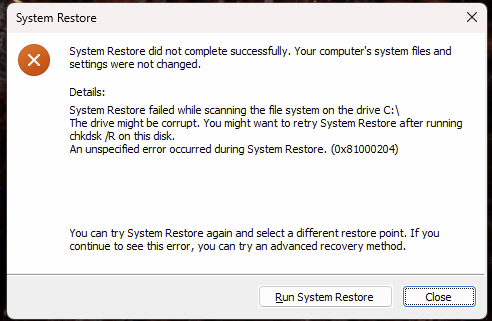
    Image

    And Suddenly also....

    Startmenu stoped working
    Store doesn't starts
    Win + I for Control Panel does nothing
    Win +Shift+S for snapping does also nothing...

    Edit:

    The other Restore point had worked out & all apps are workings again :)
    also DISM worked out well without any issues...I used DISM /restore with /online, /Source from ESD file,
    And also /StartComponentCleanup

    Any ideas?

    Was this answer helpful?

    2 people found this answer helpful.
    0 comments No comments
  2. Anonymous
    2022-09-30T12:00:35+00:00

    Hi,

    Regarding Microsoft Store, I suppose you used this LTSB-Add-MicrosoftStore method, which installs a very old version of the Store app and its dependencies.

    Instead, you can try Method 2 in this article and generate the latest Store Appx Installer (and the latest dependency packages) download links via the store.rg-adguard.net portal.

    If the Appx and Msixbundle files don't install when you double-click them, then the Desktop Installer app may be missing. However, you can use PowerShell admin to install each package. Here is the syntax:

    Appx-Package -Path "X:\Path\to\File.Appx"
    

    You need to install the dependencies first and then install the Store app Msixbundle file. See also: Can’t Install Appx, AppxBundle, and Msixbundle Files in Windows

    Was this answer helpful?

    1 person found this answer helpful.
    0 comments No comments
  3. Anonymous
    2022-09-30T11:50:04+00:00

    Damn I'm really trying to avoid this.

    It's not about my personal data, its about my all 3D programs, plugins & especially my settings 🙈

    Any other idea what could cause this issue ?

    I got the feeling its about lack of permissions to the System. (folder or registry)

    I also have a clean vm installation, perhaps I can replace the some related files to the windowsstore.

    Can you tell me which Folders I could try.

    maybe I could try a partial import of the registry, but I dont know which key are related to the store.

    luckily I have a full backup of my system but from the late august/21h2 but meanwhile I changed a lot.

    I also have a fresh full registry backup of the 21H2 and most of my installations are not on the System drive, perhaps I could try loading the backup and also import my registry backup.

    I guess Importing a 21H2 reg to my 22H2 will not work or is it possible?

    What do you think ?

    until the late august I was running a backup every week....but was annoyed by the sound of my fileserver, I will never ever again stop backing up my file regularly 🙈

    Was this answer helpful?

    1 person found this answer helpful.
    0 comments No comments
  4. Anonymous
    2022-09-29T21:32:12+00:00

    Hello krankes_etwas,

    Thank you for updating me with that information. I apologize that the above methods did not resolve the issue.

    If most methods fail, you may need to consider performing a Clean Installation of Windows 11.

    Back up your important personal data and files to an external hard drive or USB flash drive.

    Please check Shawn Brink's tutorial guide in the link below on How to Clean Install Windows 11.

    https://www.elevenforum.com/t/clean-install-win...

    Kindly let me know if this helps or if you have any further concerns.

    Kind regards,

    John DeV

    Independent Advisor

    Standard Disclaimer: This is a non-Microsoft website. The page appears to be providing accurate, safe information. Watch out for ads on the site that may advertise products frequently classified as a PUP (Potentially Unwanted Products). Thoroughly research any product advertised on the site before you decide to download and install it.

    Was this answer helpful?

    1 person found this answer helpful.
    0 comments No comments
  5. Anonymous
    2022-09-29T14:27:57+00:00

    Hello krankes_etwas,

    Good day! I'm John Dev a Windows user like you and I'll be happy to assist you today. I know this has been difficult for you, Rest assured, I'm going to do my best to help you.

    Please try creating a new local administrator account then check if the issue persists.

    Press Windows key+R to open Run then type: cmd

    Press CTRL+SHIFT+ENTER to Run as administrator

    At the command prompt, type the following command, and then press ENTER:

    net user USER_NAME PASSWORD /add

    In the above command make sure to change USER_NAME and PASSWORD with the credentials you want to use for the new user account.

    For example: net user John 1234 /add

    After that, please type the following command to add the newly created account to the Administrators group and press Enter:

    net localgroup administrators USER_ACCOUNT /add

    For example: net localgroup administrators John /add

    Signout then login to the new administrator account.

    Kindly let me know if this helps or if you have any further concerns.

    Kind regards,

    John DeV

    Independent Advisor

    Was this answer helpful?

    1 person found this answer helpful.
    0 comments No comments
