Share via

Computer login problem - will not bring up local account

Anonymous
2022-10-31T18:11:24+00:00

My laptop has a local login with a password that I have always used for security. For a long time it has brought up two logins - one that includes the password key, another that doesn't that seems to be associated with Windows hello and perhaps a microsoft online accout. Now neither account comes up and I only have this windows Hello **** that will not go away regardless of the various instructions from this help community to stop it. I will never use windows hello. However, entering my password seems to get me in even without the login key symbol.

I want to be able to log in with my password and ensure I am getting into the right account.

The machine is 2016 and I am running:

Edition Windows 10 Home
Version 21H2
Installed on ‎3/‎18/‎2021
OS build 19044.2006
Experience Windows Feature Experience Pack 120.2212.4180.0

Occassionaly I see something telling me to ACTIVATE WINDOWS or that my office programs are unregistered even though everything should be fine. The office programs are not working after one update. Its unclear if this has anything to do with the problems with the Office programs. Help!

Windows for home | Windows 10 | Windows Hello, lock screen and sign-in

Locked Question. This question was migrated from the Microsoft Support Community. You can vote on whether it's helpful, but you can't add comments or replies or follow the question.

0 comments No comments

8 answers

Sort by: Most helpful
  1. Anonymous
    2022-11-07T01:32:41+00:00

    Hello Jo Anne59,

    Sorry I'm late, thanks for the information, it helped me a lot to solve this problem.

    Usually, if the system is logged in as a personal user Windows should not prompt to purchase Microsoft 365, this may be because you are logged in as a company account on your personal computer, which causes the system to not detect your personal account and therefore prompt you that Windows is not activated and office is not activated, because the license for Windows activation is tied to your The license for Windows activation is tied to your personal account.

    Please check the system account you are logged in to.

    Windows +I open System Settings>Accounts>Access work or school>Check if you are logged in to your company account on this screen.

    If you are logged in to your company account, try logging out and logging back in to your personal account.

    Are you still experiencing this issue? Please let me know if there is any progress.

    Best Regards,

    Lenka | Microsoft Community Support Specialist

    Was this answer helpful?

    2 people found this answer helpful.
    0 comments No comments
  2. Anonymous
    2022-11-02T09:39:35+00:00

    Hello Jo Anne59,

    Thank you for your reply.

    Where did you get your Windows system from?

    From your description, I understand that your Windows is not activated. Therefore, you can contact the technical support for that laptop to restore your system to its factory state and then re-add your account.

    Due to the fact that you are not at liberty to provide a screenshot, I cannot give any further solutions.

    If the account you are logged into has administrator privileges, you can run the Windows system package initialization tool sysprep.exe to enter OOBE and reset the account.

    Open the path C:\Windows\System32\Sysprep and find Sysprep.exe and double click on it.

    Press and hold Windows +R and type "netplwiz" Press enter to see if you have administrator privileges.

    If you have any problems running sysprep.exe you can contact us and provide us with valid information so that we can help you better.

    Note: Please make sure to back up your important personal files when doing the above.

    If there is anything not clear, please do not hesitate to let me know.

    Best Regards,

    Lenka-MSFT| Microsoft Community Support Specialist

    Was this answer helpful?

    1 person found this answer helpful.
    0 comments No comments
  3. Anonymous
    2022-11-01T08:58:17+00:00

    Hello Jo Anne59,

    Welcome to Microsoft Community.

    Your computer currently only logs in with windows hello, not with a password, right?

    This problem occurs because your system has Windows hello login mode enabled and the preferred login method is Windows hello.

    Have you tried the following options, if not, try them.

    1. Remove Windows hello.

    1)Go to Settings > Accounts > Login Options

    2)Click Windows Hello PIN

    3)Click the Remove button.

    4)After that, follow the on-screen instructions.

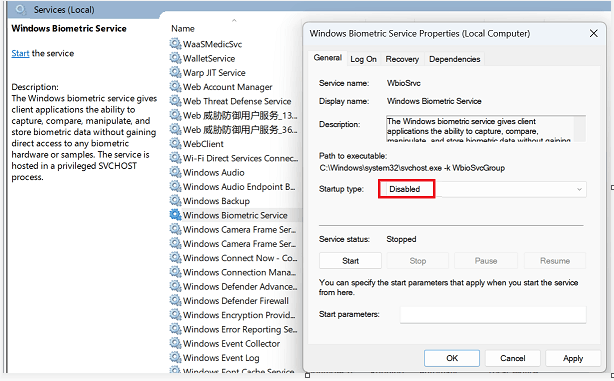
    2. Close Windows hello related services.

    1)Windows+R type "Service.msc" and press Enter to open the list of services

    2)Find Windows Biometric Service and disable it, then click "Apply", "ok".

    3) Open C:\windows\system32\WinBioDatabase and delete all the files in it.

    4)After that, restart your computer.
    Image

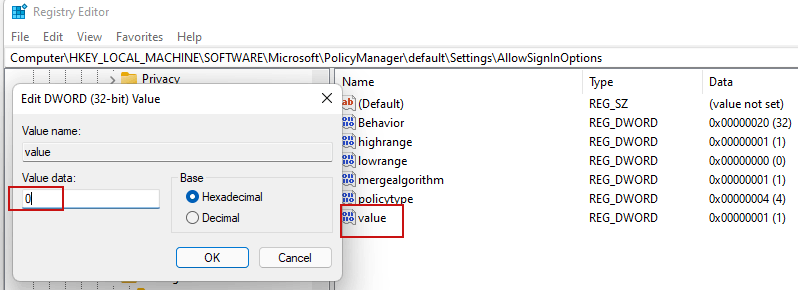
    3. Use the registry to disable Windows hello.

    1. Open the registry by typing "regedit" in Windows +R.
    2. In the registry editor, copy the following path and paste it into its address bar. Then press Enter.
    3. Go to this path: HKEY_LOCAL_MACHINE\SOFTWARE\Microsoft\PolicyManager\default\Setting

    4)Double-click the Settings key to expand it and select the AllowSignInOptions subkey.

    1. You will find a DWORD entry named Value on the right side, double-click it and change its value from 1 to 0. This will disable the Windows Hello sign-in option for all user accounts you have created on the device.
    2. Close the registry editor and restart your device.
    Image

    Disclaimer: Generally, modifying registry subkeys or work group is intended for advanced users, administrators, and IT Professionals. It can help fix some problems, however, serious problems might occur if you modify the registry incorrectly. Therefore, make sure that you follow these steps carefully. For further protection, back up the registry before you modify it. Then, you can restore the registry if a problem occurs. For more information about how to back up and restore the registry, click hereto view the article.

    4. Log out of Microsoft account and use local administrator account.

    1. Press and hold Windows +R and type "netplwiz" and press enter at the same time
    2. Click your local administrator account > select "Properties" > switch to "Group Members" > check "Administrator" > Apply > OK
    3. Press and hold Windows+L, and choose to log in with another account in the login screen, then you can choose to use the local administrator account.

    If there is anything not clear, please do not hesitate to let me know.

    Best Regards,

    Lenka-MSFT| Microsoft Community Support Specialist

    Was this answer helpful?

    1 person found this answer helpful.
    0 comments No comments
  4. Anonymous
    2022-11-01T22:22:58+00:00

    Please remember that this started with an update several weeks ago and has gotten worse. At this point, when I turn on the machine in the morning it takes about 10 minutes to bring up anything. Often I need to hit a key for it to open something to put in a password or something. Now that only brings up a windows hello symbol and a bunch of boxes, not the key for the password. I enter the password anyway and it starts sort of, but the following do not work:

    1. Any of the microsoft office programs (Office 2016)
    2. My printer (but I can print from my tablet and troubleshooter says everything is fine so it is NOT a problem with the router or anything to do with the printer software itself)
    3. print to pdf

    Also, in the last few days it now has something at the bottom right of the screen saying:

    ACTIVATE WINDOWS

    Go to Settings to activate Windows

    (please don't ask for a screenshot it won't do it)

    When I go into settings it has my personal email and tells me windows is not set up (it wants me to buy windows 365). I believe this machine was set up under my work email or another account name but that gets nowhere. I did not set up the machine myself and do not have that information.

    So either a windows update is causing all these problems or I am somehow not logging into my computer's account properly. Help!

    Was this answer helpful?

    0 comments No comments
  5. Anonymous
    2022-11-01T14:59:29+00:00

    Thank you for the reply. NO, Windows hello is not enabled on the account as per your first suggestion and the password does get me in - although it may not be to the same account. I double checked this over a month ago. I could not get any registry sequence to come up then.

    I am hesitant to try the registry change you suggest because the computer is now taking about 5-10 minutes to bring up any log-in screen. Before I try this, please tell me any risks. I use this computer for work and can't afford to not be able to log in at all.

    Thank you,

    Jo Anne

    Was this answer helpful?

    0 comments No comments
