Share via

How can we show the internet speeds on windows 11?

Anonymous
2022-12-27T23:49:43+00:00

How can we show the internet speeds on windows 11?

How can we show the internet speed on windows task magager?

Thanks!

Windows for home | Windows 11 | Settings

Locked Question. This question was migrated from the Microsoft Support Community. You can vote on whether it's helpful, but you can't add comments or replies or follow the question.

0 comments No comments

5 answers

Sort by: Most helpful
  1. Rodrigo Queiroz 77,500 Reputation points Independent Advisor
    2022-12-28T03:34:55+00:00

    This application can add a connection speed meter on the desktop/taskbar

    https://www.microsoft.com/store/productId/9NMBX...

    After installing it, open it and it will show your connection speed on the screen, if you prefer, you can right-click the icon o the taskbar and select "Keep in taskbar" to keep the meter on the taskbar.

    50+ people found this answer helpful.
    0 comments No comments
  2. Rodrigo Queiroz 77,500 Reputation points Independent Advisor
    2022-12-28T00:22:18+00:00

    Hi Manh,

    I'm Rodrigo and I will help you.

    you can see the moment connection speed in the Task Manager by going to the Performance tab and selecting your network interface.

    20+ people found this answer helpful.
    0 comments No comments
  3. Anonymous
    2022-12-28T02:42:36+00:00

    Thanks!

    I want it show on desktop or taskbar?

    6 people found this answer helpful.
    0 comments No comments
  4. Anonymous
    2022-12-28T02:42:47+00:00

    Thanks!

    I want it show on desktop or taskbar?

    1 person found this answer helpful.
    0 comments No comments
  5. Anonymous
    2022-12-28T01:03:40+00:00

    Let's look at everything. Who is your ISP and what service are you signed up for?

    I have Spectrum and my w-fi is for downloads up to 500 Mbps and upload is usually

    22 Mbps.
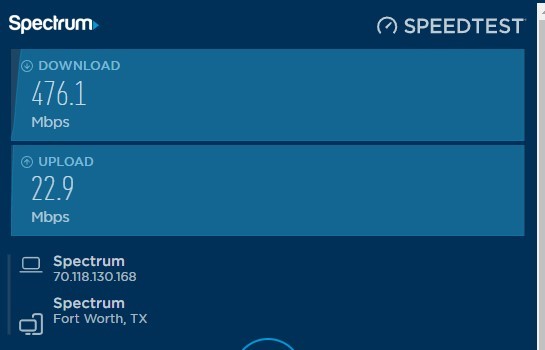
    Next is the modem/router. I own my own modem and router.

    Linksys Official Support - Hydra Pro 6E Tri-Band AXE6600 Mesh WiFi 6E Router

    What do you have and what is it capable of? What bands and speed are you able to use?

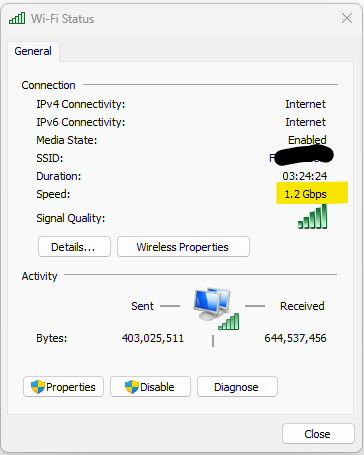
    Next comes my adapter on my computer, currently I am on my desktop computer. Just because it shows a Speed of 1.2 Gbps doesn't mean I get that all the time. My fastest speeds usually come when I work with devices on my home network.
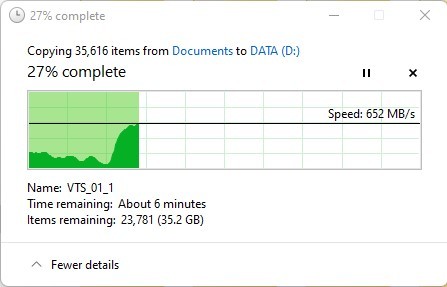
    Transfer speeds on my devices. Examples and speed is shown in MBps.

    Image One
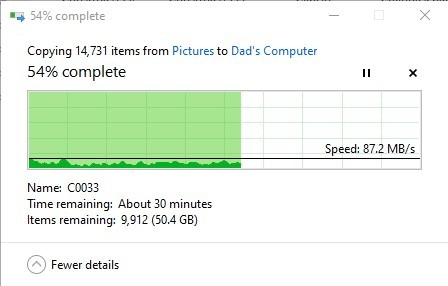
    Image Two
    1 person found this answer helpful.
    0 comments No comments

