' cx='32' cy='32' r='32' /%3E%3Ctext x='50%25' y='55%25' dominant-baseline='middle' text-anchor='middle' fill='%23FFF' %3EA%3C/text%3E%3C/svg%3E)

Hello Faisal,
Welcome to Microsoft Community.
As far as I know, The NET HELPMSG 2182 error arises for some users when trying to update Windows or install new MS Store apps. The complete error message should look like the following:
Problem with BITS service: The requested service has already been started. System.Management.Automation.RemoteException More help is available by typing NET HELPMSG 2182.
This issue usually pertains to the BITS (Background Intelligent Transfer Service) that assists update downloads from Microsoft servers. I suggest you check the BITS Service status first, search for the service in the taskbar and open the service application, then please find "Background Intelligent Transfer Service", double-click to open it, if the service is not started, please start it and set to manual.
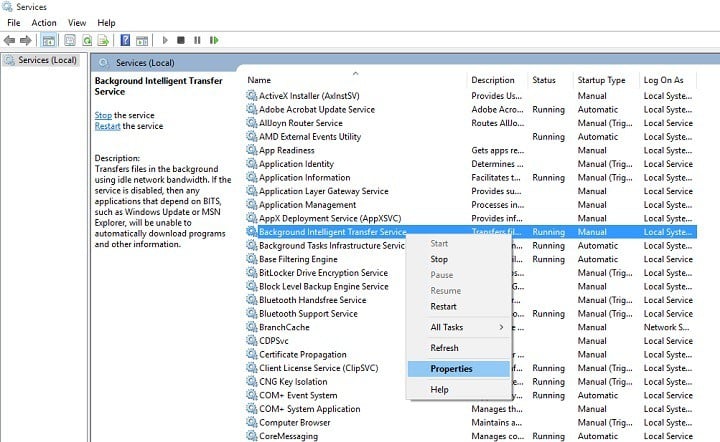
Then please confirm whether this error occurs again.
However, if this error occurs during an update, I'll give you a few options to try to fix the problem. For example, try using the command to fix it:
using the following commands(Please run the Command Prompt as an administrator ("Win" logo key + "Q", enter "cmd", select "Run as administrator"), and enter the following commands one by one.):
sfc /scannow

DISM /Online /Cleanup-Image /RestoreHealth
After the command is rectified, check whether the fault persists.
There is also a solution to clear the update cache:
- Stop the Windows Update service: Search for "services" in Taskbar open it with administrator rights. Locate Windows Update service and stop it using the right-click menu.
- Locate C: \ Windows \ SoftwareDistribution \Download and delete all files in this folder.
- In the Services desktop application, start the Windows Update service and go to Settings. Then you can try updating the system again in Settings.
If the problem persists, please tell me where you saw the error and provide a screenshot of it.
If anything is unclear, please do not hesitate to let me know.
Best regards,
Mitchell - | Microsoft community support expert from MSFT