Question in the title.
Google has been utterly useless at answering this simple question: on LTE capable computers, in windows 10 and 11 Wifi, bluetooth, etc. can be turned off and on by just clicking/tapping on the big icon in the notification area. If the button is blue, it means its turned on. If its grey, it means its turned off.
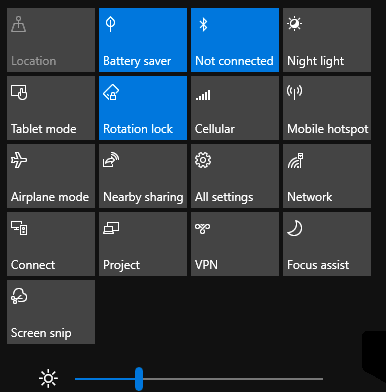
I need to find a way to turn on CELLULAR data connection - not just enable the adapter, but turn it on, make that big button blue and connect to an LTE network as configured in the APN.
Powershell "Enable-NetAdapter -Name "<cellular adapter name>" -Confirm:$false" doesn't work. It may very well enable the DEVICE if its disabled, but it does not turn the Cellular blue and does not connect to anything.
CMD "netsh mbn connect interface="<adapter name>" connmode=name name="{....}" does not work - and is extremely painful to automate into a .bat file (which is the end goal here) - results in "Connect Failure: error 0x139f." and no, it is not because of roaming, I've run "netsh mbn set dataroamcontrol interface=Cellular profileset=all state=all" and it still results in the same error.
There are some other things I've tried, but none worked. It's a very simple thing I'm trying to achieve here, so it's baffling that it is so difficult to figure out and more so that Google has been so useless in helping.
If someone could provide just 1 command that will achieve what I'm after here, I would be extremely grateful. I don't mind whether its a powershell command or cmd, as long as it works, and it works on windows 10 and 11 both, I'd be happy.
Thank you!
' cx='32' cy='32' r='32' /%3E%3Ctext x='50%25' y='55%25' dominant-baseline='middle' text-anchor='middle' fill='%23FFF' %3EA%3C/text%3E%3C/svg%3E)
