Microsoft Security | Microsoft Graph
An API that connects multiple Microsoft services, enabling data access and automation across platforms

This browser is no longer supported.
Upgrade to Microsoft Edge to take advantage of the latest features, security updates, and technical support.
' cx='32' cy='32' r='32' /%3E%3Ctext x='50%25' y='55%25' dominant-baseline='middle' text-anchor='middle' fill='%23FFF' %3EMD%3C/text%3E%3C/svg%3E)
In our product we are integrating email sending using Microsoft Graph API. We are able to send and receive emails successfully using the Graph SDK.
But we are not able to get Read Receipt for the mails.
As per the below mentioned docs, tried enabling "isReadReceiptRequested"
https://learn.microsoft.com/en-us/graph/api/resources/message?view=graph-rest-1.0
The same parameter when enabled using Microsoft explorer works as expeceted.
The issue is found only with the SDK
Any help would be appreciated.
An API that connects multiple Microsoft services, enabling data access and automation across platforms

Hi @ManojKumar Dharmar ,
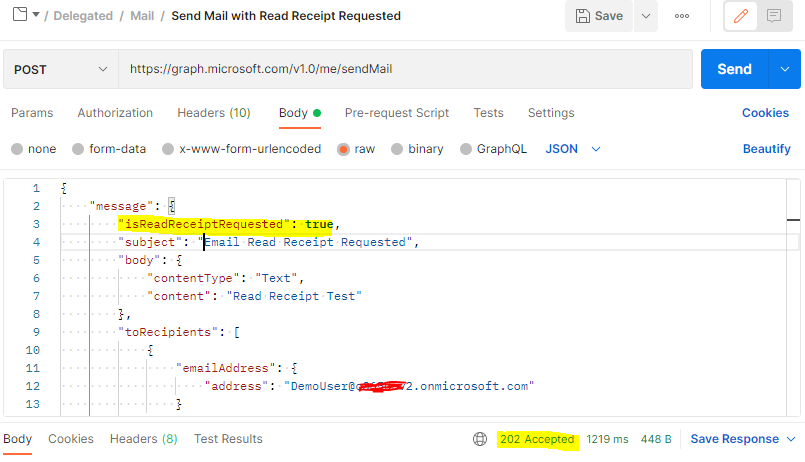
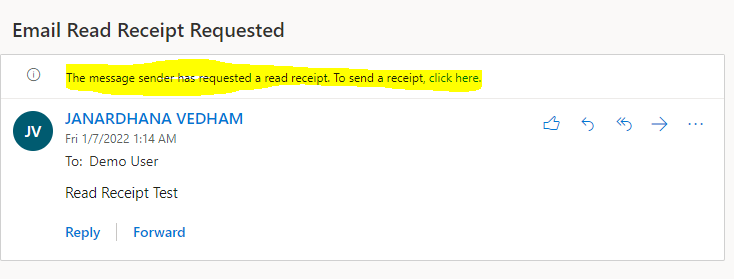
I tested "isReadReceiptRequested" property using Send mail Microsoft Graph API in both Graph Explorer and Postman tool and it is working as expected. You can try using the below equivalent Graph SDK code base by setting up the "isReadReceiptRequested" property at the start of the request body in the code (as shown below).
Microsoft Graph C#.NET SDK ( sample code) :
GraphServiceClient graphClient = new GraphServiceClient( authProvider );

var message = new Message
{
	IsReadReceiptRequested = true,
	Subject = "Email Read Receipt Requested",
	Body = new ItemBody
	{
		ContentType = BodyType.Text,
		Content = "Read Receipt Test"
	},
	ToRecipients = new List<Recipient>()
	{
		new Recipient
		{
			EmailAddress = new EmailAddress
			{
				Address = "******@o365XXXX.onmicrosoft.com"
			}
		}
	}
};

await graphClient.Me
	.SendMail(message,null)
	.Request()
	.PostAsync();
Microsoft Graph JavaScript SDK ( sample code) :
const options = {
	authProvider,
};

const client = Client.init(options);

const sendMail = {message: {isReadReceiptRequested: true,subject: 'Email Read Receipt Requested',body: {contentType: 'Text',content: 'Read Receipt Test'},toRecipients: [{emailAddress: {address: '******@o365XXXX.onmicrosoft.com'}}]}};

await client.api('/me/sendMail')
	.post(sendMail);
My testing outcome in Postman/Graph Explorer using Send mail Graph API :

Hope this helps.
If the answer is helpful, please click "Accept Answer" and kindly upvote it, so that it will be useful for other community users. If you have any further questions about this answer, please click "Comment".