Hello,
I have very recently had issues with my audio, specifically the internal speakers in my laptop with installed Realtek speaker drivers on windows 10. The internal speakers do not produce sound, and seem to not even light up green in the volume mixer. It is not a hardware issue, as I will explain later. Most common causes I have tried fixing with guides online. Issues I found:
- nothing appears on 'applications' for my laptop speaker on my volume mixer,
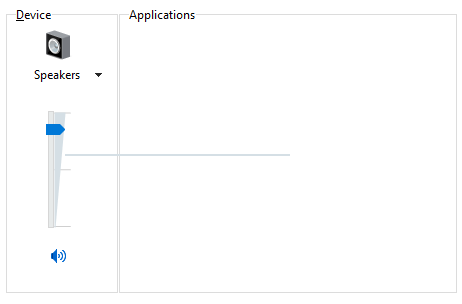
and when I plug in another external speaker they all show up for its application panel: 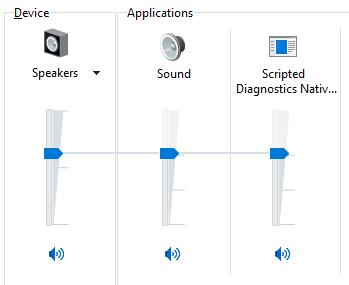
- when testing the sound for it, it says 'Failed to play test tone'
- When troubleshooting it says audio services not responding, but I have corrected all the startup related issues if any for all the relevant services (such as setting to automatic startup, checking if they're running, restarting).
- The only method that has worked to produce sound is the 'High Definition Audio Device' driver:
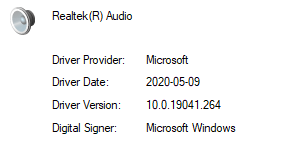
- On all Realtek drivers I've installed from the Microsoft update catalogue (by pressing update, then installing specific drivers after rolled back to 'High Definition Audio Device') the speaker is unable to produce sound or respond at all. It seems no Realtek driver works.
So far I have tried most guides online to do with making sure the audio services run properly, and have tried installing more recent drivers of Realtek, but to no avail. The most recent driver my computer updates to (doesn't work of course):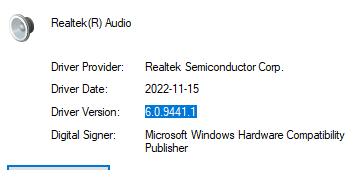
This is a problem for me because my headset cannot be detected as one on the driver (High Definition Audio Device), and is only detected as a headphone. The recent audio manager like 'Realtek Audio Console' doesn't work with this driver and I haven't been able to change it either.
To reiterate, this is a very recent issue and I'm currently trying to uninstall recent programs that have been installed since 2 days ago (when it suddenly stopped working). Before when it was working, the headset and speakers would not be separate devices if i plugged any into the AUX, but I could change the device type to be a headset with Realtek Audio Console. Obviously it doesn't work anymore.
I would like to hear a solution to fix the problem entirely (to make the speaker work on recent Realtek drivers), or a way to let the working driver to detect my headset as a headset and not headphones (although I am aware this might not be possible for this driver).
Thank you for your time reading through this post.
' cx='32' cy='32' r='32' /%3E%3Ctext x='50%25' y='55%25' dominant-baseline='middle' text-anchor='middle' fill='%23FFF' %3EA%3C/text%3E%3C/svg%3E)
