Hello Vincent Lane,
Good to see you in Microsoft Community.
Firstly, could you let me know the specific system version? You can check it by pressing the Win key + R key, and typing "winver", then press Enter, please take a screenshot/photo of it, and only send the relevant information without PII in the next reply.
What specific version of the game were you talking about? I found two different System requirements.
- The game natively supports Windows XP or Windows Vista (Windows 7 is not officially supported), maybe you can turn on compatibility mode in the compatibility settings and then set it to Windows XP or Vista.
- The other's system requirements are shown in the following figure(Visit CALL OF DUTY®: MODERN WARFARE® II PC TRAILER, SPECS, AND PRELOADING INFO for more details.), if your system and hardware meet their needs, you can repair the game.
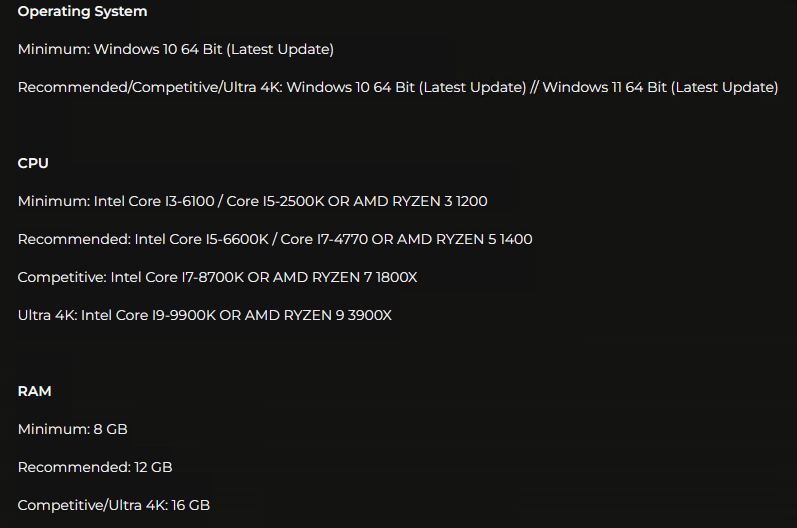 Disclaimer*: This is a non-Microsoft website. The page appears to be providing accurate and safe information. Watch out for ads on the site that may advertise products frequently classified as PUP (Potentially Unwanted Products). Thoroughly research any product advertised on the site before you decide to download and install it.*
Alternatively, you can run the game as an administrator and then check for system updates.
If anything is unclear, please do not hesitate to let me know.
Best Regards,
Mosken_L - MSFT | Microsoft Community Support Specialist
' cx='32' cy='32' r='32' /%3E%3Ctext x='50%25' y='55%25' dominant-baseline='middle' text-anchor='middle' fill='%23FFF' %3EA%3C/text%3E%3C/svg%3E)
