Hello everyone,
The Problem:
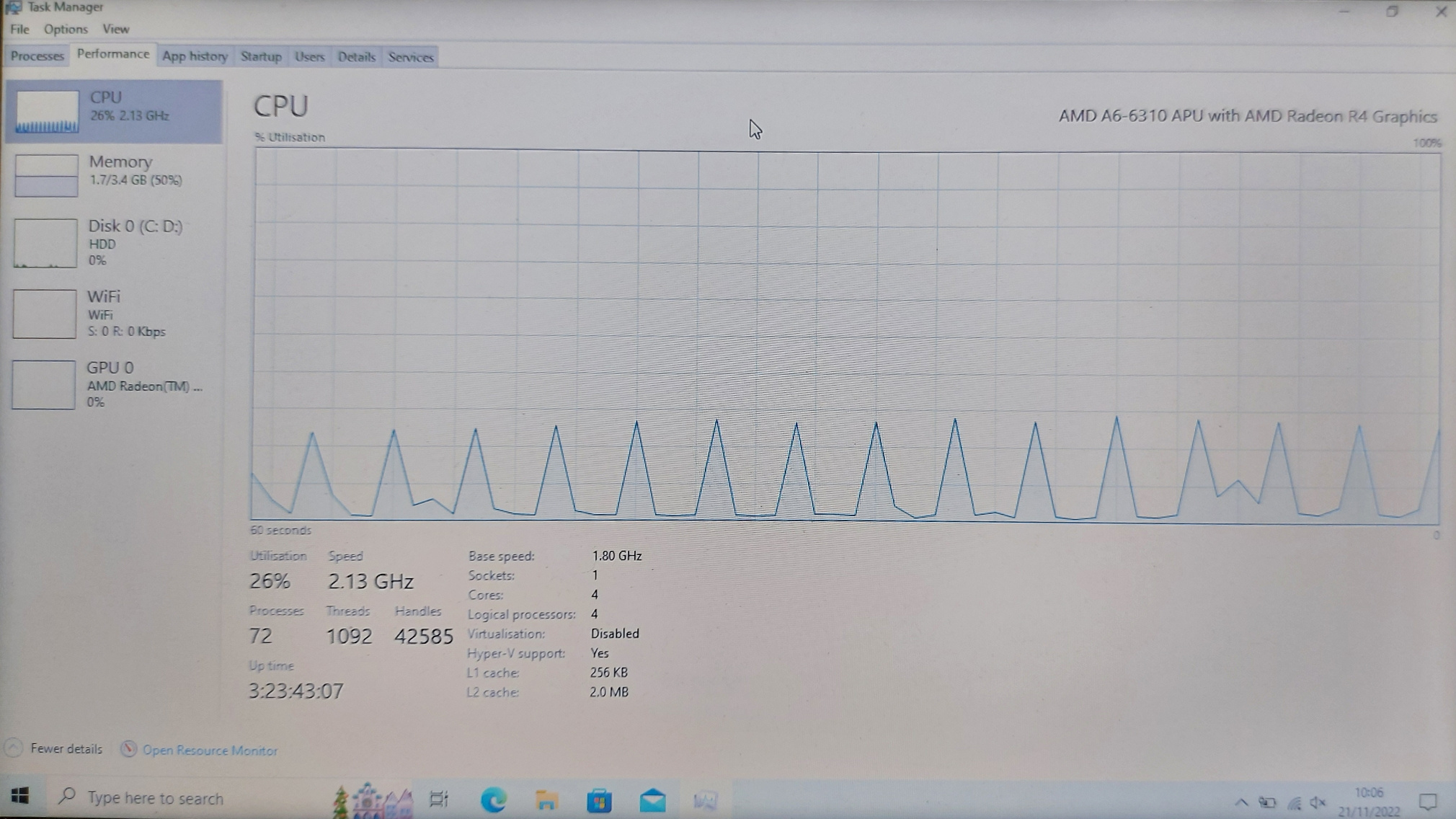
The whole computer hangs every few seconds due to what I think is the system process. The laptop I'm using is quite old in terms of technology, but I'm mainly wanting it just to view Youtube and browse the web so nothing that it shouldn't be able to handle. Hopefully you can tell by this video: https://www.youtube.com/watch?v=SLB6HM9-0nU the cursor freezes every few seconds and it's not just the cursor that freezes, it's the whole computer. The cursor is a good visual aid to show what the whole computer does. It's seems to pause in time with the system process going from a very low power state to moderate. Also it spikes the CPU usage up a small amount.
When the computer is idle, this is the performance graph of the CPU. Each time it spikes, the whole computer freezes:
What I've Done So Far:
I've reset the whole laptop to fresh as it was in quite a mess.
I've updated any drivers that need updating.
I'm currently in a clean boot environment.
I've disabled the realtek sound and DVD drive as that was something that I've seen that could cause pauses.
I've run the following commands:
SFC /scannow
DISM /Online /Cleanup-Image /CheckHealth
DISM /Online /Cleanup-Image /ScanHealth
DISM /Online /Cleanup-Image /RestoreHealth
I've searched the internet as much as possible and this is where I'm at so hopefully you ladies and gents can help me out getting this laptop to run as smooth as a old laptop can.
System Specs:
Operating System: Windows 10 Home 64-bit (10.0, Build 19045) (19041.vb_release.191206-1406)
Language: English (Regional Setting: English)
System Manufacturer: HP
System Model: HP Notebook
BIOS: F.1F (type: UEFI)
Processor: AMD A6-6310 APU with AMD Radeon R4 Graphics (4 CPUs), ~1.8GHz
Memory: 4096MB RAM
Available OS Memory: 3530MB RAM
Page File: 4616MB used, 1484MB available
Windows Dir: C:\WINDOWS
DirectX Version: DirectX 12
' cx='32' cy='32' r='32' /%3E%3Ctext x='50%25' y='55%25' dominant-baseline='middle' text-anchor='middle' fill='%23FFF' %3EA%3C/text%3E%3C/svg%3E)
