Hi, so I've been having an issue for a few weeks now where when my computer should be going to sleep (both manually and by going idle), it instead just shuts down. Here is a post I had made on Reddit describing the issue (between the dotted lines):
So for the past week or so, whenever I put my computer to sleep manually or when it goes to sleep for being idle based on my power settings, it just turns off completely instead of going to sleep.
I've tried Googling this and most sites offer "solutions" to try, such as this page: https://windowsreport.com/windows-10-turns-off-instead-sleep/ . Most of these pages suggest that a main culprit for this is that the Intel Management Engine Interface needs to be updated in Device Manager. However, I have an AMD processor and this IMEI is not there.
I've tried pretty much any solution I can find on these sites, including:
- Checking my Power Settings; settings are set to Screen turn off after 15 minutes and Sleep after 30 minutes.
- Update IMEI; as mentioned, I do not have this option.
- Make sure Power Saving mode is enabled in BIOS; I looked in my BIOS and could not find this option anywhere. Here's all the Power options supposedly in my BIOS: https://i.imgur.com/eflGfXe.jpg (there was one more called Package Power Limit Control set to Auto)
- Run the Windows Power troubleshooter; This didn't have any results.
- Run Power Efficiency Diagnostics Report in Command Prompt; This scan report did say there were some issues with 'USB Suspend:USB Device not Entering Selective Suspend' but it specifically states "Note that this issue will not prevent the system from sleeping."
Not really sure what else to do here. If anyone has any suggestions, it would be appreciated. System specs:
OS: Windows 10
Processor: AMD Ryzen 5 5600X
GPU: NVIDIA GeForce GTX 1060
Mobo: ASUS Tuf Gaming X570-Plus
-------------------------------------------------------------------------------- (end Reddit post)
The only response I got was someone telling me to open Command Prompt and type in powercfg –restoredefaultschemes , and gave me a webpage with other powercfg commands. I ran powercfg –restoredefaultschemes and it solved the issue... for about a week. It has since started going it again. I've ran the command again and its not helping. Sometimes it goes to sleep but most times it shuts down.
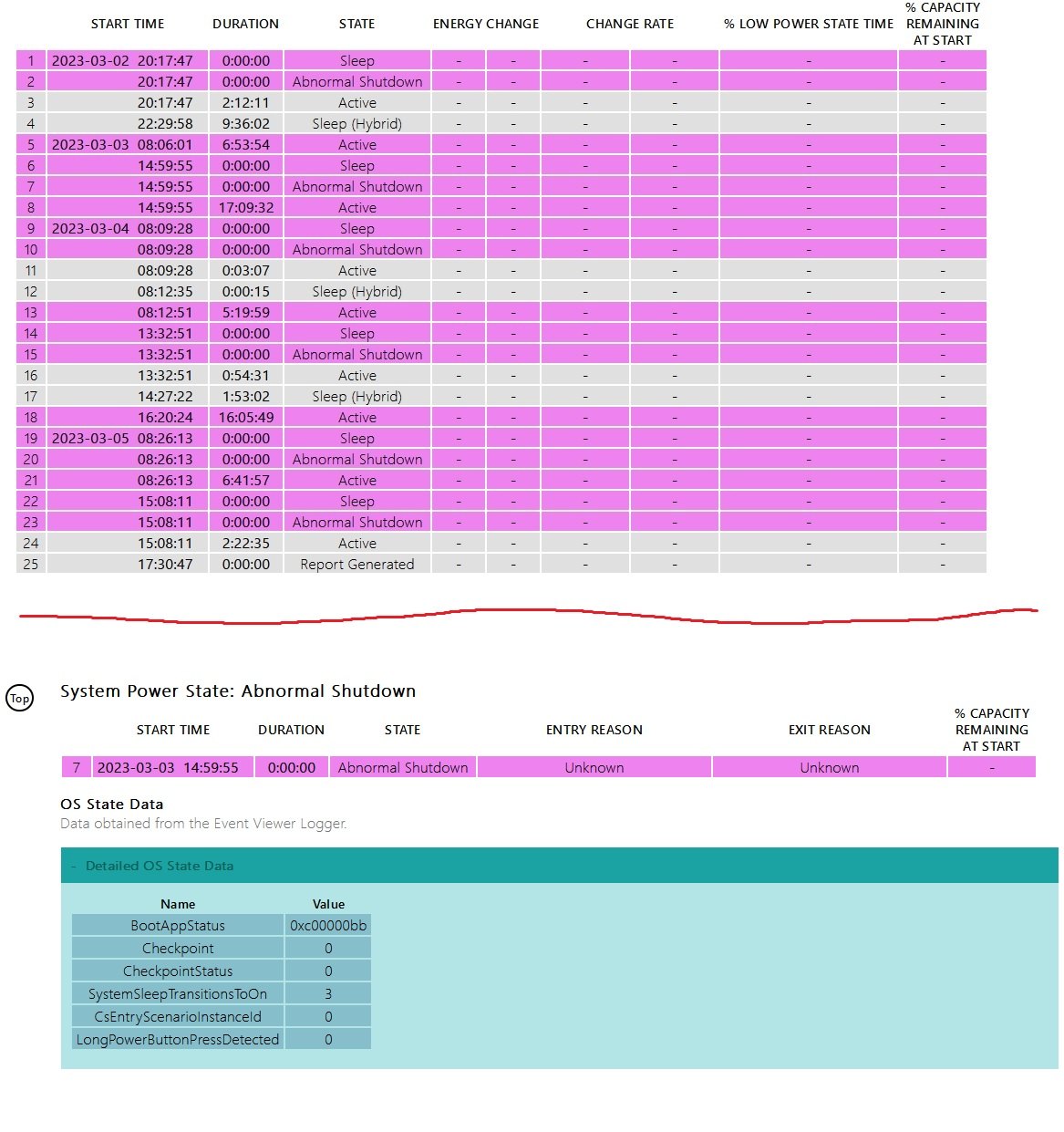
I looked at some of the other powercfg commands and I ran /systempowerreport to see if it would tell me anything. I've attached screenshots because it's a little beyond my knowledge of what to make of this report. As you can see, sometimes instead of going into Sleep, there is an 'Abnormal Shutdown'. I looked in the report at each of the Abnormal Shutdowns but I don't know what it means. The number next to "SystemSleepTransitionsToOn" is is "1" or "3" for most of them, "27" for one of them.
Anyone have any ideas what could be going on?
Thanks!
' cx='32' cy='32' r='32' /%3E%3Ctext x='50%25' y='55%25' dominant-baseline='middle' text-anchor='middle' fill='%23FFF' %3EA%3C/text%3E%3C/svg%3E)

' cx='32' cy='32' r='32' /%3E%3Ctext x='50%25' y='55%25' dominant-baseline='middle' text-anchor='middle' fill='%23FFF' %3EIL%3C/text%3E%3C/svg%3E)
