Share via

dual EFI entries after GPT conversion

Anonymous
2023-02-18T01:49:50+00:00

For reasons too lengthy to detail here, I was unable to use MBR2GPT for converting my current boot disk. Instead, I used Hasleo Disk Clone to clone the disk to another SSD while also converting it to GPT. This worked fine and the new drive correctly shows up as GPT with the shiny new MSR and EFI partitions. However, it left the protected/system EFI directory intact on the drive. My UEFI has been set to UEFI only with CSM=Disabled and yet I can still see entries for both EFI instances. Booting to the GPT partition works fine, but booting to the EFI directory fails. Is it possible (and safe) to either archive/rename or delete the EFI directory on C:\ so that it is no longer detected by the UEFI and disappears from the boot menu? I'm loathe to take any of the additional steps towards a Win11 upgrade without sorting this out first.

Windows for home | Windows 10 | Install and upgrade

Locked Question. This question was migrated from the Microsoft Support Community. You can vote on whether it's helpful, but you can't add comments or replies or follow the question.

0 comments No comments

Answer accepted by question author

Anonymous
2023-03-07T05:38:10+00:00

(1) Even looking at the log, I'm unsure what's up with /SetREImage. But I think it is unnecessary. We'll revisit it if necessary.

(2) It looks like /Disable followed by /Enable would get the job done all by themselves. /Disable moved WinRE.wim from partition 3 into the staging area, namely C:\Windows\system32\Recovery....

"

2023-03-06 17:24:41, Info [ReAgentc.exe] winreCopyWIMBack moved WIM file from \?\GLOBALROOT\device\harddisk3\partition3\Recovery\WindowsRE\ to C:\Windows\system32\Recovery\Winre.wim successfully!

"

Then /Enable wanted to move it into partition 4, which it did recognize to be the Recovery partition. But it found that partition to be too small...

"

2023-03-06 17:24:49, Info [ReAgentc.exe] Checking partition at offset 497942528000, partition number: 4

2023-03-06 17:24:49, Info [ReAgentc.exe] MeetPartitionRequirements Partition details: {Offset: 497942528000, Free space: 467849216, Total space: 487256064}

2023-03-06 17:24:49, Info [ReAgentc.exe] MeetPartitionRequirements WinRE WIM size: 423565200

2023-03-06 17:24:49, Info [ReAgentc.exe] MeetPartitionRequirements Required free space: 478091152

2023-03-06 17:24:49, Warning [ReAgentc.exe] MeetPartitionRequirements Not enough free space req = 478091152 avail = 467849216 offset = 497942528000

2023-03-06 17:24:49, Info [ReAgentc.exe] skip partition because it does not meet WinRE requirements

"

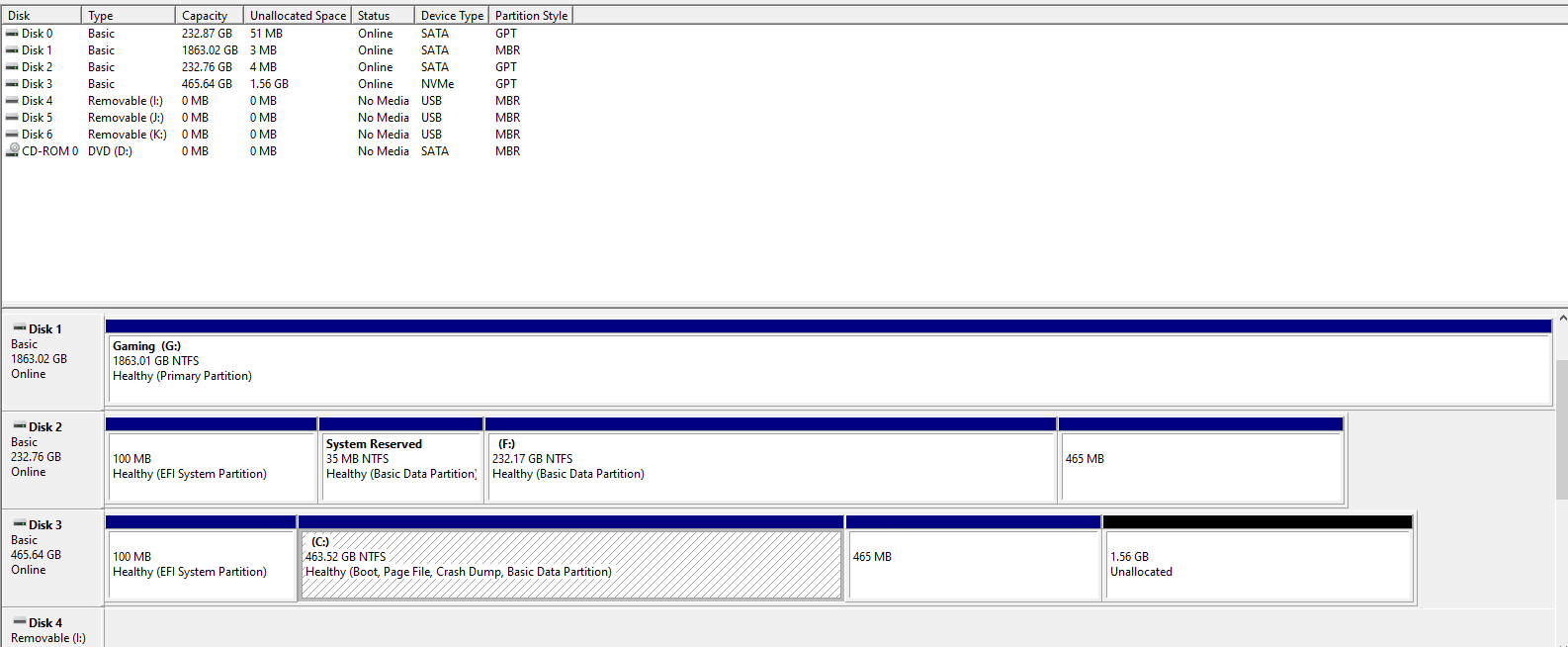
(3) So, let's make it bigger. Mine is 848 MB. Your Disk Management (DM) shows the Recovery partition of 465 MB is followed by 1.56 GB of unallocated space...

Image

Unfortunately, DM won't let you make it larger because it is a system partition. Can you easily add 383 MB to it using AOMEI Partition Assistant? If not, we can try this...

DiskPart <<<Enter DiskPart

Select Disk 3 <<<Focus on the EVO 970

List Part <<<Show its partitions

Select Part 4 <<<Focus on its Recovery partition

Detail Part <<<Show it has the Recovery type code

SET ID=ebd0a0a2-b9e5-4433-87c0-68b6b72699c7 Override <<<Basic Data Partition

Detail Part <<<Show the new type code

Exit <<<Leave DiskPart

The 2nd Detail Part should show the new type. It is now a Basic Data Partition. Reboot to be sure the whole system knows. Then open Disk Management, right-click what was the Recovery partition, & see whether you can extend volume to 848 MB. Then make it a Recovery partition again this way...

DiskPart <<<Enter DiskPart

Select Disk 3 <<<Focus on the EVO 970

List Part <<<Show its partitions

Select Part 4 <<<Focus on what was its Recovery partition

Detail Part <<<Show it has the Basic type code

SET ID=de94bba4-06d1-4d40-a16a-bfd50179d6ac Override <<<Recovery Partition

Detail Part <<<Show the new type code

Exit <<<Leave DiskPart

I would Reboot again. Then, try...

ReagentC /Disable

ReagentC /Enable

ReagentC /Info

I hope that will do it. Good luck.

Was this answer helpful?

1 person found this answer helpful.
0 comments No comments

Answer accepted by question author

Anonymous
2023-02-23T12:27:49+00:00

(1) This should move {bootmgr} back to the top of DisplayOrder...

BCDEdit /Set {FWBootMGR} DisplayOrder {BootMGR} /Addfirst

That is where it belongs. I don't know how it got to the bottom. Do a full reboot for it to register in BIOS. Then, show us a new BCDEdit /Enum All.

That's nasty that BIOS adds one back after you have deleted it.

(2) The order of the GUIDs in DisplayOrder does not have to be the same as they are in the body of the BCD. In the body, they are in the order the boot entry was created. Moving one to the top of DisplayOrder should also move it to the top in BIOS Setup (after a full reboot). It then becomes the one that will boot by default. That is, it's the one that boots unless you chose another by using the one-time BIOS Boot Options menu. I think in your Asrock that is invoked with F11. (And DEL or F2 goes to BIOS Setup).

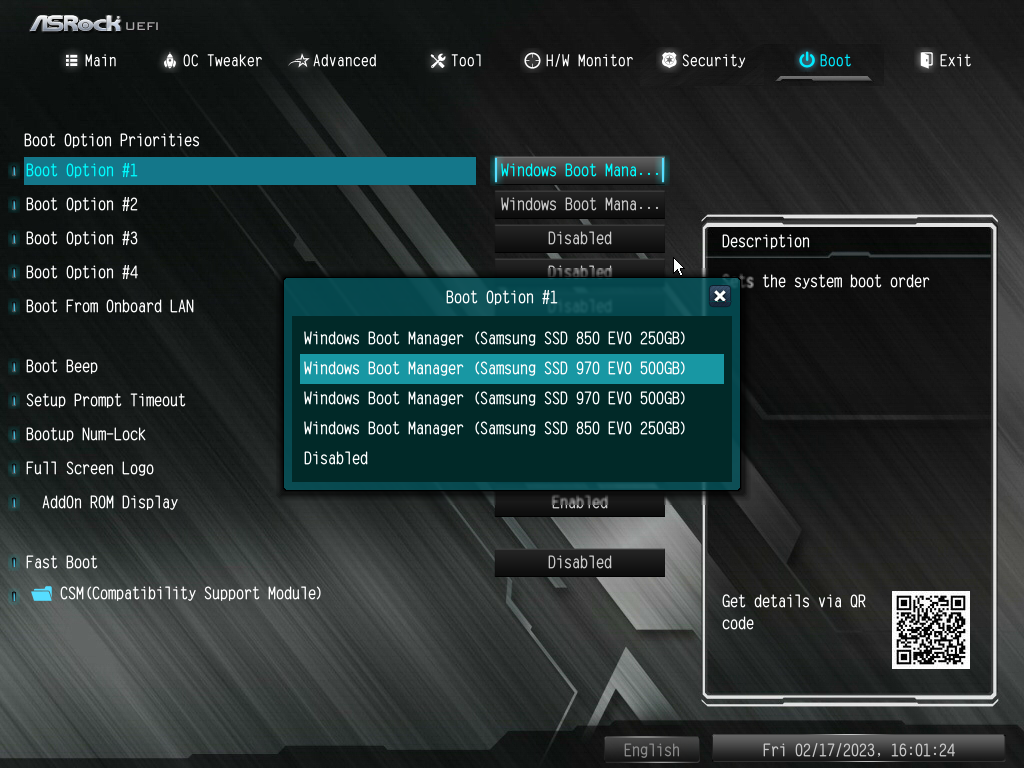
(3) I'm confused about your BIOS. I don't have one that complex.

(a) I don't know why it's got 4 Boot Options.

(b) Are you sure it is Boot Option #1 that is executing? Maybe disable ...#2 to be sure.

(c) Show us the contents of ...#2 as you showed ...#1 below.

(d) What is that item that is disabled within ...#1?

Our goal is to have you boot to the EVO that has Windows on it. So, that is the drive that needs to be at the top of the Boot Order in your Boot Option #1. Is it...?...

Image

The way to know that it is the correct Windows partition that is booted is that your C: partition will be 463 GB...

Was this answer helpful?

1 person found this answer helpful.
0 comments No comments

Answer accepted by question author

Ramesh 176.3K Reputation points Volunteer Moderator
2023-02-23T03:26:03+00:00

Rebuilding the BCD should be enough, not the entire boot files, even though rebuilding the entire boot files doesn't do any harm.

And wondering why you're trying to create a Recovery drive with system files? Is it for backup/restore purposes or only for accessing WinRE? If it's for accessing WinRE, you can uncheck "Backup system files..." and create the media.

Regarding your question about C:\EFI folder, you can simply rename it. If Windows reboots correctly, that folder can be deleted. Do this only after creating the USB setup disk or Recovery drive.

Was this answer helpful?

1 person found this answer helpful.
0 comments No comments

56 additional answers

Sort by: Most helpful
  1. Anonymous
    2023-02-18T17:46:07+00:00

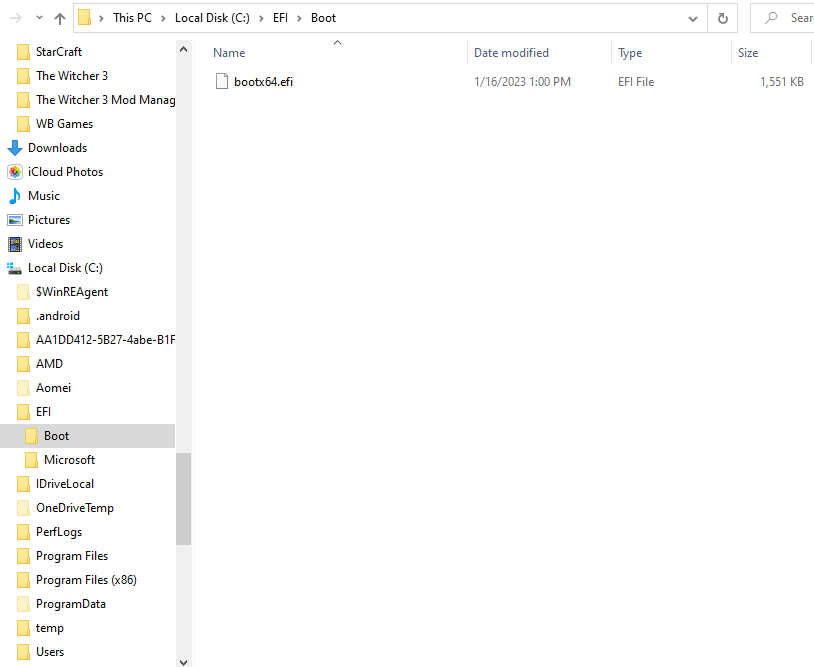
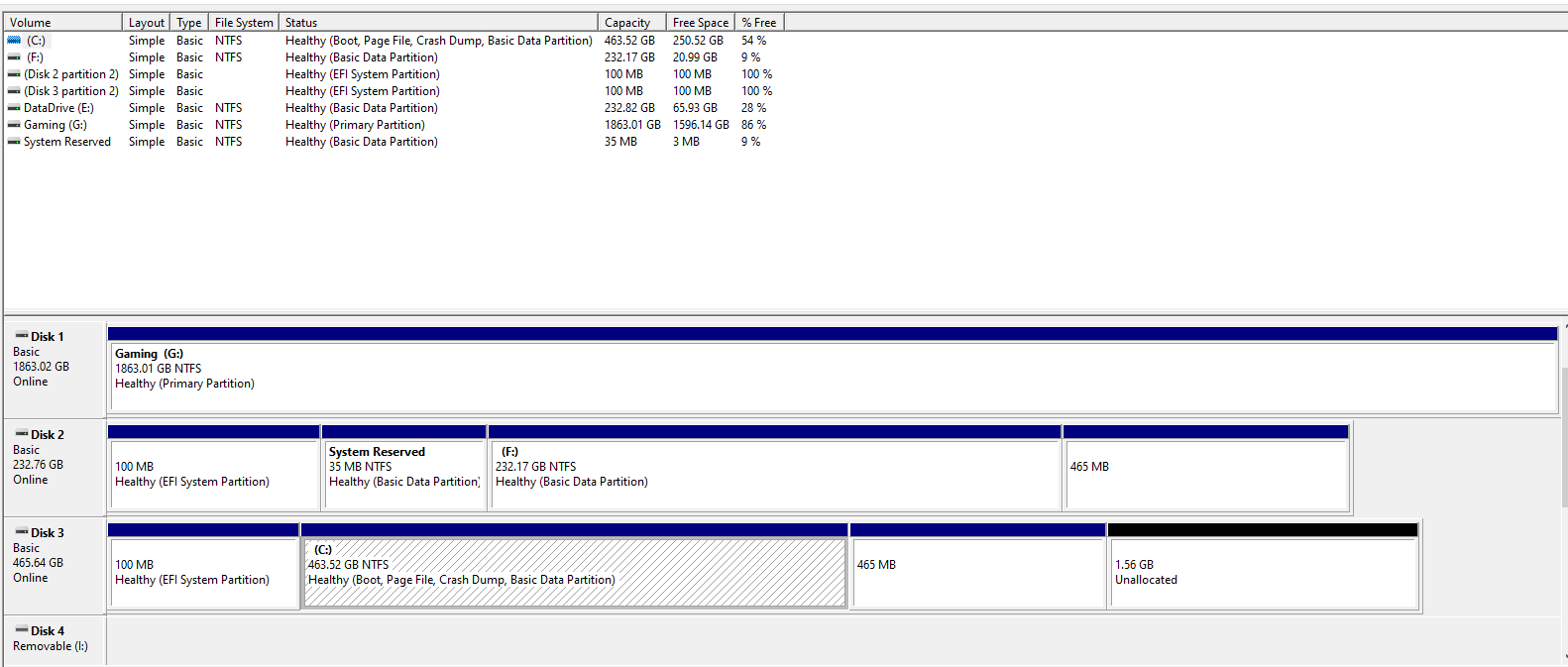
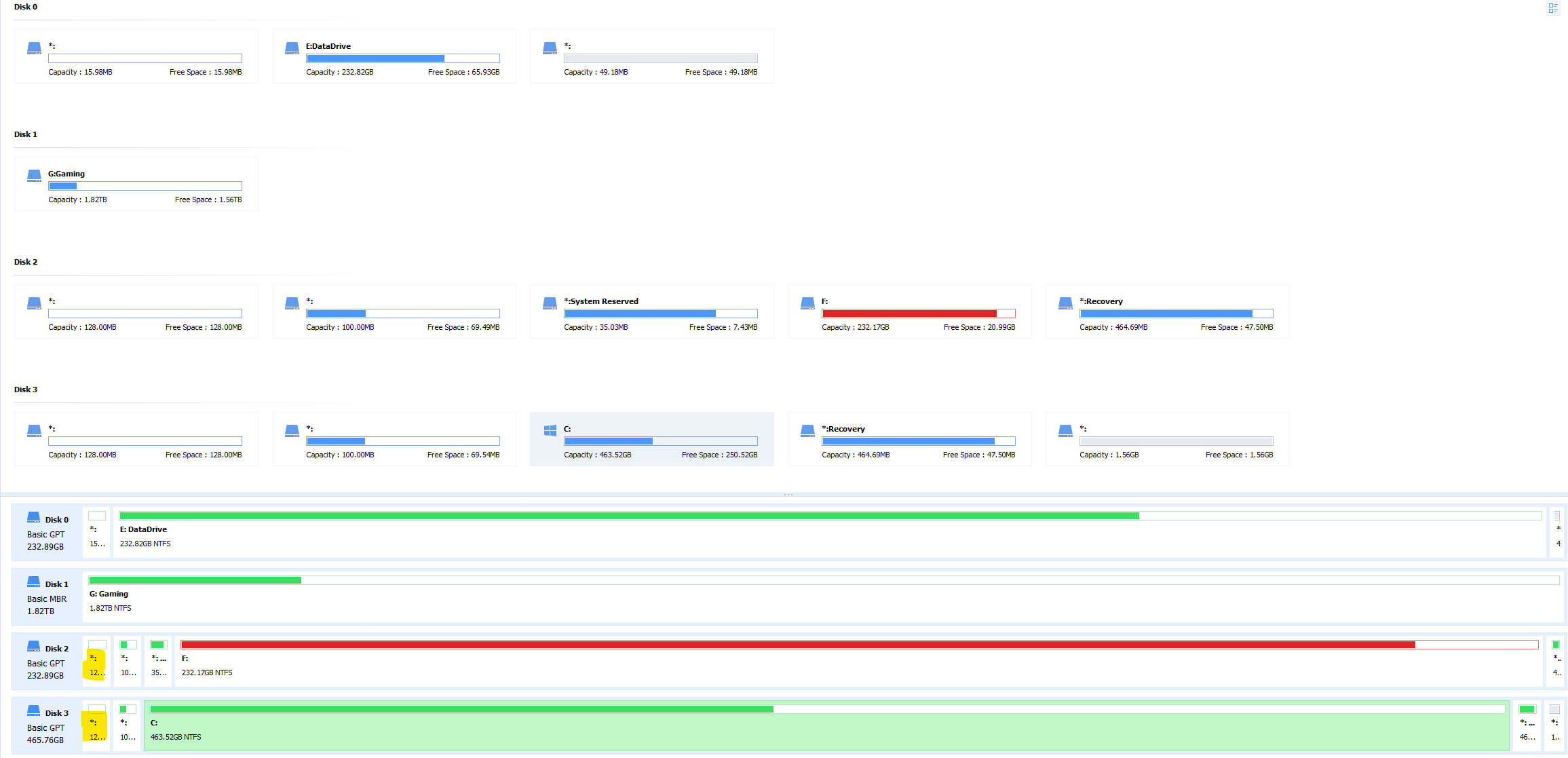
    I've attached both the disk and volume views from Disk Management as well as a view from the AOMEI tool since it also displays the MSR partition that's invisible to Disk Management. There's also a screenshot showing the legacy EFI "directory" on the boot drive that was previously used when the disk was MBR. This selection will no longer boot, but it shows up in the boot manager menu. It also seems to randomly shuffle the order of that boot menu any time I make a change to the BIOS. Even if I disable the boot entry for the MBR\EFI selection in UEFI, it still appears as an option during boot. This is what really drives me crazy since I can't tell which is the GPT/EFI and which is the MBR/EFI without attempting to boot. As a point of clarification, I intend to wipe the 850 to use as a single partition data drive once the 970 and BIOS are fully stable - so don't worry about its entries. (The diskpart command output is at the bottom of this post.)
    DISKPART> lis dis

    Disk ### Status Size Free Dyn Gpt


    Disk 0 Online 232 GB 51 MB *

    Disk 1 Online 1863 GB 1024 KB

    Disk 2 Online 232 GB 1024 KB *

    Disk 3 Online 465 GB 1600 MB *

    Disk 4 No Media 0 B 0 B

    Disk 5 No Media 0 B 0 B

    Disk 6 No Media 0 B 0 B

    DISKPART>

    DISKPART> lis vol

    Volume ### Ltr Label Fs Type Size Status Info


    Volume 0 D DVD-ROM 0 B No Media

    Volume 1 E DataDrive NTFS Partition 232 GB Healthy

    Volume 2 G Gaming NTFS Partition 1863 GB Healthy

    Volume 3 System Rese NTFS Partition 35 MB Healthy

    Volume 4 F NTFS Partition 232 GB Healthy

    Volume 5 FAT32 Partition 100 MB Healthy Hidden

    Volume 6 Recovery NTFS Partition 464 MB Healthy Hidden

    Volume 7 C NTFS Partition 463 GB Healthy Boot

    Volume 8 FAT32 Partition 100 MB Healthy System

    Volume 9 Recovery NTFS Partition 464 MB Healthy Hidden

    Volume 10 I Removable 0 B No Media

    Volume 11 J Removable 0 B No Media

    Volume 12 K Removable 0 B No Media

    DISKPART>

    DISKPART> sel dis 0

    Disk 0 is now the selected disk.

    DISKPART>

    DISKPART> det dis

    Samsung SSD 850 EVO 250GB

    Disk ID: {6A096C82-1A57-4D46-8170-7B205E80D36F}

    Type : SATA

    Status : Online

    Path : 1

    Target : 0

    LUN ID : 0

    Location Path : PCIROOT(0)#PCI(0102)#PCI(0001)#ATA(C01T00L00)

    Current Read-only State : No

    Read-only : No

    Boot Disk : No

    Pagefile Disk : No

    Hibernation File Disk : No

    Crashdump Disk : No

    Clustered Disk : No

    Volume ### Ltr Label Fs Type Size Status Info


    Volume 1 E DataDrive NTFS Partition 232 GB Healthy

    DISKPART>

    DISKPART> lis par

    Partition ### Type Size Offset


    Partition 1 Reserved 15 MB 17 KB

    Partition 2 Primary 232 GB 16 MB

    DISKPART>

    DISKPART> sel par 1

    Partition 1 is now the selected partition.

    DISKPART>

    DISKPART> det par

    Partition 1

    Type : e3c9e316-0b5c-4db8-817d-f92df00215ae

    Hidden : Yes

    Required: No

    Attrib : 0000000000000000

    Offset in Bytes: 17408

    There is no volume associated with this partition.

    DISKPART>

    DISKPART> sel par 2

    Partition 2 is now the selected partition.

    DISKPART>

    DISKPART> det par

    Partition 2

    Type : ebd0a0a2-b9e5-4433-87c0-68b6b72699c7

    Hidden : No

    Required: No

    Attrib : 0000000000000000

    Offset in Bytes: 16777216

    Volume ### Ltr Label Fs Type Size Status Info


    * Volume 1 E DataDrive NTFS Partition 232 GB Healthy

    DISKPART>

    <<deleted - there are no partitions 3-6>>

    DISKPART>

    DISKPART> sel dis 1

    Disk 1 is now the selected disk.

    DISKPART>

    DISKPART> det dis

    Samsung SSD 870 EVO 2TB

    Disk ID: 415061BC

    Type : SATA

    Status : Online

    Path : 4

    Target : 0

    LUN ID : 0

    Location Path : PCIROOT(0)#PCI(0102)#PCI(0001)#ATA(C04T00L00)

    Current Read-only State : No

    Read-only : No

    Boot Disk : No

    Pagefile Disk : No

    Hibernation File Disk : No

    Crashdump Disk : No

    Clustered Disk : No

    Volume ### Ltr Label Fs Type Size Status Info


    Volume 2 G Gaming NTFS Partition 1863 GB Healthy

    DISKPART>

    DISKPART> lis par

    Partition ### Type Size Offset


    Partition 1 Primary 1863 GB 1024 KB

    DISKPART>

    DISKPART> sel par 1

    Partition 1 is now the selected partition.

    DISKPART>

    DISKPART> det par

    Partition 1

    Type : 07

    Hidden: No

    Active: No

    Offset in Bytes: 1048576

    Volume ### Ltr Label Fs Type Size Status Info


    * Volume 2 G Gaming NTFS Partition 1863 GB Healthy

    DISKPART>

    <<deleted - there are no partitions 2-6>>

    DISKPART>

    DISKPART> sel dis 3

    Disk 3 is now the selected disk.

    DISKPART>

    DISKPART> det dis

    Samsung SSD 970 EVO 500GB

    Disk ID: {A7153D34-52E7-4173-87AE-1C01624EA161}

    Type : NVMe

    Status : Online

    Path : 0

    Target : 0

    LUN ID : 0

    Location Path : PCIROOT(0)#PCI(0106)#PCI(0000)#NVME(P00T00L00)

    Current Read-only State : No

    Read-only : No

    Boot Disk : Yes

    Pagefile Disk : Yes

    Hibernation File Disk : No

    Crashdump Disk : Yes

    Clustered Disk : No

    Volume ### Ltr Label Fs Type Size Status Info


    Volume 7 C NTFS Partition 463 GB Healthy Boot

    Volume 8 FAT32 Partition 100 MB Healthy System

    Volume 9 Recovery NTFS Partition 464 MB Healthy Hidden

    DISKPART>

    DISKPART> sel par 1

    Partition 1 is now the selected partition.

    DISKPART>

    DISKPART> det par

    Partition 1

    Type : e3c9e316-0b5c-4db8-817d-f92df00215ae

    Hidden : Yes

    Required: No

    Attrib : 0X8000000000000000

    Offset in Bytes: 1048576

    There is no volume associated with this partition.

    DISKPART>

    DISKPART> sel par 2

    Partition 2 is now the selected partition.

    DISKPART>

    DISKPART> det par

    Partition 2

    Type : c12a7328-f81f-11d2-ba4b-00a0c93ec93b

    Hidden : Yes

    Required: No

    Attrib : 0X8000000000000000

    Offset in Bytes: 135266304

    Volume ### Ltr Label Fs Type Size Status Info


    * Volume 8 FAT32 Partition 100 MB Healthy System

    DISKPART>

    DISKPART> sel par 3

    Partition 3 is now the selected partition.

    DISKPART>

    DISKPART> det par

    Partition 3

    Type : ebd0a0a2-b9e5-4433-87c0-68b6b72699c7

    Hidden : No

    Required: No

    Attrib : 0000000000000000

    Offset in Bytes: 240123904

    Volume ### Ltr Label Fs Type Size Status Info


    * Volume 7 C NTFS Partition 463 GB Healthy Boot

    DISKPART>

    DISKPART> sel par 4

    Partition 4 is now the selected partition.

    DISKPART>

    DISKPART> det par

    Partition 4

    Type : de94bba4-06d1-4d40-a16a-bfd50179d6ac

    Hidden : Yes

    Required: No

    Attrib : 0000000000000000

    Offset in Bytes: 497942528000

    Volume ### Ltr Label Fs Type Size Status Info


    * Volume 9 Recovery NTFS Partition 464 MB Healthy Hidden

    DISKPART>

    DISKPART> sel par 5

    The specified partition is not valid.

    Please select a valid partition.

    There is no partition selected.

    DISKPART>

    Was this answer helpful?

    0 comments No comments
  2. Anonymous
    2023-02-18T02:09:21+00:00

    Please perform the following steps:

    1. Post an image of disk management:

    (by default rows and columns are compressed and characters are cutoff)

    a) Widen rows disk 0, disk 1, disk 2, etc. > make sure that no characters are cutoff

    b) Widen columns Volume and Sources > make sure that no characters are cutoff

    https://www.tenforums.com/tutorials/2503-how-post-screenshot-disk-management.html

    1. Open administrative command prompt and copy and paste: (all at one time)

    bcdedit

    reagentc /info

    diskpart

    lis dis

    lis vol

    sel dis 0

    det dis

    lis par

    sel par 1

    det par

    sel par 2

    det par

    sel par 3

    det par

    sel par 4

    det par

    sel par 5

    det par

    sel par 6

    det par

    sel dis 1

    det dis

    lis par

    sel par 1

    det par

    sel par 2

    det par

    sel par 3

    det par

    sel par 4

    det par

    sel par 5

    det par

    sel par 6

    det par

    sel dis 3

    det dis

    lis par

    Type:

    ctrl + a

    ctrl + c

    Paste into this thread typing:

    ctrl + v

    Was this answer helpful?

    0 comments No comments