' cx='32' cy='32' r='32' /%3E%3Ctext x='50%25' y='55%25' dominant-baseline='middle' text-anchor='middle' fill='%23FFF' %3EA%3C/text%3E%3C/svg%3E)

' cx='32' cy='32' r='32' /%3E%3Ctext x='50%25' y='55%25' dominant-baseline='middle' text-anchor='middle' fill='%23FFF' %3EL%3C/text%3E%3C/svg%3E)
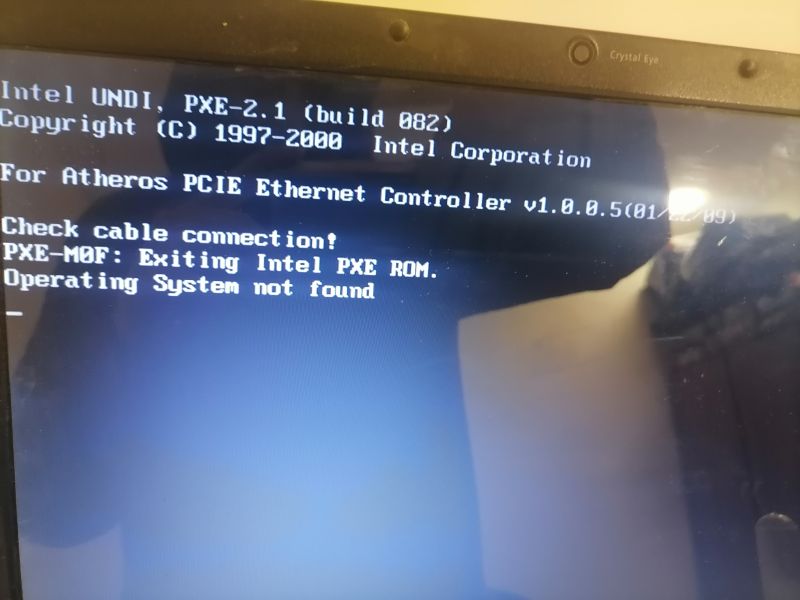
Most consumer computers have a built-in ability to boot from a network resource, although this feature is rarely, if ever, used by home users. The "PXE" error means that your computer is attempting to boot from a network resource but is not able connect to your local network.
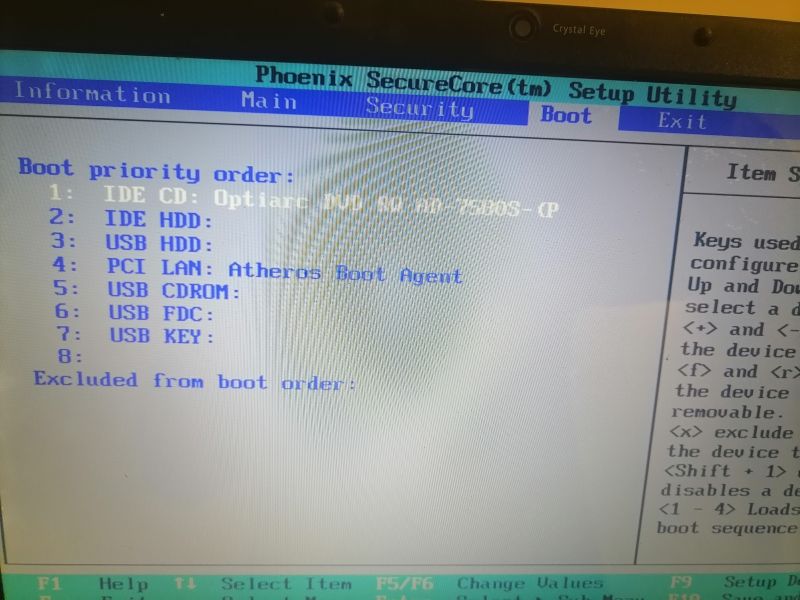
Your second screenshot shows the order in which your computer is configured to look for bootable devices. Your configuration is normal: look first for a bootable CD or DVD, then look on the local hard drive, then look for an external USB-connected drive, and then look for a local network resource.
The error means that you do not have a bootable operating system on a CD or DVD inserted into your CD/DVD drive, you do not have a bootable operating system on your local hard drive, you do not have a bootable operating system on a USB-connected drive, and the system is unable to connect to a local network resource.
Assuming that you're not attempting to reinstall Windows from a CD/DVD or a USB flash drive, this error almost certainly means that your effort to "clean" your computer was a bit too successful: you wiped out your hard drive. Depending on how you "cleaned" your computer, you may be able to reset it to factory conditions. See https://community.acer.com/en/kb/articles/14751-how-to-factory-reset-windows
Otherwise, you'll have to do a clean install with a Windows 7 DVD or USB flash drive.