Share via

Windows 11 memory integrity pxhlpa64.sys (DVD driver)

Anonymous
2022-09-07T10:37:32+00:00

Running Windows 11 Home (21H2) on new HP laptop with an ASUS USB DVD driver.

Windows 11 installed driver, pxhlpa64.sys, is activated when I plug in the drive and I can use the drive normally. However, Windows turns off Memory Integrity complaining about pxhlpa64.sys not being compatible.

Neither ASUS nor HP have a USB DVD driver update since they use the 'installed' Windows 11 driver but Windows 11 memory integrity is not happy with its 'installed' driver, pxhlpa64.sys.

Is there a solution to this 'catch 22'?

Thanks in advance.

Windows for home | Windows 11 | Devices and drivers

Locked Question. This question was migrated from the Microsoft Support Community. You can vote on whether it's helpful, but you can't add comments or replies or follow the question.

0 comments No comments

33 answers

Sort by: Most helpful
  1. Anonymous
    2023-03-27T19:35:09+00:00

    I cleared the problem by renaming the files (adding an .off extension) ...

    C:\Program Files (x86)\Common Files\Sonic Shared\PX Drivers\pxhlpA64.sys.off

    C:\Windows\System32\drivers\PxHlpa64.sys.off

    I kept using Adobe Photoshop Element since last fall and nothing has bugged so far.

    Was this answer helpful?

    10+ people found this answer helpful.
    0 comments No comments
  2. Anonymous
    2023-01-15T16:33:09+00:00

    Bottom Line Upfront - the solution for me was to remove "Adobe Elements" which uses this driver (also anything Roxio uses it as well). I'll have to live without that program I guess.

    My research showed that pxhlpa64.sys is not a native Win 11 system driver, it is added by other programs. I tired and was successful at disabling it using the free program "Autorun64" (I also move the file out of the Windows/System32/Drivers folder). After reboot, CORE ISOLATION was on but then I could NOT see my DVD Burner in File Explorer :-( Also, I am running Win11 Pro 22h2 but it did not resolve the issue for me, and I could find no updated version of pxhlpa64.sys that allowed CORE Isolation to work.

    It would be nice if MS or Corell or Roxio or Sonic would find a fix for this very common problem!

    Was this answer helpful?

    10+ people found this answer helpful.
    0 comments No comments
  3. Anonymous
    2022-09-14T15:47:14+00:00

    It appears that this is an old filter driver that was left over from something or other. I was able to get rid of the driver by modifying this registry entry:

    Computer\HKEY_LOCAL_MACHINE\SYSTEM\CurrentControlSet\Control\Class{4d36e965-e325-11ce-bfc1-08002be10318}

    Look for a LowerFilters key with the value of PxHlpa64.

    Either modify that name/value pair or delete it.

    Reboot.

    Turn on Memory Integrity in Windows Security and it should allow you to enable the feature.

    Reboot as prompted.

    Was this answer helpful?

    10+ people found this answer helpful.
    0 comments No comments
  4. Anonymous
    2022-09-14T06:26:59+00:00

    Mine doesn't show a published name so I cannot locate and delete/uninstall it.

    Anything else I can try?

    Was this answer helpful?

    10+ people found this answer helpful.
    0 comments No comments
  5. Lester Bernard Reyes 80,290 Reputation points Independent Advisor
    2022-09-07T12:06:49+00:00

    Hi and thanks for reaching out. My name is Bernard a Windows fan like you. I'll be happy to help you out today.

    I understand the issue you have, nothing to worry I am here to help, I know some of these steps are already done, you have just skipped it if you think it will have the same result.

    Press Windows key + X then click Windows Powershell (Admin) or Windows Terminal (Admin)

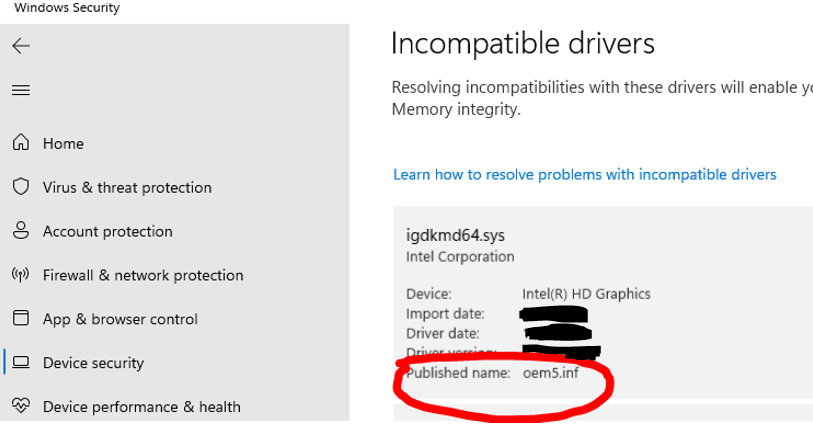
    If you cannot see the Published name run this command:

    dism /online /get-drivers /format:table

    and uninstall using the command below:

    pnputil /delete-driver oem5.inf /uninstall /force

    Note: This is just an example command wherein the incompatible published name driver is “oem5.inf”, replace it depending on your incompatible driver.

    Refer to this link: https://answers.microsoft.com/en-us/windows/for...

    Let me know how it goes and I hope that helps.

    Bernard

    Independent Advisor
    Was this answer helpful?

    8 people found this answer helpful.
    0 comments No comments
