Share via

Is there a way to allow my child to install programs with Microsoft Family controls?

Anonymous
2023-01-01T20:52:04+00:00

My 12 year old son saved his money to buy a gaming computer, which is great, but we still want to use Microsoft Family to control screen time and content. Unfortunately this requires that his Windows Account be a Standard User, which means he can't install software, make updates, or do much of anything. The result is him asking me 20 times a day to enter my PIN, which isn't very convenient or workable for either of us.

Is there any way to allow a Standard User to install programs on Windows 11 (I know - that's what the PC came with), or alternatively, to set Family settings to allow installation of software? I checked all the settings and tried changing the Age level, but it still requires my pin. The only workaround I have found is to make his account an Admin, then use 3rd party control software like Circle to manage internet access time and content. But this doesn't manage his windows screen time, so he can still use it 16 hours a day for games that don't require an internet connection.

Surely Microsoft is aware that kids need to install software, or they wouldn't provide the Age restrictions in Family Settings.

Thanks for any ideas or advice.

***Move from Microsoft 365 and Office / Family Safety / For home / Windows ***

Windows for home | Windows 10 | Family and online safety

Locked Question. This question was migrated from the Microsoft Support Community. You can vote on whether it's helpful, but you can't add comments or replies or follow the question.

0 comments No comments

3 answers

Sort by: Most helpful
  1. Anonymous
    2023-03-08T10:31:42+00:00

    Hi

    I have tried this and at Step 3 I don’t get “Family Licenses”, I instead get “Manage Consent”. And then there are no further prompts to anywhere that I would need to go (in fact it goes round in circles asking me to log in which is fairly annoying!).

    Getting to Step 4&5 would be great as I assume I can it appears I’ll be able to set my child’s account to allow him to download apps without my consent/password - which is handy when I am not there - eg when he’s at school and needs to download an app when directed by his teacher.

    Are the “Additional” steps the only solution? If so it seems crazy that I can’t do it easily and conveniently from the Family Safety app on my phone.

    Thanks

    30+ people found this answer helpful.
    0 comments No comments
  2. Anonymous
    2023-01-02T02:55:03+00:00

    Hello theruska,

    Welcome to Microsoft Community.

    I understand that you are having some problems setting up parental controls.

    Have you granted your child a family permission?

    If you have added a family permission to your child's account and you want to block your child from downloading non-Microsoft apps you can try the following.

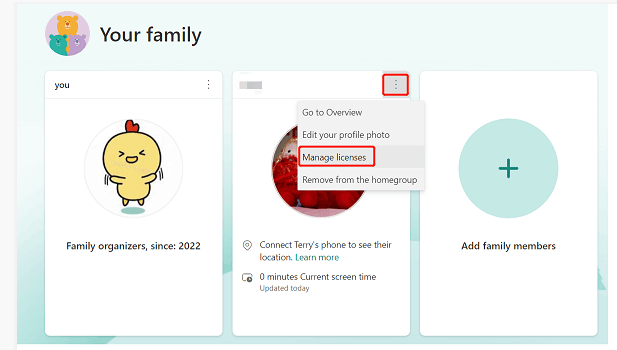
    1. Go to the account.live.com website and sign in with your Microsoft account
    2. View your family
    3. Manage your child's license in your family, if your child has not added a license, please try to add a license
    Image

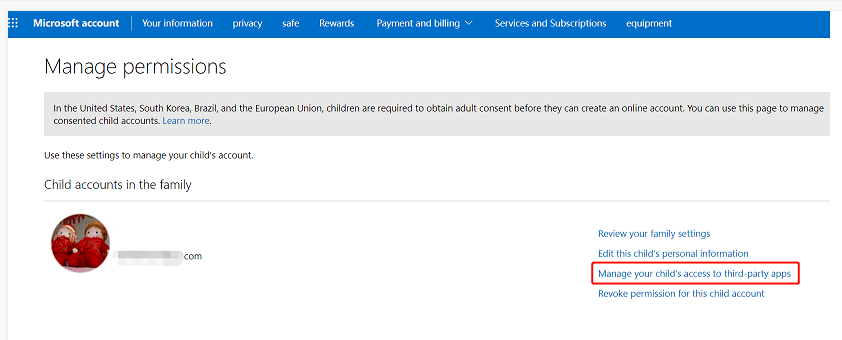
    1. Click Manage your child's access to third-party apps
    Image

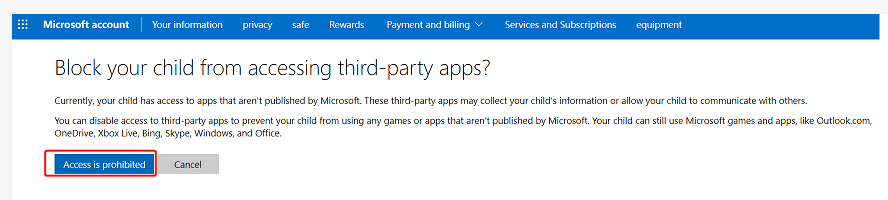
    5.Click "Access is prohibited ", then your child can only access Microsoft applicationsImage
    In addition, you can manage licenses as follows.

    Sign in on your son's computer with your Microsoft account>then open Settings>Accounts>Family>Add your Microsoft account and your son's Microsoft account>and set it to allow login>then Windows+L lock the computer>Select your son's account to sign in>Then you will be prompted whether you are a parent or non-parent>Select you are a parent and sign in with your Microsoft account>Then set permission and screen time for your son's account>Just follow the prompts

    You can refer to the following link on how to manage parental permission and set screen time.

    Managing parental consent - Microsoft Support

    If there is anything not clear, please do not hesitate to let me know.

    Best Regards,

    Lenka-MSFT| Microsoft Community Support Specialist

    2 people found this answer helpful.
    0 comments No comments
  3. Anonymous
    2023-01-09T07:49:36+00:00

    Hello theruska,

    I haven't received the message from you yet. If there is anything more I can do for you or anything is unclear, please do not hesitate to let me know. 

    Best Regards,

    Lenka | Microsoft Community Support Specialist


    * Beware of scammers posting fake support numbers here.

    * If your problem is not solved, you could reply to the post again and we would continue to provide technical support for you.

    * Please check and vote this answer if it helps as it will be beneficial to more community members reading here.

    0 comments No comments
