Developer technologies | Windows Presentation Foundation
A part of the .NET Framework that provides a unified programming model for building line-of-business desktop applications on Windows.
This browser is no longer supported.
Upgrade to Microsoft Edge to take advantage of the latest features, security updates, and technical support.

First and foremost, I apologize for my grammatical errors; my first language is Persian (Iran).
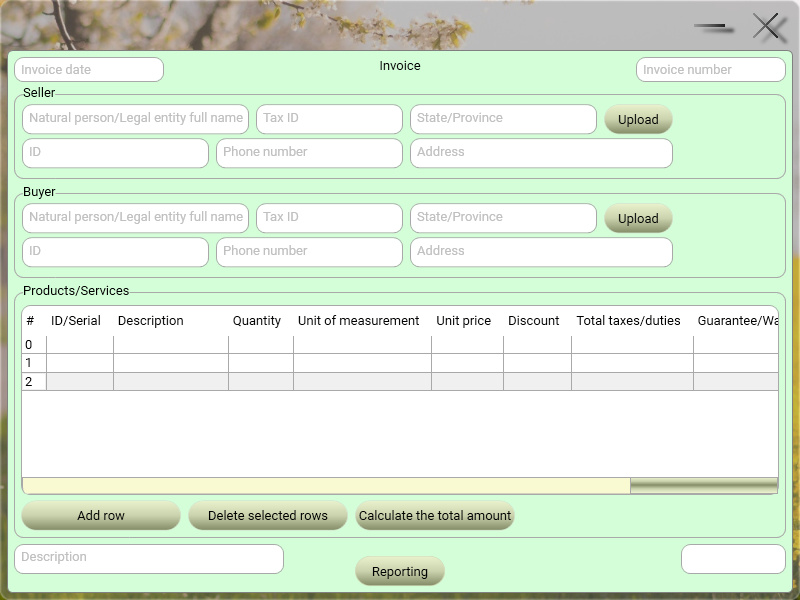
I want to remove one or more rows from DataGrid depending on the user's choice.
I add blank rows to the DataGrid with the following codes:
    public struct DefaultRow
    {
        public string NO { get; set; }
        public string ID_Serial { get; set; }
        public string ProductsOrServicesDescription { get; set; }
        public string Quantity { get; set; }
        public string UnitOfMeasurement { get; set; }
        public string UnitPrice { get; set; }
        public string Discount { get; set; }
        public string TaxDutyVat { get; set; }
        public string GuaranteeOrWarrantyPeriod { get; set; }
        public string TotalAmount { get; set; }
    }
    public void AddBlankRow()
    {
        List<object> DefaultRow = new List<object>();
        DefaultRow DR = new DefaultRow();
        DR.NO = "";
        DR.ID_Serial = "";
        DR.ProductsOrServicesDescription = "";
        DR.Quantity = "";
        DR.UnitOfMeasurement = "";
        DR.UnitPrice = "";
        DR.Discount = "";
        DR.TaxDutyVat = "";
        DR.GuaranteeOrWarrantyPeriod = "";
        DR.TotalAmount = "";
        for (int i = 0; i < BillDataGrid.Items.Count; i++)
        {
            DefaultRow.Add(BillDataGrid.Items[i]);
        }
        DefaultRow.Add(DR);
        BillDataGrid.ItemsSource = DefaultRow;
    }
    private void AddNewRow_Button_PreviewMouseLeftButtonDown(object sender, MouseButtonEventArgs e)
    {
        AddBlankRow();
    }
When I try to fill the blank rows, DataGrid.SelectedItems.Count increases with each click, then when I want to select a number of rows again to delete, I get the following error:
System.ArgumentOutOfRangeException: 'Index was out of range. Must be non-negative and less than the size of the collection.'
These are my codes:
WPF:
                <DataGrid x:Name="BillDataGrid" HeadersVisibility="Column" CanUserAddRows="True" CanUserDeleteRows="True" EnableRowVirtualization="True" AutoGenerateColumns="False" HorizontalAlignment="Left" VerticalAlignment="Top" Height="190" Width="758" Margin="7,12,0,0">
                    <DataGrid.Columns>
                        <DataGridTextColumn x:Name="NO" Binding="{Binding NO}" Width="SizeToHeader"/>
                        <DataGridTextColumn x:Name="ID_Serial" Binding="{Binding ID_Serial}" Width="SizeToHeader"/>
                        <DataGridTextColumn x:Name="ProductsOrServicesDescription" Binding="{Binding ProductsOrServicesDescription}" Width="115"/>
                        <DataGridTextColumn x:Name="Quantity" Binding="{Binding Quantity}" Width="SizeToHeader"/>
                        <DataGridTextColumn x:Name="UnitOfMeasurement" Binding="{Binding UnitOfMeasurement}" Width="SizeToHeader"/>
                        <DataGridTextColumn x:Name="UnitPrice" Binding="{Binding UnitPrice}" Width="SizeToHeader"/>
                        <DataGridTextColumn x:Name="Discount" Binding="{Binding Discount}" Width="SizeToHeader"/>
                        <DataGridTextColumn x:Name="TaxDutyVat" Binding="{Binding TaxDutyVat}" Width="SizeToHeader"/>
                        <DataGridTextColumn x:Name="GuaranteeOrWarrantyPeriod" Binding="{Binding GuaranteeOrWarrantyPeriod}" Width="SizeToHeader"/>
                        <DataGridTextColumn x:Name="TotalAmount" Binding="{Binding TotalAmount}" Width="SizeToHeader"/>
                    </DataGrid.Columns>
                </DataGrid>
C#:
    private void DeleteSelectedRows_Button_PreviewMouseLeftButtonDown(object sender, MouseButtonEventArgs e)
    {
        switch (BillDataGrid.SelectedItems.Count > 0)
        {
            case false:
                break;
            default:
                List<object> DefaultRow = new List<object>();
                for (int i = 0; i < BillDataGrid.Items.Count; i++)
                {
                    DefaultRow.Add(BillDataGrid.Items[i]);
                }
                for (int i = 0; i < BillDataGrid.SelectedItems.Count; i++)
                {
                    DefaultRow.RemoveAt(BillDataGrid.SelectedItems.IndexOf(BillDataGrid.SelectedItems[i]));
                }
                BillDataGrid.ItemsSource = DefaultRow;
                break;
        }
    }
Also, I tried to remove the selected rows from the DataGrid directly with the help of the following codes, but I got another error:
    private void DeleteSelectedRows_Button_PreviewMouseLeftButtonDown(object sender, MouseButtonEventArgs e)
    {
        switch (BillDataGrid.SelectedItems.Count > 0)
        {
            case false:
                break;
            default:;
                for (int i = 0; i < BillDataGrid.SelectedItems.Count; i++)
                {
                    BillDataGrid.Items.Remove(BillDataGrid.SelectedItems[i]);
                }
                break;
        }
    }
System.InvalidOperationException: 'Operation is not valid while ItemsSource is in use. Access and modify elements with ItemsControl.ItemsSource instead.'
Thanks
A part of the .NET Framework that provides a unified programming model for building line-of-business desktop applications on Windows.
A language based on Extensible Markup Language (XML) that enables developers to specify a hierarchy of objects with a set of properties and logic.
An object-oriented and type-safe programming language that has its roots in the C family of languages and includes support for component-oriented programming.
Answer accepted by question author

Hi Reza,
you must iterate thru SelectedItems in descending order and remove form items collection (not from SelectedItems collection). I changed your demo. try it.
XAML:
<Window x:Class="WpfApp1.Window098"
        xmlns="http://schemas.microsoft.com/winfx/2006/xaml/presentation"
        xmlns:x="http://schemas.microsoft.com/winfx/2006/xaml"
        xmlns:d="http://schemas.microsoft.com/expression/blend/2008"
        xmlns:mc="http://schemas.openxmlformats.org/markup-compatibility/2006"
        xmlns:local="clr-namespace:WpfApp098"
        xmlns:i="clr-namespace:System.Windows.Interactivity;assembly=System.Windows.Interactivity"
        mc:Ignorable="d"
        Title="RezaJafery_220115" Height="450" Width="900">
  <Window.DataContext>
    <local:ViewModel/>
  </Window.DataContext>
  <Grid>
    <Grid.RowDefinitions>
      <RowDefinition/>
      <RowDefinition Height="Auto"/>
    </Grid.RowDefinitions>
    <DataGrid x:Name="BillDataGrid"
              HeadersVisibility="Column"
              CanUserAddRows="False"
              CanUserDeleteRows="False"
              EnableRowVirtualization="True"
              AutoGenerateColumns="False"
              HorizontalAlignment="Left"
              VerticalAlignment="Top"
              Margin="5">
      <i:Interaction.Behaviors>
        <local:DataGridBehavior/>
      </i:Interaction.Behaviors>
      <DataGrid.Columns>
        <DataGridTextColumn Header="NO" Binding="{Binding NO}" Width="SizeToHeader"/>
        <DataGridTextColumn Header="ID_Serial" Binding="{Binding ID_Serial}" Width="SizeToHeader"/>
        <DataGridTextColumn Header="ProductsOrServicesDescription" Binding="{Binding ProductsOrServicesDescription}" Width="115"/>
        <DataGridTextColumn Header="Quantity" Binding="{Binding Quantity}" Width="SizeToHeader"/>
        <DataGridTextColumn Header="UnitOfMeasurement" Binding="{Binding UnitOfMeasurement}" Width="SizeToHeader"/>
        <DataGridTextColumn Header="UnitPrice" Binding="{Binding UnitPrice}" Width="SizeToHeader"/>
        <DataGridTextColumn Header="Discount" Binding="{Binding Discount}" Width="SizeToHeader"/>
        <DataGridTextColumn Header="TaxDutyVat" Binding="{Binding TaxDutyVat}" Width="SizeToHeader"/>
        <DataGridTextColumn Header="GuaranteeOrWarrantyPeriod" Binding="{Binding GuaranteeOrWarrantyPeriod}" Width="SizeToHeader"/>
        <DataGridTextColumn Header="TotalAmount" Binding="{Binding TotalAmount}" Width="SizeToHeader"/>
      </DataGrid.Columns>
    </DataGrid>
    <StackPanel Grid.Row="1" Orientation="Horizontal" HorizontalAlignment="Right">
      <Button Content="Add New Row" Command="{Binding}" CommandParameter="AddNewRow" Width="100" Margin="5"/>
      <Button Content="Delete selected rows" Command="{Binding}" CommandParameter="DeleteSelectedRows" Width="100" Margin="5"/>
    </StackPanel>
  </Grid>
</Window>
and code:
using System;
using System.Collections.Generic;
using System.Windows;
using System.Windows.Controls;
using System.Windows.Input;
using System.Windows.Interactivity;

namespace WpfApp098
{
  public class ViewModel : ICommand
  {
    public DataGrid BillDataGrid { get; set; }
    int NO;

    public void AddBlankRow()
    {
      List<object> DefaultRow = new List<object>();
      DefaultRow DR = new DefaultRow();
      DR.NO = (++NO).ToString(); //  "";
      DR.ID_Serial = "";
      DR.ProductsOrServicesDescription = "";
      DR.Quantity = "";
      DR.UnitOfMeasurement = "";
      DR.UnitPrice = "";
      DR.Discount = "";
      DR.TaxDutyVat = "";
      DR.GuaranteeOrWarrantyPeriod = "";
      DR.TotalAmount = "";
      for (int i = 0; i < BillDataGrid.Items.Count; i++)
      {
        DefaultRow.Add(BillDataGrid.Items[i]);
      }
      DefaultRow.Add(DR);
      BillDataGrid.ItemsSource = DefaultRow;
    }

    private void DeleteSelectedRows_Button_PreviewMouseLeftButtonDown(object sender, MouseButtonEventArgs e)
    {
      switch (BillDataGrid.SelectedItems.Count > 0)
      {
        case false:
          break;
        default:
          List<object> DefaultRow = new List<object>();
          for (int i = 0; i < BillDataGrid.Items.Count; i++)
          {
            DefaultRow.Add(BillDataGrid.Items[i]);
          }
          for (int i = BillDataGrid.SelectedItems.Count - 1; i >= 0; i--)
          {
            DefaultRow.RemoveAt(BillDataGrid.Items.IndexOf(BillDataGrid.SelectedItems[i]));
          }
          BillDataGrid.ItemsSource = DefaultRow;
          break;
      }
    }

    //private void DeleteSelectedRows_Button_PreviewMouseLeftButtonDown(object sender, MouseButtonEventArgs e)
    //{
    //  switch (BillDataGrid.SelectedItems.Count > 0)
    //  {
    //    case false:
    //      break;
    //    default:
    //      ;
    //      for (int i = 0; i < BillDataGrid.SelectedItems.Count; i++)
    //      {
    //        BillDataGrid.Items.Remove(BillDataGrid.SelectedItems[i]);
    //      }
    //      break;
    //  }
    //}

    public event EventHandler CanExecuteChanged;
    public bool CanExecute(object parameter) => true;
    public void Execute(object parameter)
    {
      switch (parameter.ToString())
      {
        case "AddNewRow": AddBlankRow(); break;
        case "DeleteSelectedRows": DeleteSelectedRows_Button_PreviewMouseLeftButtonDown(null, null); break;
        default: break;
      }
    }
  }

  public class DefaultRow
  {
    public string NO { get; set; }
    public string ID_Serial { get; set; }
    public string ProductsOrServicesDescription { get; set; }
    public string Quantity { get; set; }
    public string UnitOfMeasurement { get; set; }
    public string UnitPrice { get; set; }
    public string Discount { get; set; }
    public string TaxDutyVat { get; set; }
    public string GuaranteeOrWarrantyPeriod { get; set; }
    public string TotalAmount { get; set; }
  }

  public class DataGridBehavior : Behavior<DataGrid>
  {
    protected override void OnAttached() =>
      AssociatedObject.Loaded += (s, e) =>
      ((ViewModel)AssociatedObject.DataContext).BillDataGrid = AssociatedObject;
  }
}
A better solution is to use collection and ItemsSource. Try following demo:
XAML:
<Window x:Class="WpfApp1.Window099"
        xmlns="http://schemas.microsoft.com/winfx/2006/xaml/presentation"
        xmlns:x="http://schemas.microsoft.com/winfx/2006/xaml"
        xmlns:d="http://schemas.microsoft.com/expression/blend/2008"
        xmlns:mc="http://schemas.openxmlformats.org/markup-compatibility/2006"
        xmlns:local="clr-namespace:WpfApp099"
        xmlns:i="clr-namespace:System.Windows.Interactivity;assembly=System.Windows.Interactivity"
        mc:Ignorable="d"
        Title="RezaJafery_220115" Height="450" Width="900">
  <Window.DataContext>
    <local:ViewModel/>
  </Window.DataContext>
  <Grid>
    <Grid.RowDefinitions>
      <RowDefinition/>
      <RowDefinition Height="Auto"/>
    </Grid.RowDefinitions>
    <DataGrid ItemsSource="{Binding View}"
              HeadersVisibility="Column"
              CanUserAddRows="False"
              CanUserDeleteRows="False"
              EnableRowVirtualization="True"
              AutoGenerateColumns="False"
              HorizontalAlignment="Left"
              VerticalAlignment="Top"
              Margin="5">
      <i:Interaction.Behaviors>
        <local:DataGridBehavior/>
      </i:Interaction.Behaviors>
      <DataGrid.Columns>
        <DataGridTextColumn Header="NO" Binding="{Binding NO}" Width="SizeToHeader"/>
        <DataGridTextColumn Header="ID_Serial" Binding="{Binding ID_Serial}" Width="SizeToHeader"/>
        <DataGridTextColumn Header="ProductsOrServicesDescription" Binding="{Binding ProductsOrServicesDescription}" Width="115"/>
        <DataGridTextColumn Header="Quantity" Binding="{Binding Quantity}" Width="SizeToHeader"/>
        <DataGridTextColumn Header="UnitOfMeasurement" Binding="{Binding UnitOfMeasurement}" Width="SizeToHeader"/>
        <DataGridTextColumn Header="UnitPrice" Binding="{Binding UnitPrice}" Width="SizeToHeader"/>
        <DataGridTextColumn Header="Discount" Binding="{Binding Discount}" Width="SizeToHeader"/>
        <DataGridTextColumn Header="TaxDutyVat" Binding="{Binding TaxDutyVat}" Width="SizeToHeader"/>
        <DataGridTextColumn Header="GuaranteeOrWarrantyPeriod" Binding="{Binding GuaranteeOrWarrantyPeriod}" Width="SizeToHeader"/>
        <DataGridTextColumn Header="TotalAmount" Binding="{Binding TotalAmount}" Width="SizeToHeader"/>
      </DataGrid.Columns>
    </DataGrid>
    <StackPanel Grid.Row="1" Orientation="Horizontal" HorizontalAlignment="Right">
      <Button Content="Add New Row" Command="{Binding}" CommandParameter="AddNewRow" Width="100" Margin="5"/>
      <Button Content="Delete selected rows" Command="{Binding}" CommandParameter="DeleteSelectedRows" Width="100" Margin="5"/>
    </StackPanel>
  </Grid>
</Window>
And code:
using System;
using System.Collections.Generic;
using System.Collections.ObjectModel;
using System.ComponentModel;
using System.Windows;
using System.Windows.Controls;
using System.Windows.Data;
using System.Windows.Input;
using System.Windows.Interactivity;

namespace WpfApp099
{
  public class ViewModel : ICommand
  {
    public DataGrid BillDataGrid { get; set; }
    int NO;

    public ViewModel() => cvs.Source = col;
    ObservableCollection<DefaultRow> col = new ObservableCollection<DefaultRow>();
    private CollectionViewSource cvs = new CollectionViewSource();
    public ICollectionView View { get => cvs.View; }

    public void AddBlankRow()
    {
      DefaultRow DR = new DefaultRow();
      DR.NO = (++NO).ToString(); //  "";
      DR.ID_Serial = "";
      DR.ProductsOrServicesDescription = "";
      DR.Quantity = "";
      DR.UnitOfMeasurement = "";
      DR.UnitPrice = "";
      DR.Discount = "";
      DR.TaxDutyVat = "";
      DR.GuaranteeOrWarrantyPeriod = "";
      DR.TotalAmount = "";
      col.Add(DR);
    }

    private void DeleteSelectedRows_Button_PreviewMouseLeftButtonDown(object sender, MouseButtonEventArgs e)
    {
      switch (BillDataGrid.SelectedItems.Count > 0)
      {
        case false:
          break;
        default:
          List<DefaultRow> cache = new List<DefaultRow>();
          foreach (var item in BillDataGrid.SelectedItems) cache.Add((DefaultRow)item);
          foreach (DefaultRow item in cache) col.Remove(item);
          break;
      }
    }

    public event EventHandler CanExecuteChanged;
    public bool CanExecute(object parameter) => true;
    public void Execute(object parameter)
    {
      switch (parameter.ToString())
      {
        case "AddNewRow": AddBlankRow(); break;
        case "DeleteSelectedRows": DeleteSelectedRows_Button_PreviewMouseLeftButtonDown(null, null); break;
        default: break;
      }
    }
  }

  public class DefaultRow
  {
    public string NO { get; set; }
    public string ID_Serial { get; set; }
    public string ProductsOrServicesDescription { get; set; }
    public string Quantity { get; set; }
    public string UnitOfMeasurement { get; set; }
    public string UnitPrice { get; set; }
    public string Discount { get; set; }
    public string TaxDutyVat { get; set; }
    public string GuaranteeOrWarrantyPeriod { get; set; }
    public string TotalAmount { get; set; }
  }

  public class DataGridBehavior : Behavior<DataGrid>
  {
    protected override void OnAttached() =>
      AssociatedObject.Loaded += (s, e) =>
      ((ViewModel)AssociatedObject.DataContext).BillDataGrid = AssociatedObject;
  }
}
Hi, PeterFleischer-3316
I correct my text.
Your code need one reference, which exists in my system.
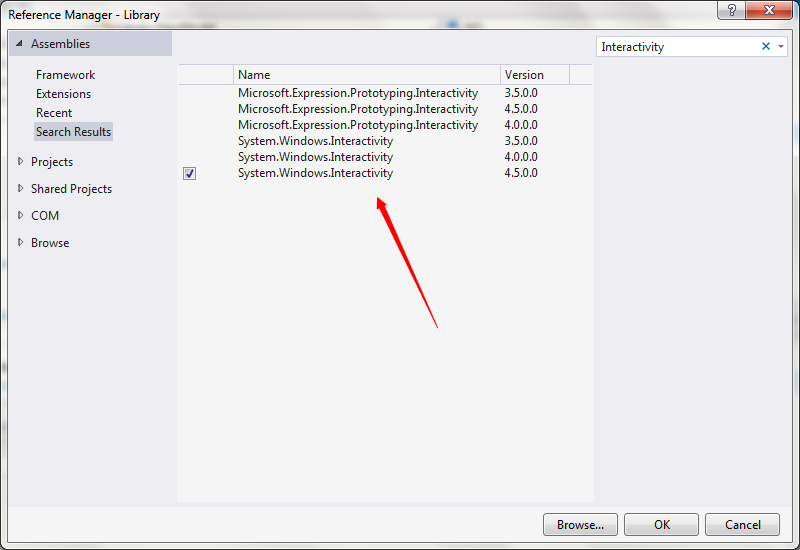
If you really tested this code, can you tell me how to use it?
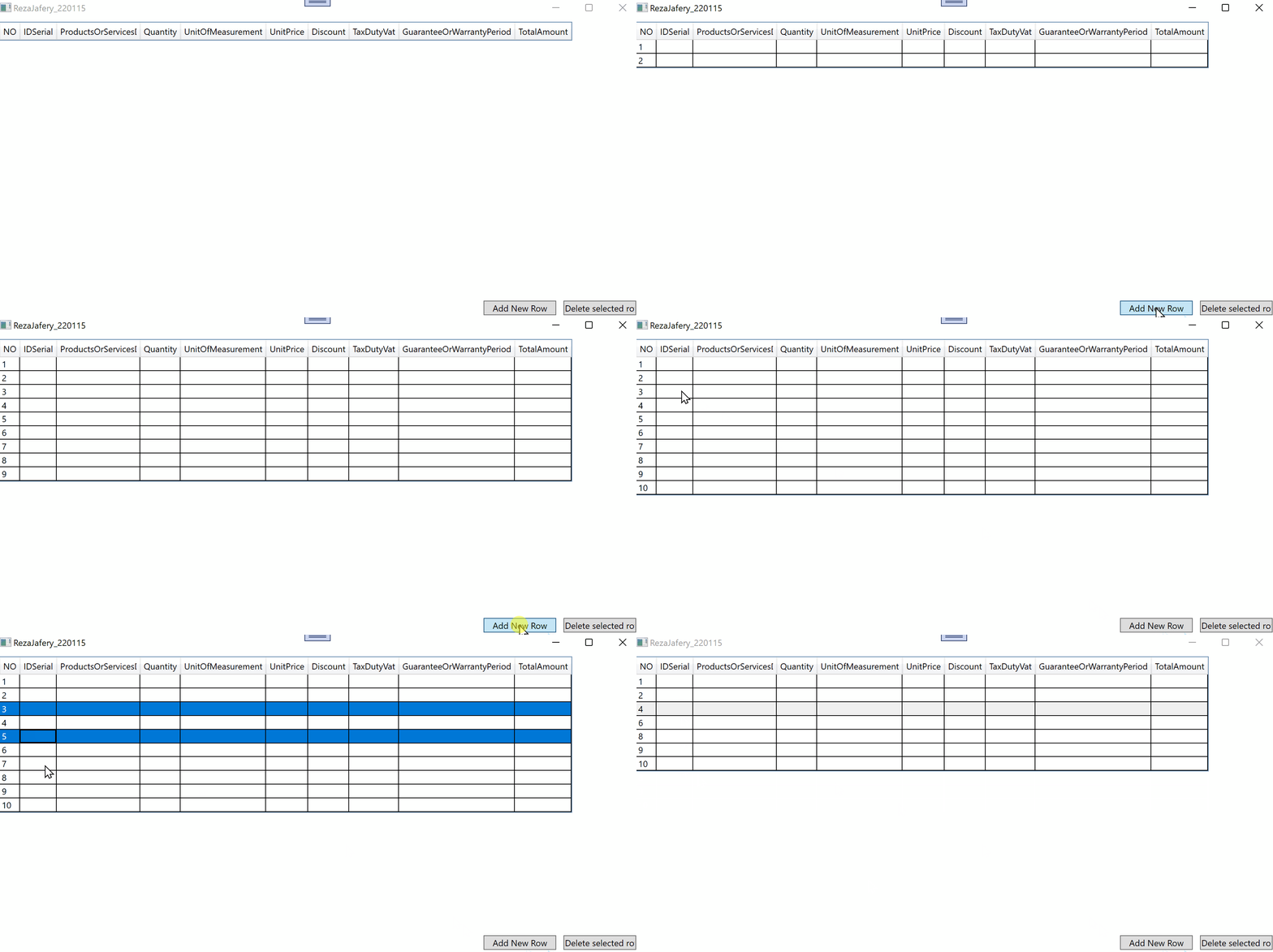
Hi Reza,
I tested my posted code. It's a very easy solution. Behavior you must get from Nuget and delete Reference to XAML.Behavior or use alias. See result (my second code).
Hi, PeterFleischer-3316
I'm sorry to ask you so many questions.
I solved the refrences problem, but I don't know how to use your code, can you explain how to use your second code in AddNewRow_Button_PreviewMouseLeftButtonDown and DeleteSelectedRows_Button_PreviewMouseLeftButtonDown events?
I used your code again as shown below but this time it does not work by clicking.

Thanks
Hi Reza,
copy my code without changes in a new project und test it. It works without problems.
Hi, PeterFleischer-3316
I complete your answer, so that others can use it.
I forgot the following code:
Command = "{Binding}" CommandParameter = "AddNewRow" and Command = "{Binding}" CommandParameter = "DeleteSelectedRows"
And I mistakenly used the PreviewMouseLeftButtonDown event instead.
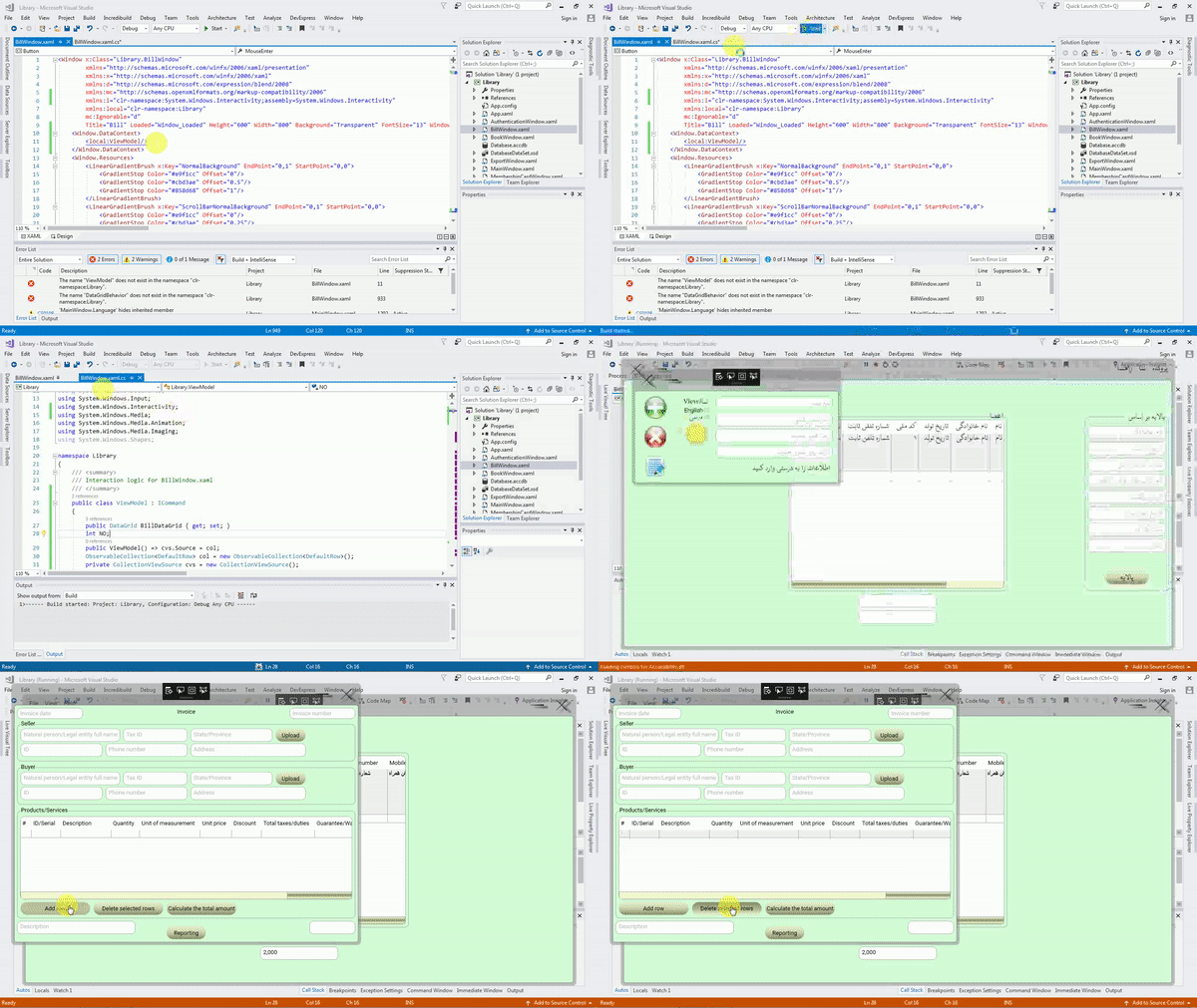
Note: If you added the references correctly, you also entered the C # and XAML codes correctly, and you got an error from the following two codes before compiling, do not worry, run the program, the errors will be fixed as shown below.
<Window.DataContext>
   <local:ViewModel/>
</Window.DataContext>

<i:Interaction.Behaviors>
   <local:DataGridBehavior/>
</i:Interaction.Behaviors>
Output:
Thank you for your attention