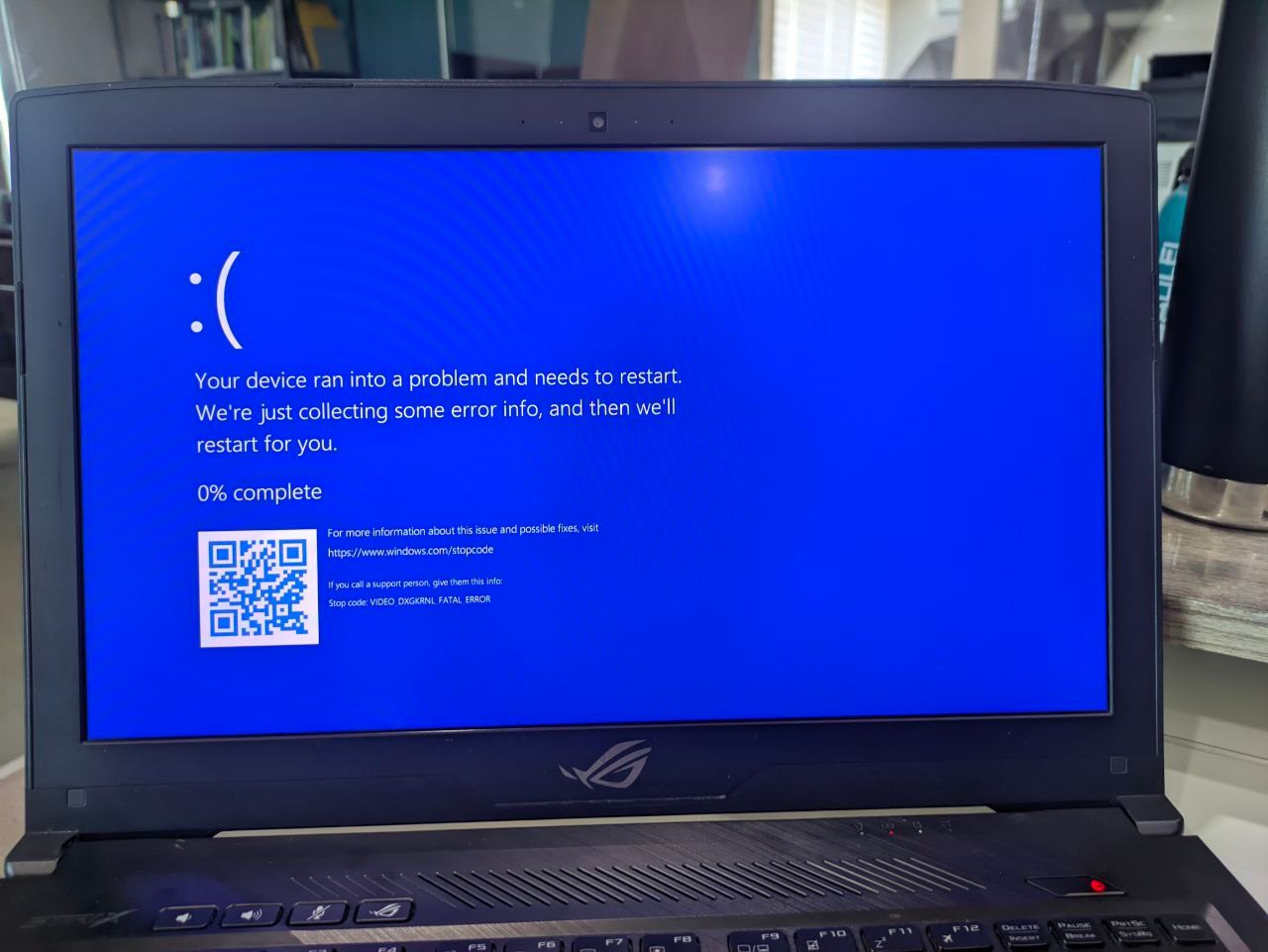
As you can see in the first image it says "video dxgkrnl fatal error". This usually happens when I try to install/update my Nvidia Drivers. The moment I install or update my Nvidia drivers, BSOD will appear at log in screen or whenever I type my password then BSOD will appear. I'm currently using Nvidia Game Ready driver 531.61 when the latest BSOD happened. The dump file says it's caused by watchdog.sys. Here is the dump info:
==================================================
Dump File : 041823-9171-01.dmp
Crash Time : 4/18/2023 10:13:57 AM
Bug Check String :
Bug Check Code : 0x00000113
Parameter 1 : 00000000`00000019
Parameter 2 : 00000000`00000002
Parameter 3 : 00000000`000010de
Parameter 4 : 00000000`00001c8d
Caused By Driver : watchdog.sys
Caused By Address : watchdog.sys+5685
File Description : Watchdog Driver
Product Name : Microsoft® Windows® Operating System
Company : Microsoft Corporation
File Version : 10.0.22621.608 (WinBuild.160101.0800)
Processor : x64
Crash Address : ntoskrnl.exe+4293a0
Stack Address 1 :
Stack Address 2 :
Stack Address 3 :
Computer Name :
Full Path : C:\Windows\Minidump\041823-9171-01.dmp
Processors Count : 8
Major Version : 15
Minor Version : 22621
Dump File Size : 2,232,644
Dump File Time : 4/18/2023 10:16:26 AM
==================================================
I've tried several "fix" for this but to no avail. Here are the different ways that I tried:
- Uninstall/Install nvidia driver
- Rollback nvidia driver.
- Tried older nvidia driver versions
- Downgrade to Windows 10 OS
- Clean uninstall Nvidia Driver via DDU (in safe mode)
- Clean install Windows
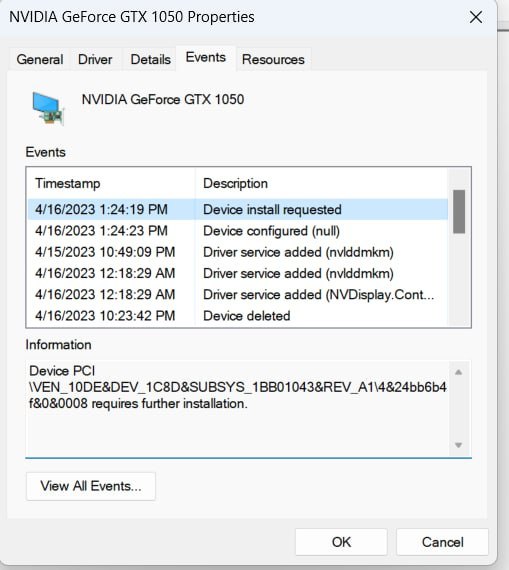
Also, in the second image, under the Events Tab in NVidia driver properties, there is an information that says Device Install requested "Device PCIVEN_8086&DEV_591B&SUBSYS_1BB01043&REV_043&11583659&0&10 requires further installation." It's like this every time I install the nvidia driver. Also my intel driver has that info. Maybe this has something to do with BSOD error but I'm not entirely sure if the two are connected.
Here are my PC (notebook) specs:
Asus ROG GL503VD
Intel i7-7700hq 7th gen
Nvidia GTX 1050 4gb
8gb ram
Windows 11 Home 22H2 OS Build 22621.1555 (KB5025239)
With that said. I end up disabling or uninstalling the Nvidia Driver just for my laptop to function normally since I get BSOD every now and then. Maybe someone knows how to fix this. I also need my nvidia drivers as I also play games occasionally and some of my Apps needs it like AutoCAD, Sketchup.
' cx='32' cy='32' r='32' /%3E%3Ctext x='50%25' y='55%25' dominant-baseline='middle' text-anchor='middle' fill='%23FFF' %3EA%3C/text%3E%3C/svg%3E)

' cx='32' cy='32' r='32' /%3E%3Ctext x='50%25' y='55%25' dominant-baseline='middle' text-anchor='middle' fill='%23FFF' %3ESD%3C/text%3E%3C/svg%3E)