Current specs:
Intel(R) Core(TM) i7-9750H CPU @ 2.60GHz 2.59 GHz with 16GB RAM.
My laptop recently blue screened and wouldn't boot, giving the error "SYSTEM_SERVICE_EXCEPTION" on startup. Whatever. I used a restore point and started experiencing problems with Windows Explorer. At random times, the program would spike in both CPU and memory resources and become completely unresponsive; my desktop would lock up and I couldn't interact with anything unless I used task manager to kill it and open a new process. Everything I've attempted thus far:
>Using the SFC and CHKDSK scan commands to see if anything was wrong. There were no reported errors.
>Ran all 3 DSIM check and repair commands. There were no reported errors.
>Performed a disk cleanup of my C: drive.
>Ran the windows memory diagnostics tool. No reported problems with memory.
>Deleted all temporary files.
>Disabled cloud storage.
>Cleared File Explorer history.
>Ran system maintenance troubleshooter. Nothing wrong was detected.
>Performed a full malware scan. Nothing harmful was detected.
>Tried installing the latest updates for all available hardware and drivers. Windows stating I am "up to date" and no updates were available.
>Performed a clean boot with only Windows processes running.
>Booted in safe mode.
>Created a new blank user account to separate Windows processes.
I thought maybe it had something to do with the restore point itself being corrupted so I reinstalled Windows 10 using media installation. And much to my absolute frustration, the problem still occurs, only not in the same capacity. Windows Explorer will still spike CPU and memory resources, but now only the taskbar freezes when the program becomes unresponsive. I can still open and use all of my 3rd party installed apps as it seems that only a very few Windows default apps stop working like the photo viewer and media player. However, I can still use the file explorer just fine as long as I use a folder on my desktop to access it first, even though Windows Explorer itself is not responding. In addition to trying everything above again, I sought out other lesser methods which I also attempted:
>Unlinked OneDrive account.
>Rebuilt Windows search index.
>Disabled Windows search.
>Checked personalization to disable slideshow background and automatic accent color picking(wasn't enabled).
>Disabled the preview plane.
>Disabled thumbnails.
>Launching explorer folders in a separate process.
>Checked for possible files without icons(there were none).
>Restarted Windows management service.
>Changed display settings to default.
>Uninstalling KB3081449 and KB3081448 updates(not installed anyway).
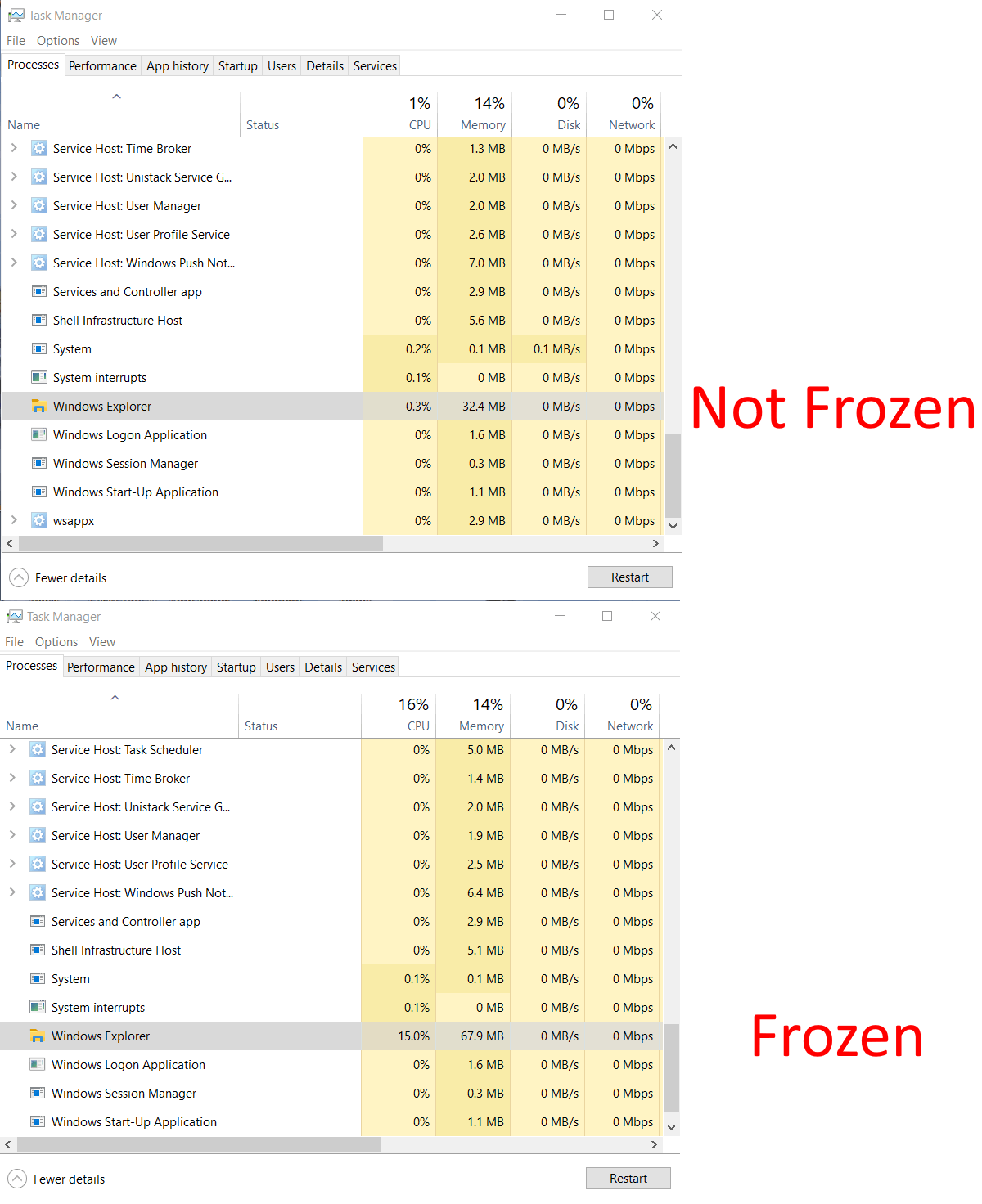
I've included a screenshot showing the difference of Windows Explorer operating normally and when it's unresponsive/frozen. In both cases I was running no applications other than default Windows background applications/services on a blank desktop. Taking a look at the event viewer, here are the details from the maintenance log from the most recent event:
A problem caused this program to stop interacting with Windows.
Faulting Application Path: C:\Windows\explorer.exe
Problem signature
Problem Event Name: AppHangB1
Application Name: explorer.exe
Application Version: 10.0.19041.2728
Application Timestamp: 4990a333
Hang Signature: 27a0
Hang Type: 134217729
OS Version: 10.0.19045.2.0.0.768.101
Locale ID: 1033
Additional Hang Signature 1: 27a07f81cfa2686c417e518726e74751
Additional Hang Signature 2: 3e68
Additional Hang Signature 3: 3e68e74079104e24f2b15cf9967f7de3
Additional Hang Signature 4: 19d5
Additional Hang Signature 5: 19d5ecfb97e482e2af3484f8e3acdaec
Additional Hang Signature 6: 8f7e
Additional Hang Signature 7: 8f7e254800141103eff9bdd90acd8e06
Extra information about the problem
Bucket ID: 9ec5f1914b1e8fa81d5b003b218b6548 (2115284703946433864)
 The only thing suspicious I've noticed within the event viewer is that accompanying every explorer error is a warning that states "Windows Hello for Business provisioning will not be launched. " However, I don't understand why I'm getting that warning because I'm running the home edition of Windows 10 so hello for business and group policy editor are not features I have access to.
' cx='32' cy='32' r='32' /%3E%3Ctext x='50%25' y='55%25' dominant-baseline='middle' text-anchor='middle' fill='%23FFF' %3EA%3C/text%3E%3C/svg%3E)
