Share via

Creative Soundblaster X-Fi Elite Pro - Windows 11 22621.1343

Anonymous
2023-04-15T13:52:36+00:00

Hi! This is a bit of a long-shot, but I have a Creative Soundblaster X-Fi Elite Pro - don't get me wrong, this is an ancient sound card but I do really like it.

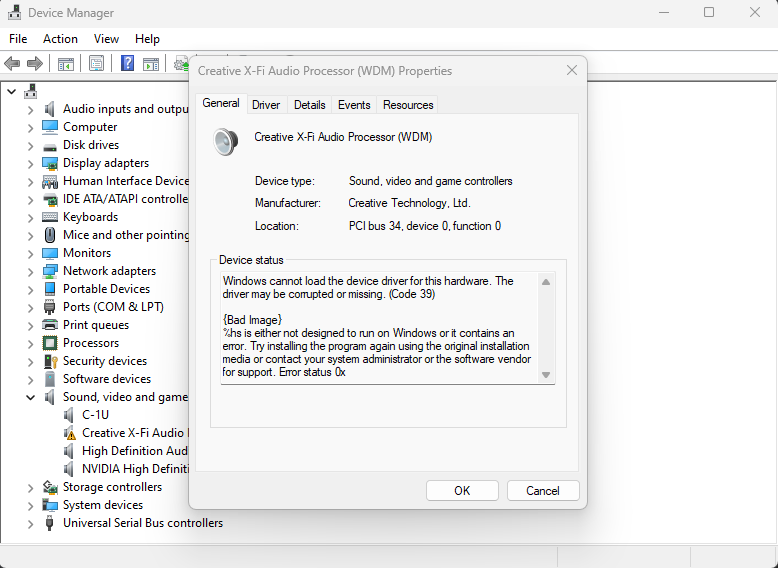
Just to give you some context, this sound card has official driver support for Windows 10, and I've successfully used it on Windows 11 until this update (it works when I update from an older version to the new version of windows but not when I completely reinstall the new version - this is really weird).

I now get this error: 1897141084_Screenshot2023-03-08165903.png.96eb3c44b36f1c66cf1d5874afcce989.png

I've tried the drivers from Creative's own website, and the ones that Windows 11 Automatically installs through windows update, got the same result.

Is there anyone, that might have an idea on how to fix this?

Or someone that encountered the same problem?

Thank you in advance.

Windows for home | Windows 11 | Devices and drivers

Locked Question. This question was migrated from the Microsoft Support Community. You can vote on whether it's helpful, but you can't add comments or replies or follow the question.

0 comments No comments

3 answers

Sort by: Most helpful
  1. Anonymous
    2023-04-16T13:23:25+00:00

    Based on the Hardware Ids it appears the driver is correct (Version 6.0.230.12).

    Can you try the following:

    In the Device Manager right click the adapter > Uninstall device and then also select "Attempt to remove the driver for this device" > Uninstall

    Restart the computer and let Windows re-detect the device and reinstall the driver.

    5 people found this answer helpful.
    0 comments No comments
  2. Anonymous
    2023-04-15T14:44:08+00:00

    Hi,

    Can you do the following :

    In the Device Manager double-click the adapter > Driver

    What is the "Driver Version" ?

    Then click on the "Details" tab, then choose "Hardware Ids" from the drop-down menu under "Property".

    What is listed under "Value"?

    4 people found this answer helpful.
    0 comments No comments
  3. Anonymous
    2023-04-15T18:17:28+00:00

    Here are both of the tabs:

    ImageImage

    EDIT: Also, here are the latest events if that would be of any help.

    2 people found this answer helpful.
    0 comments No comments