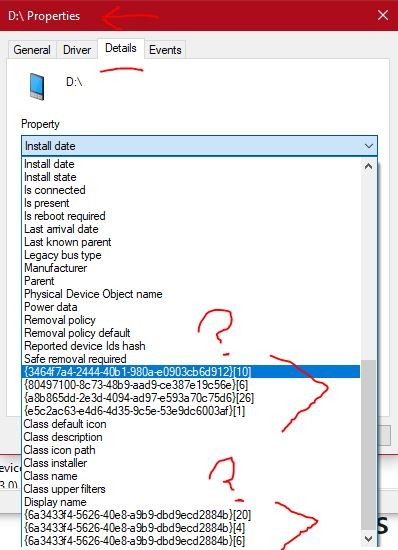
If I go to Device Mgr, choose a device, and open its Properties, then choose the Details tab, and click in the property box to see the drop down menu items, there are usually quite a few of the items that appear to be encoded where they cannot be read. Clicking on one of them will cause the answer to pop up, but that does not help if you can't read the question. For example, clicking on {6a3433f4-5626-40e8-a9b9-dbd9ecd2884b}[20] could respond with "False" or "00000" and the 20 at the end of the line means there are at least 20 of the items in the list that are encoded so it is frustrating not being able to read them. What is the reason for hiding them and how can they be decoded so I can read them?
' cx='32' cy='32' r='32' /%3E%3Ctext x='50%25' y='55%25' dominant-baseline='middle' text-anchor='middle' fill='%23FFF' %3EA%3C/text%3E%3C/svg%3E)

