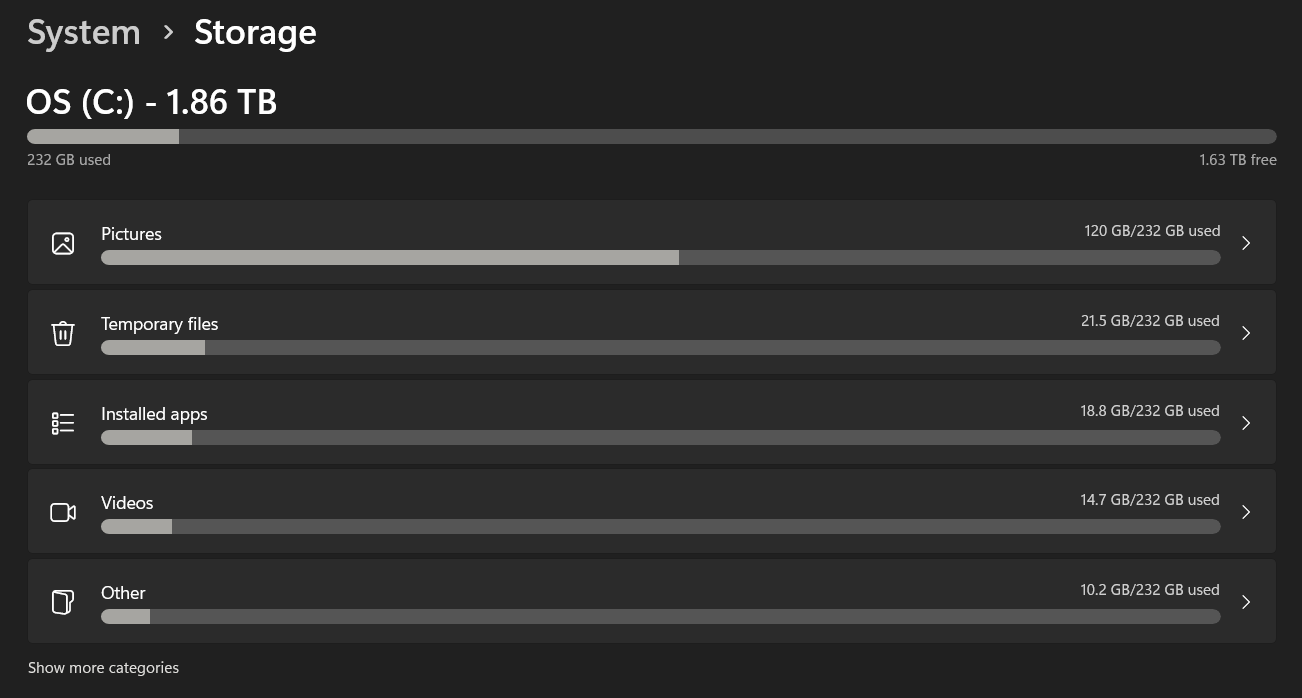
So here's a little question I have regarding my storage and having 2 TB on my laptop. So, as you can see, according to my storage settings, it says I have a lot of room left over for more stuff on my computer with 1.63 TB. But I'm confused about why the category bar for Pictures is the most full. At first I thought that it meant that that's because the pictures are what's taking up the most of it as seen through the 120 GB out of 232 GB thing.
But now I'm worried that it means I'm almost out of room for how many more pictures I can save. I REALLY hope that's not the case since for the longest time I was led to believe that 1.63 more TB would allow me to save so many more pictures. I've always been a big picture saver and I'll definitely save more in the future so I really hope that the nearly full Pictures bar doesn't equal how many more pictures I can save and that it's rather the rest of the 1.63 TB showing how many more pictures I can save.
Once again, I really hope that it's what I initially thought it was in that it's simply showing that pictures are what's taking up the most of that 232 GB space I have and that it doesn't mean that come a few more gigabytes I won't have anymore room for pictures in particular. I'm hoping that maybe when the bar for pictures gets full it'll move over to 233 GB when my storage saves more pictures.
So sorry, I know I'm not the best at explaining these things and I know that I probably sound a little dense for not entirely knowing how this works and what it means, but I just want reassurance that it's the 1.63 TB that represents how many more pictures I can save rather than the Picture category bar itself. I really hope I'm wrong and that I can still save a whole bunch of more pictures still. I hope it ultimately just means that pictures are what's mostly taking up the already used 232 GB like I initially thought. I hope it doesn't prevent me from saving more pictures once it makes it up to the full 232 GB. I hope it simply leads to 233 more GB taken up out of all of that space on my 2 TB hard drive.
' cx='32' cy='32' r='32' /%3E%3Ctext x='50%25' y='55%25' dominant-baseline='middle' text-anchor='middle' fill='%23FFF' %3EA%3C/text%3E%3C/svg%3E)


