Hello,
Recently I've bought a new laptop and replaced my old one. I took out the old laptop's M.2 NVME SSD out and inserted it as a secondary NVME on my new laptop.
At first everything seemed alright, but after a couple of restarts it started disappearing from File Explorer and Disk Management. Using PowerShell or Disk-part also did not show the drive.
In the Device Manager there is no sign of the drive under the "Disk drives" category but there are two NVME drivers under "Storage controllers". One cannot be disabled and the other can be, and that's how I figured that its related to my missing drive.
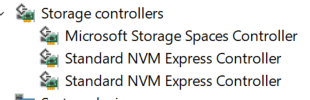
Disabling and Re-enabling that driver makes the SSD show up real-time without having to restart, as if nothing was wrong with it before.
The SSD has two operating systems on it and also had GNU GRUB installed.
I am planning to back up the files in-order to format it hoping it will solve the issue but I feel as it's related more to it's driver.
I would appreciate if someone could help me resolve this issue.
Thank you.
Laptop:
Lenovo Legion 5 15IAH7
Faulty NVME SSD:
HFS256GD9TNG-62A0A
System Information:
OS Name Microsoft Windows 11 Pro
Version 10.0.22621 Build 22621
Other OS Description Not Available
OS Manufacturer Microsoft Corporation
System Name SAUSERPC
System Manufacturer LENOVO
System Model 82RC
System Type x64-based PC
System SKU LENOVO_MT_82RC_BU_idea_FM_Legion 5 15IAH7
Processor 12th Gen Intel(R) Core(TM) i5-12500H, 2500 Mhz, 12 Core(s), 12 Logical Processor(s)
BIOS Version/Date LENOVO J2CN40WW, 15/04/2022
SMBIOS Version 3.3
Embedded Controller Version 1.40
BIOS Mode UEFI
BaseBoard Manufacturer LENOVO
BaseBoard Product LNVNB161216
BaseBoard Version NO DPK
Platform Role Mobile
Secure Boot State On
PCR7 Configuration Elevation Required to View
Windows Directory C:\Windows
System Directory C:\Windows\system32
Boot Device \Device\HarddiskVolume4
Locale United Kingdom
Hardware Abstraction Layer Version = "10.0.22621.1413"
Username SauserPC\SauPC
Time Zone Jerusalem Summer Time
Installed Physical Memory (RAM) 16.0 GB
Total Physical Memory 15.8 GB
Available Physical Memory 9.83 GB
Total Virtual Memory 24.8 GB
Available Virtual Memory 15.9 GB
Page File Space 9.00 GB
Page File C:\pagefile.sys
Kernel DMA Protection On
Virtualisation-based security Running
Virtualisation-based security required security properties
Virtualisation-based security available security properties Base Virtualisation Support, Secure Boot, DMA Protection, UEFI Code Readonly, SMM Security Mitigations 1.0, Mode Based Execution Control, APIC Virtualisation
Virtualisation-based security services configured
Virtualisation-based security services running Credential Guard
Windows Defender Application Control policy Enforced
Windows Defender Application Control user mode policy Off
Device Encryption Support Elevation Required to View
A hypervisor has been detected. Features required for Hyper-V will not be displayed.
' cx='32' cy='32' r='32' /%3E%3Ctext x='50%25' y='55%25' dominant-baseline='middle' text-anchor='middle' fill='%23FFF' %3EA%3C/text%3E%3C/svg%3E)
