Microsoft Security | Microsoft Graph
An API that connects multiple Microsoft services, enabling data access and automation across platforms

This browser is no longer supported.
Upgrade to Microsoft Edge to take advantage of the latest features, security updates, and technical support.
' cx='32' cy='32' r='32' /%3E%3Ctext x='50%25' y='55%25' dominant-baseline='middle' text-anchor='middle' fill='%23FFF' %3ESB%3C/text%3E%3C/svg%3E)
I was able to add or remove users from the mail-enabled security group using graph API. but suddenly it stopped working. I am getting an error that the mail-enabled group can not update.
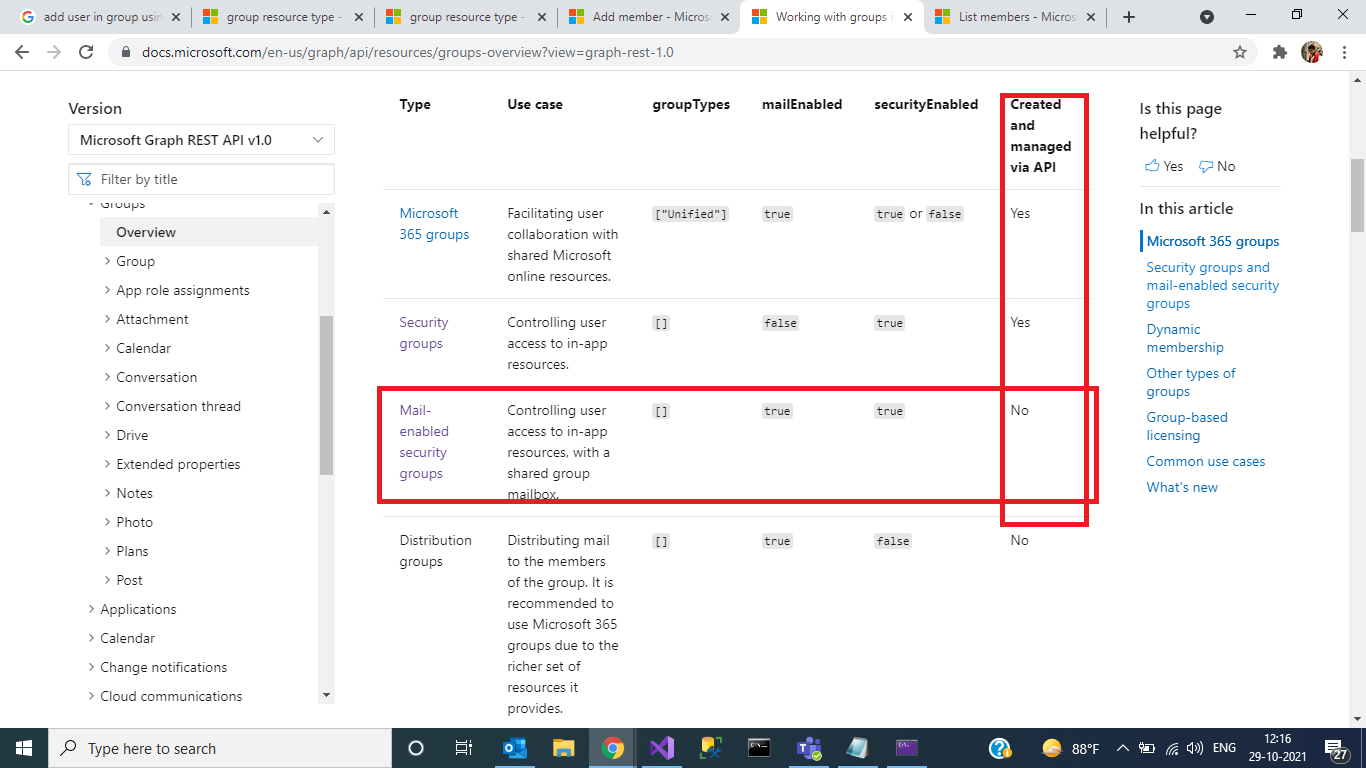
Please refer your ms doc
An API that connects multiple Microsoft services, enabling data access and automation across platforms
' cx='32' cy='32' r='32' /%3E%3Ctext x='50%25' y='55%25' dominant-baseline='middle' text-anchor='middle' fill='%23FFF' %3EDW%3C/text%3E%3C/svg%3E)
Hello @Sourav Bhunia thank you for reaching out. Would you kindly share the error message and request id so we can investigate?
Hi. thanks for your reply. Please find the request ID And error massage below
RequestID: d890243a-c035-4c45-bab0-12c1b6c6a4f2
Error:
Code: Request_BadRequest
Message: Cannot Update a mail-enabled security groups and or distribution list.
Inner error:
AdditionalData:
date: 2021-11-02T11:35:17
request-id: d890243a-c035-4c45-bab0-12c1b6c6a4f2
client-request-id: d890243a-c035-4c45-bab0-12c1b6c6a4f2
ClientRequestId: d890243a-c035-4c45-bab0-12c1b6c6a4f2
Please let me know if you need any further information
' cx='32' cy='32' r='32' /%3E%3Ctext x='50%25' y='55%25' dominant-baseline='middle' text-anchor='middle' fill='%23FFF' %3EC%3C/text%3E%3C/svg%3E)
We are trying to do the same, according to the docs, managing Mail-Enabled Security Groups is not possible via Graph API.
https://learn.microsoft.com/en-us/microsoft-365/admin/create-groups/compare-groups?view=o365-worldwide
"$type": "Microsoft.Graph.ServiceException, Microsoft.Graph.Core",
"ClassName": "Microsoft.Graph.ServiceException",
"Message": "Code: Request_BadRequest
Message: Cannot Update a mail-enabled security groups and or distribution list.
Inner error:
\tAdditionalData:
\tdate: 2021-11-01T14:47:13
\trequest-id: 42ff0b15-1c2f-4f15-9907-71c5353797be
\tclient-request-id: 42ff0b15-1c2f-4f15-9907-71c5353797be
ClientRequestId: 42ff0b15-1c2f-4f15-9907-71c5353797be
Does Microsoft plan to expose an API to manage these type of groups in the near future?
Are there any work arounds?
Thank you.
' cx='32' cy='32' r='32' /%3E%3Ctext x='50%25' y='55%25' dominant-baseline='middle' text-anchor='middle' fill='%23FFF' %3EFO%3C/text%3E%3C/svg%3E)
Hi,
I had a similar issue with a PowerAutomate which used to add a member to a mail-enabled security group. End of october it suddenly stopped working with the same error message.
I suppose the root of the problem is the same; I was trying to fall back to Graph tas a workaround but I see it's not possible with Graph either, at least for now.
Do we know if it is a bug or if that is meant to be like that ? In the Graph documentation I do see it's supposed to be possible to add a member to a mail-enabled security group.
Thank you
Francis
' cx='32' cy='32' r='32' /%3E%3Ctext x='50%25' y='55%25' dominant-baseline='middle' text-anchor='middle' fill='%23FFF' %3EL%3C/text%3E%3C/svg%3E)
Hi,
What other options are out there? How can I manage members within a Group (Distribution list)?
Thank you,
Lenny
' cx='32' cy='32' r='32' /%3E%3Ctext x='50%25' y='55%25' dominant-baseline='middle' text-anchor='middle' fill='%23FFF' %3EAD%3C/text%3E%3C/svg%3E)
Great question Lenny. I'm perplexed how this can be? Is it 2022?
' cx='32' cy='32' r='32' /%3E%3Ctext x='50%25' y='55%25' dominant-baseline='middle' text-anchor='middle' fill='%23FFF' %3EJB%3C/text%3E%3C/svg%3E)
I can only agree with that statement, that's incredible !
' cx='32' cy='32' r='32' /%3E%3Ctext x='50%25' y='55%25' dominant-baseline='middle' text-anchor='middle' fill='%23FFF' %3EA%3C/text%3E%3C/svg%3E)
Still its not working :(
' cx='32' cy='32' r='32' /%3E%3Ctext x='50%25' y='55%25' dominant-baseline='middle' text-anchor='middle' fill='%23FFF' %3EWS%3C/text%3E%3C/svg%3E)
2025 and nothing so far. Is there any way around it?
' cx='32' cy='32' r='32' /%3E%3Ctext x='50%25' y='55%25' dominant-baseline='middle' text-anchor='middle' fill='%23FFF' %3EBW%3C/text%3E%3C/svg%3E)
Is mail enabled security group support on the Graph API roadmap? Any work arounds?

Hi @Rakhesh Sasidharan , @Sourav Bhunia ,
I would like to share the latest update on this. As per mentioned in this documentation, managing mail-enabled security groups through Microsoft Graph are currently not possible. Mail-enabled security groups cannot be modified by Microsoft Graph as they are owned by Exchange Online and hence these groups need to be managed via Exchange Online PowerShell. Also, the documentation issue in this Group resource type documentation page has already been corrected for mail-enabled security groups.
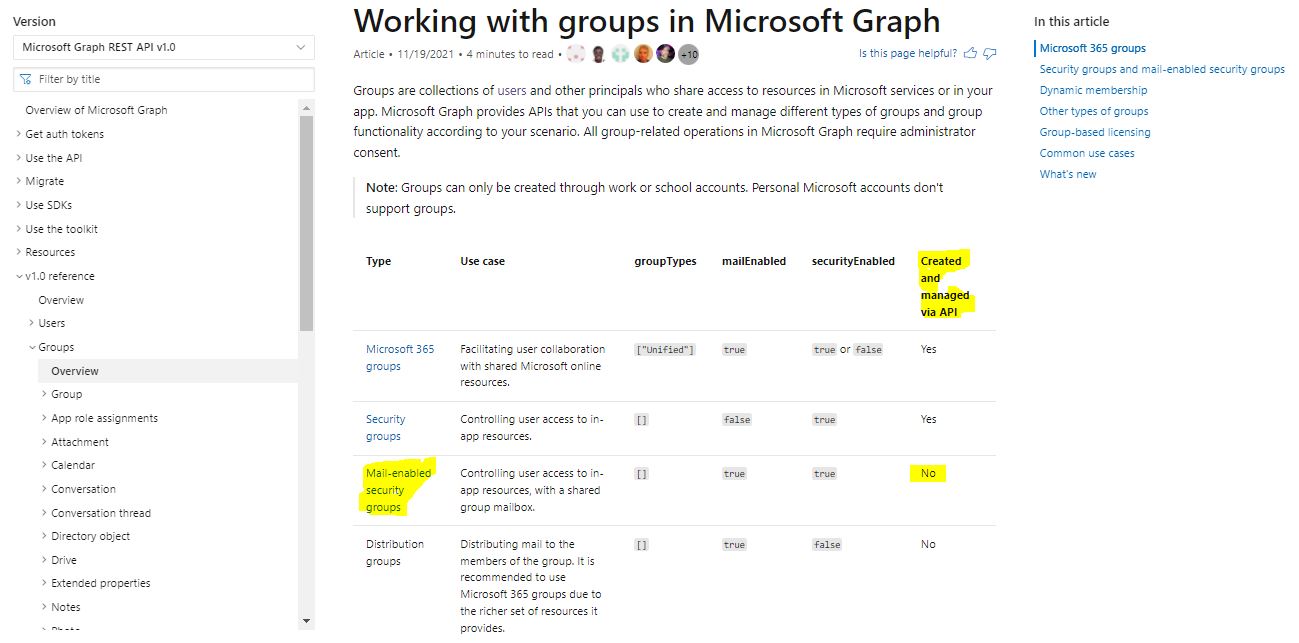
Note: I have also upvoted for your feature request on managing mail-enabled security groups using MS graph API.
Hope this helps.
If the answer is helpful, please click "Accept Answer" , so that it will be useful for the other communinity users and kindly upvote it. If you have further questions about this answer, please click "Comment".
Is there an update on this feature request?
' cx='32' cy='32' r='32' /%3E%3Ctext x='50%25' y='55%25' dominant-baseline='middle' text-anchor='middle' fill='%23FFF' %3EOK%3C/text%3E%3C/svg%3E)
For people wondering how to go around this, how I did it is by writing an Azure Functions PowerShell that can be triggered via API and under the hood it connects with exchange PS
' cx='32' cy='32' r='32' /%3E%3Ctext x='50%25' y='55%25' dominant-baseline='middle' text-anchor='middle' fill='%23FFF' %3EEE%3C/text%3E%3C/svg%3E)
Please share how i could go about this
I am trying to modify a distribution list from powerapps
Thanks

I just got a reply today to the GitHub issue I raised. Turns out you could add users to mail enabled groups previously via Graph API, but that was a bug... which they've now fixed. Also, the documentation is incorrect so MS will be correcting that. :-/
I raised a feature request for this here in case anyone wants to upvote.
In case it helps anyone else... I have the luxury of falling back to ExO as I have creds for that too so I modified my code to do that. Here's a snippet:
New-MgGroupMember -GroupId $dstGroupId -DirectoryObjectId $UserObj.Id
    if ($? -eq $false) {
        Write-Warning "==> Error adding $member via Graph, failing back to ExO"
        try {
            Add-DistributionGroupMember -Identity "$dstGroupName" -Member $UserObj.mail -Confirm:$false -BypassSecurityGroupManagerCheck -ErrorAction Stop
        } catch {
            Write-Error "==> Error adding $member via ExO"
        }
    }
This way I can keep my script working until this issue is fixed.
Just to add I too am facing the same issue and came across this post while Googling. Until the 20th of Oct the New-MgGroupMember cmdlet could add users to a mail enabled security group but now it fails.
New-MgGroupMember -GroupId 4938ba57-5e96-4a3e-b069-a066dd194a55 -DirectoryObjectId b269b48d-afa4-49ed-a26e-d684531b62c7
New-MgGroupMember_CreateExpanded1: Cannot Update a mail-enabled security groups and or distribution list.
Either the docs are now incorrect and Graph API doesn't allow adding users to mail enabled security groups, or there's a bug. I've also raised this as a GitHub issue with the docs team.
Thanks for sharing. I am still holding out hope.
' cx='32' cy='32' r='32' /%3E%3Ctext x='50%25' y='55%25' dominant-baseline='middle' text-anchor='middle' fill='%23FFF' %3EMB%3C/text%3E%3C/svg%3E)