Ill try to give all the information i can because its gotten more complex.
THE BACK STORY
I had A.I. 2022 with a plugin called FONTSELF. Worked fine with no issues. Didn't need to do all the running about I'm doing now, to aim to get it working.
Ive contacted the creator of FONTSELF, Adobe and Kaspersky. No joy...
I do have the email content from the creator of the plugin with his information on what could be the issue. Which I will post after I explain the issue.
WHERE THE SITUATION IS NOW
5 weeks approx ago I had A.I. installed on my computer all was fine and also with FONTSELF. Now fast forwarding to the current situation.
I removed the other 2 programs. Then installed the In the current version of A.I. 2023 I bought and with the latest version of the FONTSELF plugin. And with a document open and the typeface alphabet that I want to drag across to the FONTSELF Panel.
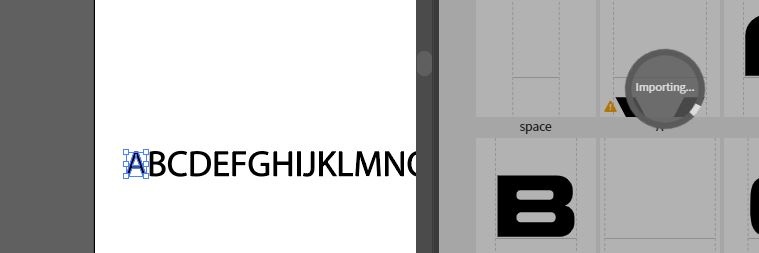
It is meant to load the dragged over content and show it within a few seconds. However it does not.
PICTURES
I get this error nearly every time start up A.I.

This image below shows previously imported font that was exported. In the A.I. with FONTSELF that worked.
The right side of image shows characters after their imported. I couldn't even add to this.
Where I'm at now, is the creator of the plugin sent me this email. Here is the content.
Same issue as previously pointed: Error: Command failed: C:\Program Files (x86)\Common Files\Adobe\CEP\extensions\com.fontself.maker.v2\node_modules\clipboardy\fallbacks\windows\clipboard_x86_64.exe If you use Kaspersky or other blockers, check how to allow this specific program:
https://support.kaspersky.com/KESWin/11/en-us/159634.htm
Franz Fontself
AND ANOTHER EMAIL
I'm sorry but I cannot say it differently. One program of yours has blocked the extension by another on program on your computer, and we cannot know which one is blocking. This file below is the one that must be allowed by all Firewall, VPN or Antivirus software you use:
Error: Command failed: C:\Program Files (x86)\Common Files\Adobe\CEP\extensions\com.fontself.maker.v2\node_modules\clipboardy\fallbacks\windows\clipboard_x86_64.exe
Franz
Fontself
===========================================================================
So based on that. How do I narrow down the issue as to why the clipboard is not working. To paste the content into the FONTSELF panel. As ive no idea what else to do what to try. The system store doesn't go back before I ripped out the previous version.
===========================================================================
THIS FROM THE LOG FILE FOR FONTSELF.
If anyone can use the to help.
2023-06-26T18:22:44.892Z - info: getClipboardText() 2023-06-26T18:22:45.156Z - warn: Oops, unable to read clipboard 2023-06-26T18:22:45.156Z - error: Error: Command failed: C:\Program Files (x86)\Common Files\Adobe\CEP\extensions\com.fontself.maker.v2\node_modules\clipboardy\fallbacks\windows\clipboard_x86_64.exe --paste thread 'main' panicked at 'Error: Could not paste from clipboard: Error { repr: Os { code: 0, message: "The operation completed successfully." } }', src\libcore\result.rs:906:4 note: Run with RUST_BACKTRACE=1 for a backtrace. at makeError (C:\Program Files (x86)\Common Files\Adobe\CEP\extensions\com.fontself.maker.v2\node_modules\clipboardy\node_modules\execa\index.js:174:9) at Function.module.exports.sync (C:\Program Files (x86)\Common Files\Adobe\CEP\extensions\com.fontself.maker.v2\node_modules\clipboardy\node_modules\execa\index.js:338:15) at Object.pasteSync (C:\Program Files (x86)\Common Files\Adobe\CEP\extensions\com.fontself.maker.v2\node_modules\clipboardy\lib\windows.js:15:30) at Object.exports.readSync (C:\Program Files (x86)\Common Files\Adobe\CEP\extensions\com.fontself.maker.v2\node_modules\clipboardy\index.js:48:38) at a3Y (http://127.0.0.1:4770/js/app.min.js:214:573674) at Object.getClipboardText (http://127.0.0.1:4770/js/app.min.js:214:579264) at f5p. (http://127.0.0.1:4770/js/app.min.js:214:252691) at f5p.eXp.$emit (http://127.0.0.1:4770/js/app.min.js:545:32944) at Function.sendEventWithData (http://127.0.0.1:4770/js/app.min.js:214:300544) at http://127.0.0.1:4770/js/app.min.js:214:251395 2023-06-26T18:28:47.514Z - info: Extension menu : reload 2023-06-26T18:28:47.515Z - info: The file was deleted C:/Users/John/AppData/Roaming/Fontself/Illustrator/.font 2023-06-26T18:28:49.234Z - info: Hello from Fontself Maker! 1687804129232
If i can provide more information i will.
John
' cx='32' cy='32' r='32' /%3E%3Ctext x='50%25' y='55%25' dominant-baseline='middle' text-anchor='middle' fill='%23FFF' %3EA%3C/text%3E%3C/svg%3E)
