Share via

BSOD at random moments, LSA package not signed, causing unexpected behavior with Credential Guard

Anonymous
2023-05-15T11:32:45+00:00

This is the second time this has happened, so I am not making note of this because I don't know what to do about it.

This is a brand new system I've had since November, no issues whatsoever.

In the past 2 weeks I've had 2 BSOD's, both while browsing and doing nothing of importance really and I can't figure out what is really wrong here.

My system is up to date with updates, after the first BSOD I checked if there were any and made sure all were installed and up to date.

I am using PRO btw, not sure if it matters but I wanted to make that known.

I am the only user and the admin of this system.
No third party virus scan, I use Microsoft Defender.

So what happens.

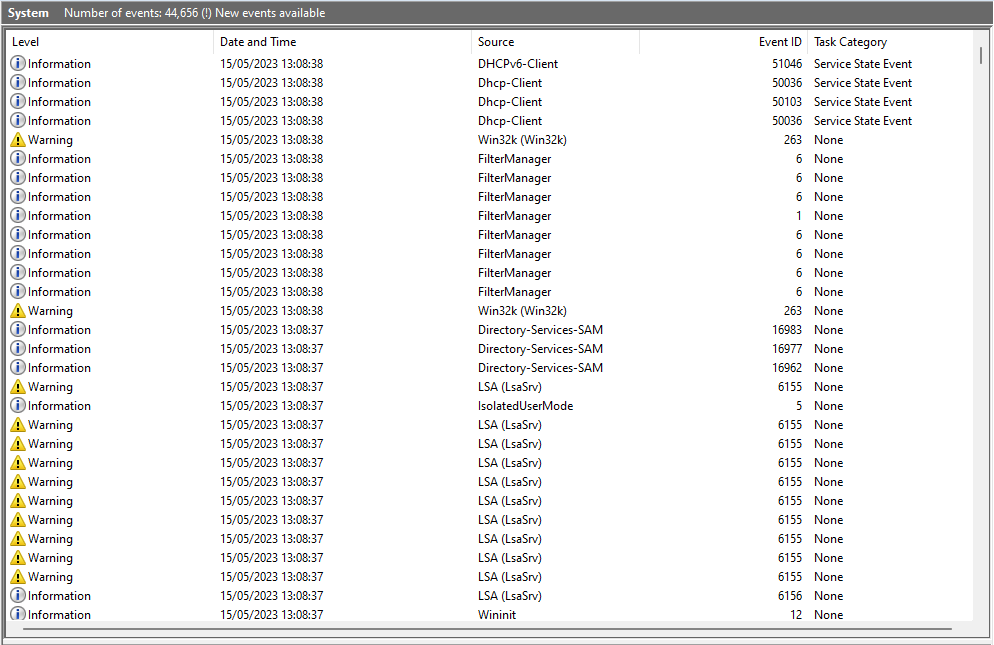
If I check my eventviewer, system afterwards I see multiple entries regarding:

LSA (LsaSrv):

LSA package is not signed as expected. This can cause unexpected behavior with Credential Guard.

PackageName: negoexts

Event ID: 6155

This warning repeats a couple times with each different package names all at the same time:

  • PackageName: kerberos
  • PackageName: msv1_0
  • PackageName: tspkg
  • PackageName: pku2u
  • PackageName: cloudap
  • PackageName: wdigest
  • PackageName: schannel
  • PackageName: sfapm

Before it adds:

Information:
IsolatedUserMode:
Secure Trustlet NULL Id 0 and Pid 0 started with status STATUS_SUCCESS.

And then,

LSA (LsaSrv):

LSA package is not signed as expected. This can cause unexpected behavior with Credential Guard.

PackageName: msv1_0

Following by the next:

Information:

Directory-Services-SAM

Event ID: 16962

Remote calls to the SAM database are being restricted using the default security descriptor: O:SYG:SYD:(A;;RC;;;BA).

For more information please see http://go.microsoft.com/fwlink/?LinkId=787651.

Followed by the same event with the following descriptions:

The domain is configured with the following minimum password length-related settings.

MinimumPasswordLength: 0

RelaxMinimumPasswordLengthLimits: 0

MinimumPasswordLengthAudit: -1

For more information see https://go.microsoft.com/fwlink/?LinkId=2097191.

And lastly

The security account manager is now logging periodic summary events for remote clients that call legacy password change or set RPC methods.

For more information please see https://go.microsoft.com/fwlink/?linkid=2150956.

And after this the BSOD happens with a log warning

Warning:
Win32k
Event ID: 263

A pointer device has no information about the monitor it is attached to.

I don't know if it is helpful but the event concerning the BugCheck says this:

The computer has rebooted from a bugcheck.  The bugcheck was: 0x000000de (0x0000000000000002, 0xffffbb0a7782e390, 0xffffbb0a7700e390, 0x0000000599c948c0). A dump was saved in: C:\WINDOWS\MEMORY.DMP. Report Id: 3aa0d25e-bc13-4552-9c06-e6e43a18bf93.

What is the cause of this issue?

Is this yet another bug? It seems to happen at random, I am not doing anything specific when it occurs nor can I make it happen myself.

Other than this I experience no bugs whatsoever.

https://drive.google.com/file/d/1WfbJcrP8hsyB78Ly_P-RVisWvESRTiU1/view?usp=sharing

This is the dmp file btw, let me know if this works and if not I will adjust or upload it elsewhere.
Windows for home | Windows 11 | Performance and system failures

Locked Question. This question was migrated from the Microsoft Support Community. You can vote on whether it's helpful, but you can't add comments or replies or follow the question.

0 comments No comments

18 answers

Sort by: Most helpful
  1. Anonymous
    2023-06-13T10:53:02+00:00

    Hi Dave, Adding this as additional information as to what just happened.

    Image

    Edit:

    Would like to add that I disabled it following these found instructions:

    How to disable using local policy on Windows 11, 22H2

    Open Local Group Policy Editor (gpedit.msc)

    1. Expand Computer Configuration, expand Administrative Templates, expand System, and then expand Local Security Authority.
    2. Open the Configure LSASS to run as a protected process policy.
    3. Set the policy to Enabled.
    4. Under Options, set Configure LSA to "Disabled"
    5. Restart the computer.

    Hopefully it will help with my issue

    8 people found this answer helpful.
    0 comments No comments
  2. Anonymous
    2023-06-20T13:30:02+00:00

    Again more updates mainly for anyone who comes across this problem.

    Another BSOD happened and using Bluescreenreader I figured it was again memory management that was the cause.

    I ran chkdsk and it fixed some system errors.

    I ran Windows Memory Diagnostics and it came back with errors, which ofc is a wide term with many probably causes.

    So I started looking at my ram first and ran Memtest overnight, but it came back all green (which was to be expected since the errors were not replicable and the system is barely half a year old)

    So instead I have updated all my drivers:

    • the BIOS
    • GPU
    • motherboard related drivers
    • all cpu related drivers

    and so on.

    So far so good. Hopefully it stays this way.

    I can only tell after a while because these BSOD's would only come by every 2-3 weeks and only once.

    5 people found this answer helpful.
    0 comments No comments
  3. Anonymous
    2023-07-03T10:59:14+00:00

    Just to throw in an update, I haven't had any more BSOD's since I updated everything.

    Hopefully this can be of help for others.

    2 people found this answer helpful.
    0 comments No comments
  4. Anonymous
    2023-06-07T06:46:29+00:00

    Hello again, it has been a few weeks but I did want to mention this.

    This morning another BSOD had occurred, the PC was started, got past post and into windows but upon the log in screen the BSOD occurred and had to reboot afterwards.

    Checking out the log I again see entries regarding LSA (LsaSrv), the exact thing that was mentioned before as something that should have been turned off by an update.

    A log of the BSOD can be found here: https://drive.google.com/file/d/19_j8xn6tM-6fBWQqNH1uHWL4QElPZrJt/view?usp=sharing

    But yes, this is exactly what I meant with random/irregular moments, 3 weeks everything was fine and now again a random BSOD and yes I know the first time around was due to another reason, but the log currently reads the same as the second time this occurred 3 weeks ago.

    2 people found this answer helpful.
    0 comments No comments
  5. Anonymous
    2023-05-15T13:20:54+00:00

    Hi Dave,

    It's good to hear that there's not something critical going on with my system and that this seems to be a common issue.

    Could you tell me how I can turn off LSA and how I can reenable it at a later time when I know everything is fixed?

    I read you could see the option in the Core Isolation menu, but I don't see it listed there.

    Do I have to look at the registry and make adjustments there?

    Also what does it do exactly? Will it have any effects on security or anything else?

    Thanks for the quick replies by the way, much appreciated.

    1 person found this answer helpful.
    0 comments No comments
