Azure Machine Learning
An Azure machine learning service for building and deploying models.
This browser is no longer supported.
Upgrade to Microsoft Edge to take advantage of the latest features, security updates, and technical support.
' cx='32' cy='32' r='32' /%3E%3Ctext x='50%25' y='55%25' dominant-baseline='middle' text-anchor='middle' fill='%23FFF' %3ESJ%3C/text%3E%3C/svg%3E)
I am learning Azure ML from Microsoft tutorials, here. The third tutorial is giving me the following error.
[stderr]Traceback (most recent call last):
[stderr]  File "train.py", line 8, in <module>
[stderr]    from azureml.core import Run
[stderr]ModuleNotFoundError: No module named 'azureml'
[stderr]
Working with Azure ML Studio and submitting the code to the environment, I am unable to find how to resolve this error.
I have checked that the package is installed (running on Azure ML studio so this is a basic assumption, but I have tested as well). Following is the code 'run-pytorch.py' which calls the script 'train.py'
# run-pytorch.py
from azureml.core import Workspace
from azureml.core import Experiment
from azureml.core import Environment
from azureml.core import ScriptRunConfig

if __name__ == "__main__":
    ws = Workspace.from_config()
    experiment = Experiment(workspace=ws, name='day1-experiment-train')
    config = ScriptRunConfig(source_directory='./src',
                             script='train.py',
                             compute_target='cpu-cluster')

    # set up pytorch environment
    env = Environment.from_conda_specification(
        name='pytorch-env',
        file_path='pytorch-env.yml'
    )
    config.run_config.environment = env

    run = experiment.submit(config)

    aml_url = run.get_portal_url()
    print(aml_url)
    print('Success...!!!')
The code snippet for train.py is as follows
# train.py
import os
import argparse
import torch
import torch.optim as optim
import torchvision
import torchvision.transforms as transforms
from model import Net
from azureml.core import Run
...
...
An Azure machine learning service for building and deploying models.
' cx='32' cy='32' r='32' /%3E%3Ctext x='50%25' y='55%25' dominant-baseline='middle' text-anchor='middle' fill='%23FFF' %3EY9%3C/text%3E%3C/svg%3E)
Sorry for your experience and thanks for reaching out to us, I am able to reproduce your issue with my new create compute-cpu, the resolution is easy to install the azureml in your compute at the terminal under your root user.
pip install azureml
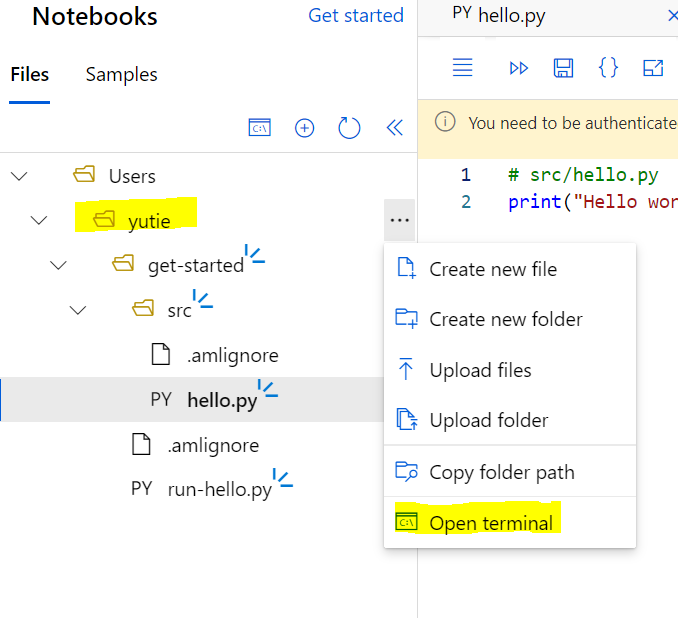
Just in case, I encounter pyarrow error after that, the resolution is uninstall the pyarrow 4.0 and install pyarrow 3.0.0 instead as below:
pip uninstall pyarrow

pip install pyarrow==3.0.0
I have forwarded this bug to product group and hope to make this process smoother.
Please kindly accept the answer if you feel this is helpful. Thank you.
Regards,
Yutong
Thanks for your answer.
I tried what you mentioned, but it does not work, unfortunately. Same error.
First of all, it says that the 'Requirement already satisfied'.
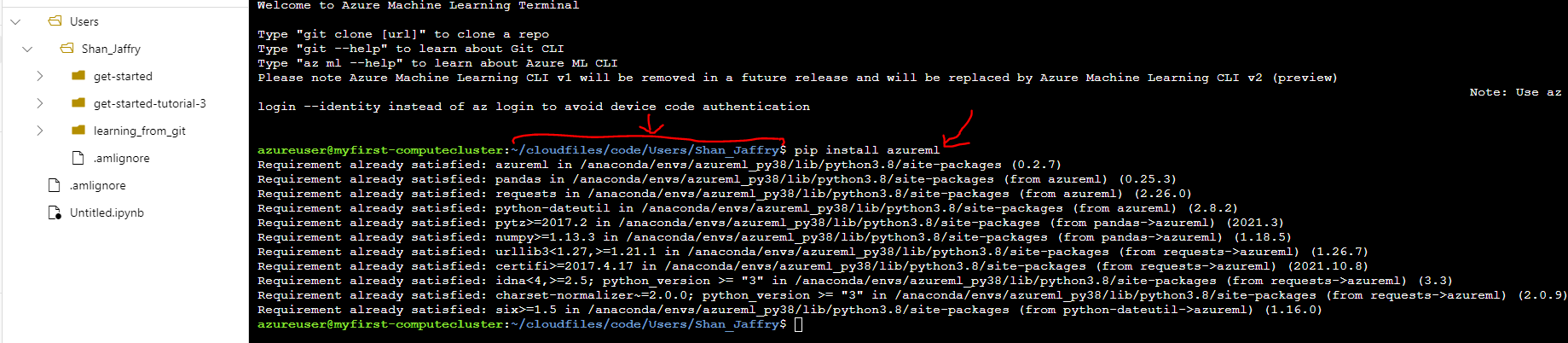
Secondly, I can see that azureml is already installed. Furthermore, as I mentioned earlier, that it is running in other cases. Not running for this particular case ! I appreciate your help.


I think this is caused by incorrect path. I saw you have created the first project "hello.py" as well, did you see any error when you train the fist one? Is you training the first one now the same error happen?
Regards
,Yutong
Thanks Again Yutong,
No. There is no error in any other files, including 'hello.py'.
Hello.py is a simple program for me to see if the packages were installed all right, which they were found to be installed OK.
I think there may be something wrong around your env setting, do you mind to raise a support ticket for this issue to have a live debugging session? I try to reproduce your error but everything looks good to me.
Regards,
Yutong