Share via

Why do all fresh Windows installations run IEXPLORE.EXE (Internet Explorer) still ?!?

Anonymous
2023-07-23T05:06:18+00:00

I've got dozens of Windows 10 computers at my disposal on separate networks installed using separate media... Every installation of Windows including fresh installations with latest patches all have an IEXPLORE.EXE process and sub-process running under DCOMLAUNCH process and occasionally I see them connecting to Microsoft's servers....

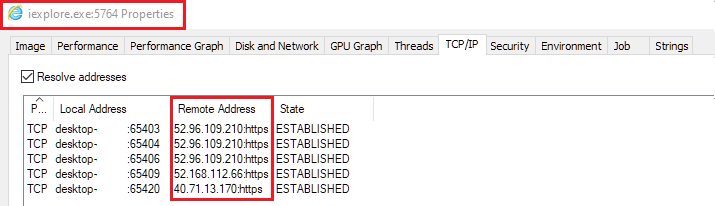
If IE has been "officially retired" why does the operating system still launch the browser? What is this process doing? Why is it making connections to MS servers?
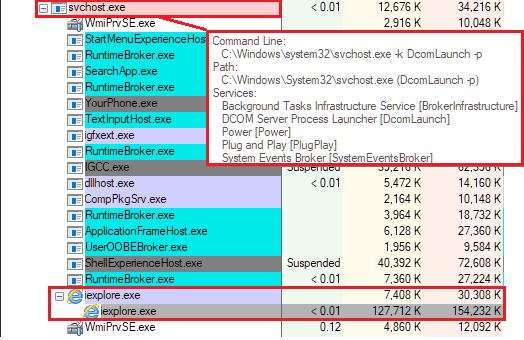
These IPv4 ranges are owned by Microsoft:
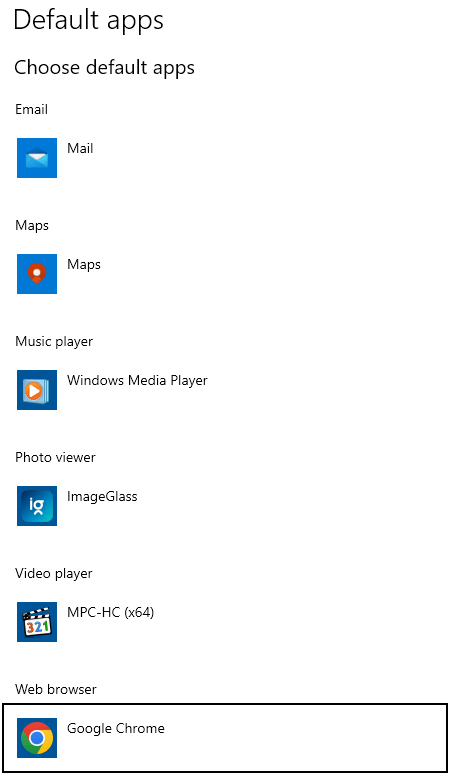
And yes my default web browser is Chrome, but I'm sure that anybody looking into this will see the exact same behavior on their machine as I do.. Running Windows 10 x86_64 with latest updates:
Any insight on why this process is running? How can MS claim browser is "Retired" when core OS features still depend on it? If anyone can figure out what core features these are, maybe we can disable them... Hopeful for any insight. thank you

Windows for home | Windows 10 | Internet and connectivity

Locked Question. This question was migrated from the Microsoft Support Community. You can vote on whether it's helpful, but you can't add comments or replies or follow the question.

0 comments No comments

3 answers

Sort by: Most helpful
  1. Anonymous
    2023-07-25T01:17:23+00:00

    Thank you - Your question is great! :)

    They are working on it; for example, Windows 11 23H2 will launch with a new File Explorer. However, I agree that the process is slow.

    In addition, I have heard that IE Mode in MS Edge also uses Internet Explorer, so ensure you have turned off the same in MS Edge.

    Hope that helps, and rely on us for any further inquiries. All the best.

    0 comments No comments
  2. Anonymous
    2023-07-24T17:18:51+00:00

    Hi Sumit, thanks you your reply.

    It seems a bit ridiculous that they call the browser "Retired" but haven't retired the code internally which still calls it. It's certainly typical tech debt but I'd be curious to find out exactly what's using this... I can't turn off DCOMLAUNCH because it would kill way too many important functions, so if I knew a little more about what depends on this maybe I could find a way to manually kill it. Just a thought.

    Hi Gerarld,
    I'm Sumit, here to answer your query at the Microsoft Community.

    IE frameworks are used by Windows internally due to being coded in Legacy components of Windows; hence you see the processes. However, it is certain that you can't access IE.

    I'll try to find the Tweet for you which listed where iexplore.exe is used in Windows - I am sure it included explorer.exe too.

    Hope that helps, and rely on us for any further inquiries. All the best.

    0 comments No comments
  3. Anonymous
    2023-07-23T08:59:25+00:00

    Hi Gerarld,

    I'm Sumit, here to answer your query at the Microsoft Community.

    IE frameworks are used by Windows internally due to being coded in Legacy components of Windows; hence you see the processes. However, it is certain that you can't access IE.

    I'll try to find the Tweet for you which listed where iexplore.exe is used in Windows - I am sure it included explorer.exe too.

    Hope that helps, and rely on us for any further inquiries. All the best.

    0 comments No comments
