Windows always prompts NTVDM successfully installed. It also prompts NTVDM needs to be installed every single time the legacy program is launched. An error is immediately thrown after closing the window. Something other than what I already mentioned is blocking it. I haven't located the culprit. No third-party apps are installed. The OS has been fully updated.
Permissions to Execute 16bit Applications in Windows 10 32bit
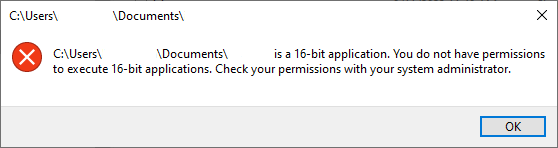
I am running Windows 10 Pro 32bit in a virtual machine. NTVDM + Direct Play under Legacy Components in Windows Features are enabled. HLM\SOFTWARE\Policies\Microsoft\Windows\AppCompat\VDMDisallowed is disabled. CMD is set to legacy console. The system was rebooted post changes. Windows still prompts I am not allowed to run 16bit apps. This is incredibly frustrating. I have been hunting down what is stopping the legacy app from executing. Any ideas?
Windows for home | Windows 10 | Security and privacy
Locked Question. This question was migrated from the Microsoft Support Community. You can vote on whether it's helpful, but you can't add comments or replies or follow the question.
4 answers
Sort by: Most helpful
-
Anonymous
2023-08-12T00:22:10+00:00 -
Anonymous
2023-08-11T23:04:53+00:00 Hi, I'm Elise, a fellow user like yourself and I'd be happy to help with your issue.
Could you run the following at an admin command prompt:
FONDUE.exe /enable-feature:NTVDM
Please let me know if you need any further assistance.
Kind Regards,
Elise
-
Anonymous
2023-08-12T09:02:44+00:00 Could you also run gpedit.msg and go to:
Computer Configuration > Administrative Templates > Windows Components > Application Compatibility.
Then change Prevent access to 16-bit applications to disabled
-
Anonymous
2023-11-30T04:05:38+00:00 Windows always prompts NTVDM successfully installed. It also prompts NTVDM needs to be installed every single time the legacy program is launched. An error is immediately thrown after closing the window. Something other than what I already mentioned is blocking it. I haven't located the culprit. No third-party apps are installed. The OS has been fully updated.
I ran into this same issue with a clean install and just discovered a fix for me.
Go into "Turn Windows Features on & off". Under the legacy components, the NTVDM portion was enabled (likely from the program I was trying to install invoking it) and after unchecking it and then checking it again, applying the changes, and rebooting (the reboot took a few minutes to "apply features" compared to earlier restarts, I can now install the program I was trying to without issue.
