Microsoft Edge | Microsoft Edge development
Developing and testing features or extensions for Microsoft Edge

This browser is no longer supported.
Upgrade to Microsoft Edge to take advantage of the latest features, security updates, and technical support.
' cx='32' cy='32' r='32' /%3E%3Ctext x='50%25' y='55%25' dominant-baseline='middle' text-anchor='middle' fill='%23FFF' %3ERB%3C/text%3E%3C/svg%3E)
Hello! I've only been an Edge user for my primary browser for about a year. Since this week, Edge is now prompting to sign on to sites on my behalf. It prompts up a picture like this:
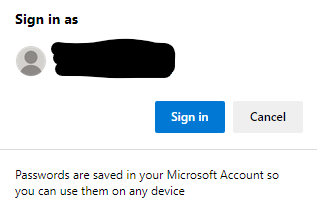
(the blacked out text is my email address listed in two rows)
The easiest way for me to reproduce this is to go to the Starbucks account page:
https://www.starbucks.com/account/signin?ReturnUrl=%2Fmenu%2Ffeatured
Chrome did this to me when it was my primary browser and there was a setting to turn it off. The setting was called 'Signing in with Google' and was in the Security settings.
This is what my settings look like in Edge. I cannot find out how to disable this totally. I don't want it 'automatically' and I don't want it to prompt for device password. I want it to stop trying to sign in - that's what my password manager is for.
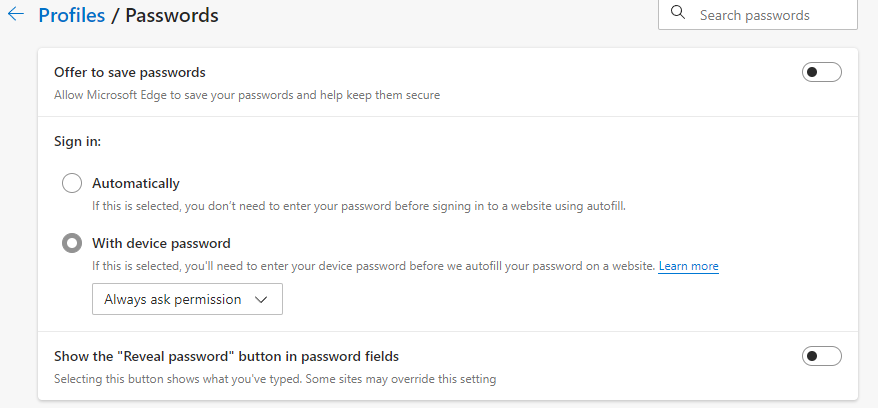
Windows 10, Edge 97.0.1072.76
Thank you!
Developing and testing features or extensions for Microsoft Edge
Thanks for your help @Anonymous , I will add some feedback. I appreciate your assistance!
Thank you @Anonymous ,
I think this is on the right track! Here's what I see there:
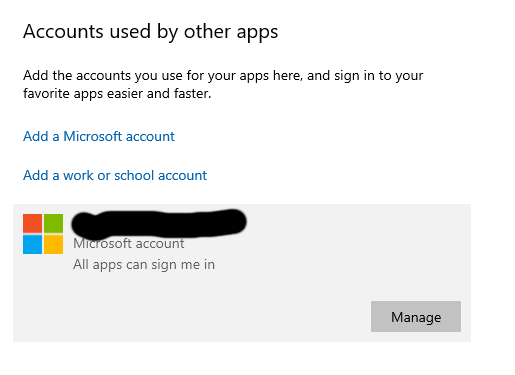
But when I go to 'manage account' I'm just directed via Edge to my Microsoft account (account.microsoft.com) with just so many settings. There's no options to change on that screen within Windows, just the 'Manage' button. Do you have any idea where to change this on the website?
Thank you so much!
' cx='32' cy='32' r='32' /%3E%3Ctext x='50%25' y='55%25' dominant-baseline='middle' text-anchor='middle' fill='%23FFF' %3EA%3C/text%3E%3C/svg%3E)
Hi @Robin Barber ,
You don't have that option maybe because the Microsoft account is the main account you use to sign in the computer and the main account will allow all apps to sign in. Only if you can set that option then you can avoid Edge automatically signing in with Microsoft account.
As far as I know, there's no option to disable only Edge from automatically signing with Microsoft account. I also click the Manage button of the account to see if there's any settings, but I find no.
So I think it's by design that Edge will automatically signing with Microsoft account if you log in Windows with Microsoft account. In addition, if you don't like the feature of Edge or have some suggestions about Edge, I suggest you can provide your feedback using Alt+Shift+i in Edge.
Hi @Robin Barber ,
According to the image you provided, I didn't find a relevant setting or group policy, so I think this issue should be related to your Microsoft account settings.
You can open Windows Settings and click Accounts, then click Email & accounts.
On this panel, you can see your Microsoft account. Now you can click on the account and check if you can edit the option of your Microsoft account. Then try modifying this option and chech if this work for you. Something like this screenshoot bleow:

Best regards,
Xudong Peng
If the answer is the right solution, please click "Accept Answer" and kindly upvote it. If you have extra questions about this answer, please click "Comment".
Note: Please follow the steps in our documentation to enable e-mail notifications if you want to receive the related email notification for this thread.