We had a power outage and my computer tried to reboot but couldn't as I had a USB device installed. I shut it down manually and restarted. The Lock Screen came up with a picture that looked like a Utah rock formation rather that the valley scene with a tractor trailer running at the bottom of the scene. This rock formation is a picture that I have never seen before. My normal Lock Screen picture is the seascape looking out from a cave, but shows the valley scene if there is a boot up problem. Did I possibly change a setting while restoring my Lock Screen picture?
After removing the USB though the proper procedure, there was still an icon showing that a device was still installed. The included screenshot shows the yellow triangle in my computer. I ran the troubleshooter and restarted per the instruction. Same problem existed. There were no errors in the Device Manager. (The icon is the 7th from the right on he taskbar.)
The computer still seems to run properly, should I just ignore it?
Edition Windows 10 Pro
Version 22H2
Installed on 11/18/2020
OS build 19045.3324
Experience Windows Feature Experience Pack 1000.19041.1000.0
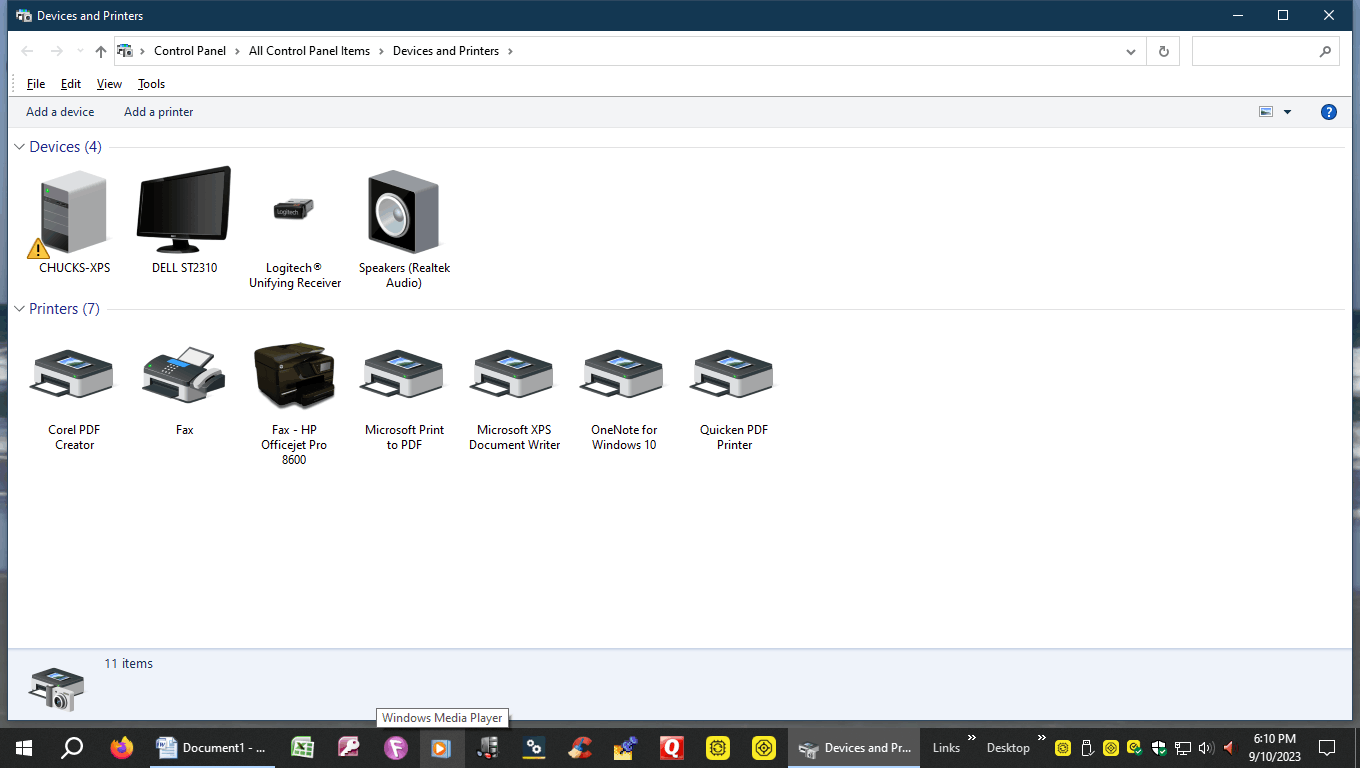
https://learn-attachment.microsoft.com/api/attachments/25b6eb6a-a0b2-4acf-8123-9ae3abc44dc7?platform=QnA
' cx='32' cy='32' r='32' /%3E%3Ctext x='50%25' y='55%25' dominant-baseline='middle' text-anchor='middle' fill='%23FFF' %3EA%3C/text%3E%3C/svg%3E)


' cx='32' cy='32' r='32' /%3E%3Ctext x='50%25' y='55%25' dominant-baseline='middle' text-anchor='middle' fill='%23FFF' %3EIB%3C/text%3E%3C/svg%3E)