Share via

Spatial Audio Dolby Atmos No Sound in games but works in Apps like Dolby Access & Netflix App

Anonymous
2023-08-02T15:47:46+00:00

Everything was working I haven't made and system changes apart from windows updates not sure which ones. and then the atmos just stopped working for no reason. Issue noticed in the last week or so. I am using Sonos HDMI set up so the phone app always tells me what signal I'm getting. Before playing games it always showed as Dolby Atmos.

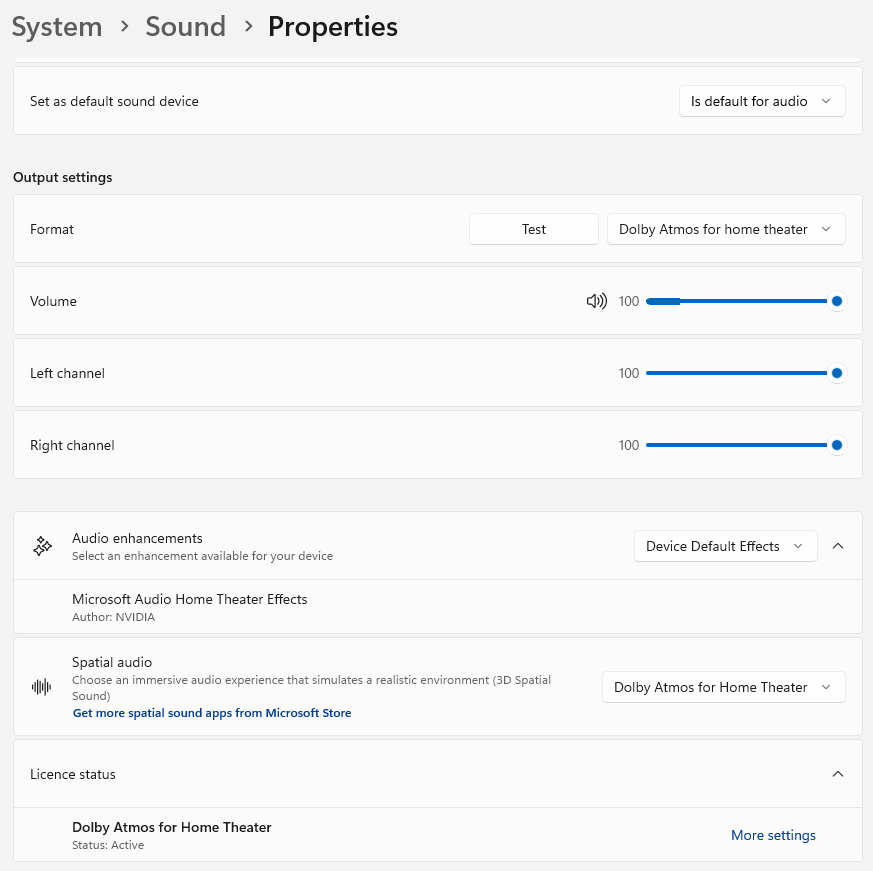
Now if I select Dobly Atmos from spatial audio / format all I get is silence but I can see the volume bar active just no sound. I can now only get sound if I switch off spatial audio and app shows I'm now using Stereo signal but in the change system sounds I can now apply 5:1 and recive multichannel PCM 5:1 but not atmos

When I use the Dolby Access App to play demos or Netflix app the Atmos works fine and the my app shows I'm getting Dolby Atmos signal but when I look and volume bar it doesn't move in the attached image.

I have tried system restore and no help I'm running Windows 11 Pro 22H2 Build 22621. Dolby access Version 3.17.3025.0 I have already repaired, reset and reinstalled the app no help

I'm assuming this is something to with widows updates as that the only thing that's changed and Atmos no only works in Microsoft Store apps and not in any games as it did before. Please could you advise how to get this working again as its very frustrating and no I cannot use recovery option to go back as its greyed out.
Windows for home | Windows 11 | Windows update

Locked Question. This question was migrated from the Microsoft Support Community. You can vote on whether it's helpful, but you can't add comments or replies or follow the question.

0 comments No comments

30 answers

Sort by: Most helpful
  1. Anonymous
    2023-10-08T23:34:19+00:00

    If you had actually read the post you would know were taking about Dolby Atoms Home Theatre. Were not talking about headphones.

    And we don’t need to wait for windows xxHx like I just said in my previous post windows 11 21H2 works so you just need to re-install older windows version and use GPO to block the update.

    Dolby Access supports Home Theatre. (I repeat again NOT TALKING ABOUT HEADPHONES)

    If you read the posts you would know that 22H2 Atmos Home Theatre works fine in Microsoft Apps like Netflix and Dolly Atmos Demos. It just doesn’t work in games anymore.

    If don’t know we’re your getting this headphone business form. Clearly didn’t read the post.

    Was this answer helpful?

    3 people found this answer helpful.
    0 comments No comments
  2. Anonymous
    2023-10-09T00:39:02+00:00

    When you have a better solution do let us all know. In the mean time keep quiet.

    Was this answer helpful?

    2 people found this answer helpful.
    0 comments No comments
  3. Anonymous
    2023-10-09T00:09:33+00:00

    Agreed. I'm using a Samsung soundbar. What is frustrating is that it literally worked fine for me with full Dolby Atmos support and sound on everything. Without any updates or changes in software, it started what the described problem is. When I reduce the bit rate quality, it plays sound on everything, but if I change it to Dolby Atmos for Home Theater, audio only works on the Netflix and Dolby Access apps.

    Was this answer helpful?

    2 people found this answer helpful.
    0 comments No comments
  4. Anonymous
    2023-10-08T23:25:42+00:00

    You are very misinformed. This has nothing to do with Dolby Atmos for Headphones. The setting is Dolby Atmos for Home Theater and it does work. I just had the issue with it in my response.

    Was this answer helpful?

    1 person found this answer helpful.
    0 comments No comments
  5. Anonymous
    2023-10-08T07:25:51+00:00

    I have this exact same problem to the letter. I've read the whole thread and have tried so many things. The only thing different is that i know exactly when Dolby Atmos stopped working for me. I literally just opened the Nvidia control panel and turned off my monitor as an audio source to try to solve an unrelated issue. My monitor has no audio and this shouldn't have made a difference. Once I realized audio cut out, I changed everything back to the way it was. Still doesn't work. I've tried uninstalling and reinstalling all drivers and unplugging and replugging all HDMI's. This is so infuriating and the responses you have gotten seem to be just as misinformed as the rest of the internet. I don't understand how it could just not work out of nowhere from one minute to the next. The one thing I have seen is that it used to support full bitrate and studio frequency up to 192kHz and Dolby Atmos and DTS. Now, it only works at up to the frequency just before 192kHz before audio cuts out. Like you, audio does work in the Dolby Access app just fine. It's just most everywhere else that doesn't. Hopefully somebody finds a fix for this.

    Was this answer helpful?

    1 person found this answer helpful.
    0 comments No comments
