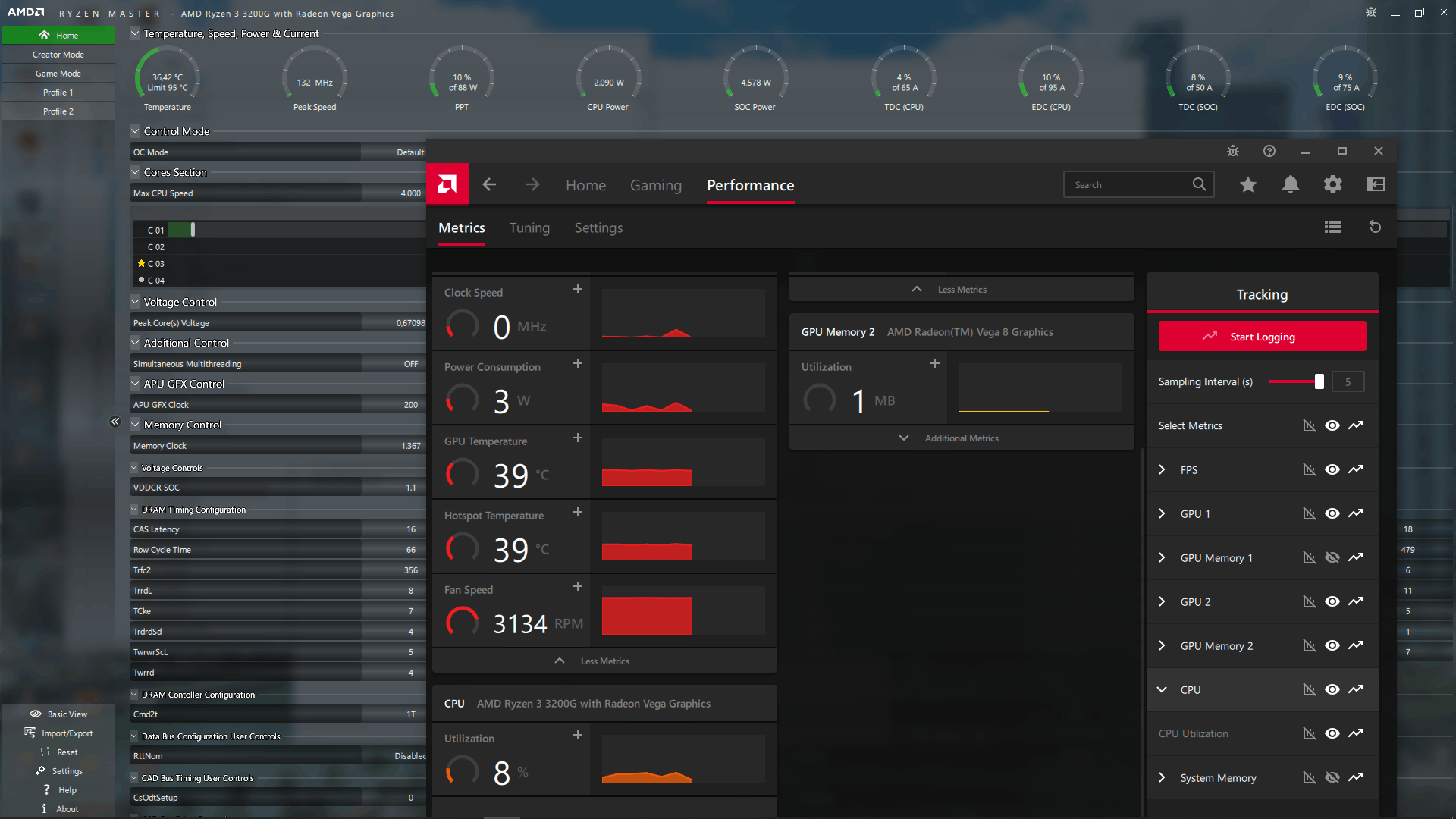
The missing CPU metrics info is cpu voltage, cpu temprature, cpu clock speed, and others. It happen after the google play games beta installed then request for a restart. After restarting, AMD ADRENALINE only has CPU UTILIZATION metric for the CPU.
After that, I downloaded the ryzen master & h&w monitor, the sensor for cpu voltage, cpu temprature, cpu clock speed, and others is working fine, the specific software for CPU can read the sensor.But the adrenaline has no info/sensor for CPU, only CPU Utilization, but other metric like GPU, RAM, FPS is fine, i even try to reset the metric setting, still the other hardware they appear to be shown/not at the eye icon.
Now i have tried everything, cleanup, and uninstall, then download & install from link you provide, and still nothing.
I said this bug is can always happen because the google play game beta installation, it happen to me first at december 2022, luckly i need a new windows for my nvme that previously i used ssd sata. So the windows is complete new, but the other disk storage is still same, so the bug is fixed and i cant waste my money again for the same bug amd & google is having for almost a year.
I do search about the bug from website & youtube but only an article that discussing my problem
AMD Radeon software does not display CPU usage met... - AMD Community
Solved: The old issue, CPU info missing. - AMD Community
Also theres a corrupted files from COMMAND PROMPT sfc /scannow but i forget what (it fixed offline)
Step to trigger the bug:
- Install GOOGLE PLAY GAME BETA
- GOOGLE PLAY GAME BETA will request for Restart after successfully installed
- CPU METRIC in ADRENALINE SOFTWARE only shown CPU UTILIZATION (while ryzen master shown all cpu metrics)
- Open any games
- BSOD will appear in most games after it opened
- BSOD code: SYSTEM SERVICE EXCPETION, CRITICAL PROCESS DIED, IRQL NOT LESS OR EQUAL, DXGMMS2.SYS, ETC.
I Appriciate any solution from you guys.
DxDiag:

------------------

System Information

------------------

      Time of this report: 9/18/2023, 23:34:09

             Machine name: *********

               Machine Id: {******************}

         Operating System: Windows 10 Pro 64-bit (10.0, Build 19045) (19041.vb_release.191206-1406)

                 Language: English (Regional Setting: English)

      System Manufacturer: To Be Filled By O.E.M.

             System Model: To Be Filled By O.E.M.

                     BIOS: P2.20 (type: UEFI)

                Processor: AMD Ryzen 3 3200G with Radeon Vega Graphics     (4 CPUs), ~3.6GHz

                   Memory: 16384MB RAM

      Available OS Memory: 14260MB RAM

                Page File: 8114MB used, 8320MB available

              Windows Dir: C:\WINDOWS

          DirectX Version: DirectX 12

      DX Setup Parameters: Not found

         User DPI Setting: 96 DPI (100 percent)

       System DPI Setting: 96 DPI (100 percent)

          DWM DPI Scaling: Disabled

                 Miracast: Available, with HDCP

Microsoft Graphics Hybrid: Not Supported

 DirectX Database Version: 1.0.8

           DxDiag Version: 10.00.19041.2075 64bit Unicode

------------

DxDiag Notes

------------

      Display Tab 1: No problems found.

      Display Tab 2: No problems found.

        Sound Tab 1: No problems found.

        Sound Tab 2: No problems found.

        Sound Tab 3: No problems found.

        Sound Tab 4: No problems found.

          Input Tab: No problems found.

--------------------

DirectX Debug Levels

--------------------

Direct3D:    0/4 (retail)

DirectDraw:  0/4 (retail)

DirectInput: 0/5 (retail)

DirectMusic: 0/5 (retail)

DirectPlay:  0/9 (retail)

DirectSound: 0/5 (retail)

DirectShow:  0/6 (retail)

---------------

Display Devices

---------------

           Card name: Radeon RX 5500 XT

        Manufacturer: Advanced Micro Devices, Inc.

           Chip type: AMD Radeon Graphics Processor (0x7340)

            DAC type: Internal DAC(400MHz)

         Device Type: Full Device (POST)

          Device Key: Enum\PCI\VEN_1002&DEV_7340&SUBSYS_55011682&REV_C5

       Device Status: 0180200A [DN_DRIVER_LOADED|DN_STARTED|DN_DISABLEABLE|DN_NT_ENUMERATOR|DN_NT_DRIVER]

 Device Problem Code: No Problem

 Driver Problem Code: Unknown

      Display Memory: 11185 MB

    Dedicated Memory: 4055 MB

       Shared Memory: 7129 MB

        Current Mode: 1920 x 1080 (32 bit) (75Hz)

         HDR Support: Supported

    Display Topology: Internal

 Display Color Space: DXGI_COLOR_SPACE_RGB_FULL_G22_NONE_P709

     Color Primaries: Red(0.655273,0.332031), Green(0.276367,0.596680), Blue(0.141602,0.065430), White Point(0.313477,0.329102)

   Display Luminance: Min Luminance = 0.000000, Max Luminance = 400.000000, MaxFullFrameLuminance = 282.000000

        Monitor Name: Generic PnP Monitor

       Monitor Model: XF27HD

          Monitor Id: ARM2012

         Native Mode: 1920 x 1080(p) (60.000Hz)

         Output Type: HDMI

Monitor Capabilities: HDR Supported (BT2020RGB BT2020YCC Eotf2084Supported )

Display Pixel Format: DISPLAYCONFIG_PIXELFORMAT_32BPP

      Advanced Color: AdvancedColorSupported

         Driver Name: C:\WINDOWS\System32\DriverStore\FileRepository\u0395510.inf_amd64_266bc083bb7590df\B395348\aticfx64.dll,C:\WINDOWS\System32\DriverStore\FileRepository\u0395510.inf_amd64_266bc083bb7590df\B395348\aticfx64.dll,C:\WINDOWS\System32\DriverStore\FileRepository\u0395510.inf_amd64_266bc083bb7590df\B395348\aticfx64.dll,C:\WINDOWS\System32\DriverStore\FileRepository\u0395510.inf_amd64_266bc083bb7590df\B395348\amdxc64.dll

 Driver File Version: 31.00.21031.1005 (English)

      Driver Version: 31.0.21031.1005

         DDI Version: 12

      Feature Levels: 12_1,12_0,11_1,11_0,10_1,10_0,9_3,9_2,9_1

        Driver Model: WDDM 2.7

 Hardware Scheduling: Supported:False Enabled:False

 Graphics Preemption: Primitive

  Compute Preemption: DMA

            Miracast: Not Supported by Graphics driver

      Detachable GPU: No

 Hybrid Graphics GPU: Not Supported

      Power P-states: Not Supported

      Virtualization: Paravirtualization

          Block List: DISABLE_HWSCH

  Catalog Attributes: Universal:False Declarative:True

   Driver Attributes: Final Retail

    Driver Date/Size: 24/08/2023 07:00:00, 1831352 bytes

         WHQL Logo'd: Yes

     WHQL Date Stamp: Unknown

   Device Identifier: {D7B71EE2-3000-11CF-DF76-26276AC2D235}

           Vendor ID: 0x1002

           Device ID: 0x7340

           SubSys ID: 0x55011682

         Revision ID: 0x00C5

  Driver Strong Name: oem0.inf:cb0ae414c0f914fc:ati2mtag_Navi14:31.0.21031.1005:PCI\VEN_1002&DEV_7340&REV_C5

      Rank Of Driver: 00CF2000

         Video Accel: Unknown

         DXVA2 Modes: {C58B9A06-7E89-11E1-BB00-70B34824019B}  DXVA2_ModeMPEG2_VLD  DXVA2_ModeMPEG2_IDCT  DXVA2_ModeH264_VLD_NoFGT  {4245F676-2BBC-4166-A0BB-54E7B849C380}  {9901CCD3-CA12-4B7E-867A-E2223D9255C3}  DXVA2_ModeH264_VLD_Stereo_Progressive_NoFGT  DXVA2_ModeH264_VLD_Stereo_NoFGT  DXVA2_ModeVC1_VLD  {CA15D19A-2B48-43D6-979E-7A6E9C802FF8}  {7C74ADC6-E2BA-4ADE-86DE-30BEABB40CC1}  DXVA2_ModeMPEG4pt2_VLD_AdvSimple_NoGMC  {D1C20509-AE7B-4E72-AE3B-49F88D58992F}  DXVA2_ModeHEVC_VLD_Main  {EA72396A-67EC-4781-BEDE-56F498F04EF2}  {C152CA8F-738C-461B-AD89-FC292CF8F162}  {514A356C-7027-4AFF-8A60-AFD2C1F672F1}  DXVA2_ModeHEVC_VLD_Main10  {65D1FA41-58AF-453A-9CAB-5D981156DA9F}  {2DB154B6-DBB2-4079-A3FF-60D7A898A6AB}  {C74A3FD0-D713-4581-A02E-8EDFB112ACE3}  DXVA2_ModeVP9_VLD_Profile0  DXVA2_ModeVP9_VLD_10bit_Profile2  {603A4756-A864-4F91-BB62-2C935B7A1391}  {84AD67F6-4C21-419A-9F0B-24F0578906C1}

      Deinterlace Caps: n/a

        D3D9 Overlay: Not Supported

             DXVA-HD: Not Supported

        DDraw Status: Enabled

          D3D Status: Enabled

          AGP Status: Enabled

       MPO MaxPlanes: 2

            MPO Caps: ROTATION,VERTICAL_FLIP,HORIZONTAL_FLIP,RGB,YUV,BILINEAR,HIGH_FILTER,STRETCH_YUV,STRETCH_RGB,IMMEDIATE,HDR (MPO3)

         MPO Stretch: 16.000X - 0.250X

     MPO Media Hints: rotation, resizing, colorspace Conversion

         MPO Formats: NV12,R16G16B16A16_FLOAT,R10G10B10A2_UNORM,R8G8B8A8_UNORM,B8G8R8A8_UNORM

    PanelFitter Caps: ROTATION,VERTICAL_FLIP,HORIZONTAL_FLIP,RGB,YUV,BILINEAR,HIGH_FILTER,STRETCH_YUV,STRETCH_RGB,IMMEDIATE,HDR (MPO3)

 PanelFitter Stretch: 16.000X - 0.250X

   Component Drivers:

             Driver Name: Unknown

          Driver Version: Unknown

             Driver Date: Unknown

         Driver Provider: Unknown

      Catalog Attributes: N/A

             Driver Name: Unknown

          Driver Version: Unknown

             Driver Date: Unknown

         Driver Provider: Unknown

      Catalog Attributes: N/A

           Card name: AMD Radeon(TM) Vega 8 Graphics

        Manufacturer: Advanced Micro Devices, Inc.

           Chip type: AMD Radeon Graphics Processor (0x15D8)

            DAC type: Internal DAC(400MHz)

         Device Type: Full Device

          Device Key: Enum\PCI\VEN_1002&DEV_15D8&SUBSYS_15D81002&REV_C9

       Device Status: 0180200A [DN_DRIVER_LOADED|DN_STARTED|DN_DISABLEABLE|DN_NT_ENUMERATOR|DN_NT_DRIVER]

 Device Problem Code: No Problem

 Driver Problem Code: Unknown

      Display Memory: 9163 MB

    Dedicated Memory: 2033 MB

       Shared Memory: 7129 MB

        Current Mode: Unknown

         HDR Support: Unknown

    Display Topology: Unknown

 Display Color Space: Unknown

     Color Primaries: Unknown

   Display Luminance: Unknown

         Driver Name: C:\WINDOWS\System32\DriverStore\FileRepository\u0395510.inf_amd64_266bc083bb7590df\B395348\aticfx64.dll,C:\WINDOWS\System32\DriverStore\FileRepository\u0395510.inf_amd64_266bc083bb7590df\B395348\aticfx64.dll,C:\WINDOWS\System32\DriverStore\FileRepository\u0395510.inf_amd64_266bc083bb7590df\B395348\aticfx64.dll,C:\WINDOWS\System32\DriverStore\FileRepository\u0395510.inf_amd64_266bc083bb7590df\B395348\amdxc64.dll

 Driver File Version: 31.00.21031.1005 (English)

      Driver Version: 31.0.21031.1005

         DDI Version: 12

      Feature Levels: 12_1,12_0,11_1,11_0,10_1,10_0,9_3,9_2,9_1

        Driver Model: WDDM 2.7

 Hardware Scheduling: Supported:False Enabled:False

 Graphics Preemption: DMA

  Compute Preemption: DMA

            Miracast: Not Supported by Graphics driver

      Detachable GPU: No

 Hybrid Graphics GPU: Not Supported

      Power P-states: Not Supported

      Virtualization: Paravirtualization

          Block List: DISABLE_HWSCH

  Catalog Attributes: Universal:False Declarative:True

   Driver Attributes: Final Retail

    Driver Date/Size: 24/08/2023 07:00:00, 1831352 bytes

         WHQL Logo'd: Yes

     WHQL Date Stamp: Unknown

   Device Identifier: Unknown

           Vendor ID: 0x1002

           Device ID: 0x15D8

           SubSys ID: 0x15D81002

         Revision ID: 0x00C9

  Driver Strong Name: oem0.inf:cb0ae4141d8be2fd:ati2mtag_PicassoAM4:31.0.21031.1005:PCI\VEN_1002&DEV_15D8&REV_C9

      Rank Of Driver: 00CF2000

         Video Accel: Unknown

         DXVA2 Modes: DXVA2_ModeMPEG2_VLD  DXVA2_ModeMPEG2_IDCT  DXVA2_ModeH264_VLD_NoFGT  {4245F676-2BBC-4166-A0BB-54E7B849C380}  {6719B6FB-5CAD-4ACB-B00A-F3BFDEC38727}  {9901CCD3-CA12-4B7E-867A-E2223D9255C3}  DXVA2_ModeHEVC_VLD_Main  {EA72396A-67EC-4781-BEDE-56F498F04EF2}  {C152CA8F-738C-461B-AD89-FC292CF8F162}  {514A356C-7027-4AFF-8A60-AFD2C1F672F1}  DXVA2_ModeH264_VLD_Stereo_Progressive_NoFGT  DXVA2_ModeH264_VLD_Stereo_NoFGT  DXVA2_ModeVC1_VLD  {CA15D19A-2B48-43D6-979E-7A6E9C802FF8}  {7C74ADC6-E2BA-4ADE-86DE-30BEABB40CC1}  DXVA2_ModeMPEG4pt2_VLD_AdvSimple_NoGMC  {D1C20509-AE7B-4E72-AE3B-49F88D58992F}  {84AD67F6-4C21-419A-9F0B-24F0578906C1}  {725AD240-786C-471E-AD3C-38F739936517}  {95664FF5-9E03-4C74-BB4F-9178D6035E58}  {5EF7D40D-5B96-49E7-B419-23342094A4CF}  DXVA2_ModeHEVC_VLD_Main10  {65D1FA41-58AF-453A-9CAB-5D981156DA9F}  {2DB154B6-DBB2-4079-A3FF-60D7A898A6AB}  {C74A3FD0-D713-4581-A02E-8EDFB112ACE3}  DXVA2_ModeVP9_VLD_Profile0  DXVA2_ModeVP9_VLD_10bit_Profile2  {603A4756-A864-4F91-BB62-2C935B7A1391}  {C58B9A06-7E89-11E1-BB00-70B34824019B}

      Deinterlace Caps: n/a

        D3D9 Overlay: Unknown

             DXVA-HD: Unknown

        DDraw Status: Enabled

          D3D Status: Enabled

          AGP Status: Enabled

       MPO MaxPlanes: 0

            MPO Caps: Not Supported

         MPO Stretch: Not Supported

     MPO Media Hints: Not Supported

         MPO Formats: Not Supported

    PanelFitter Caps: Not Supported

 PanelFitter Stretch: Not Supported

   Component Drivers:

             Driver Name: Unknown

          Driver Version: Unknown

             Driver Date: Unknown

         Driver Provider: Unknown

      Catalog Attributes: N/A

             Driver Name: Unknown

          Driver Version: Unknown

             Driver Date: Unknown

         Driver Provider: Unknown

      Catalog Attributes: N/A
' cx='32' cy='32' r='32' /%3E%3Ctext x='50%25' y='55%25' dominant-baseline='middle' text-anchor='middle' fill='%23FFF' %3EA%3C/text%3E%3C/svg%3E)
