Hi dejester1,
Welcome to Microsoft Community.
We understand your frustration and the impact this issue has had on your Alienware PC.
When it comes to firmware updates, it is generally recommended to obtain them from the official manufacturer's website. Dell, as the manufacturer of your Alienware PC, advises users to only download official updates from their platform. In this thread, it seems that the firmware you obtained may not have been thoroughly tested or approved by Dell for compatibility with your specific hardware configuration.
Windows operating system itself does not directly distribute firmware updates for specific hardware devices.
Instead, it acts as an intermediary platform through which manufacturers like Dell can provide firmware updates to their customers.
For example, as shown in the figure below.
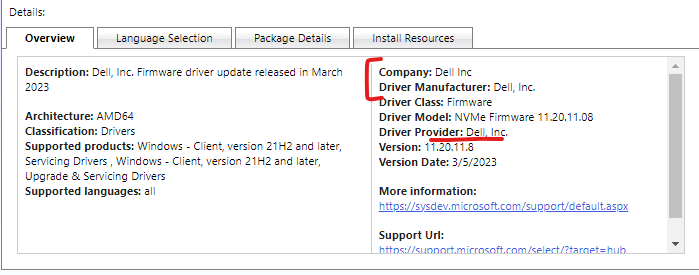
Microsoft's update service acts as an intermediary platform, facilitating the distribution of updates from various manufacturers to their respective devices. Microsoft cannot pre-verify the compatibility of firmware or software with individual hardware configurations since they don't have access to specific hardware details for all devices on the market.
While the Windows update service serves as a platform for delivering updates, the responsibility for firmware compatibility ultimately lies with the manufacturer.
We're sorry for the inconvenience you've faced, and I empathize with your frustration. Technological issues can be complex and sometimes unpredictable, and it's unfortunate that you're experiencing the consequences of this firmware problem.
It is crucial for both Microsoft and manufacturers like Dell to work together to ensure that firmware updates are thoroughly tested and verified for compatibility to avoid situations like the one you experienced.
Best Regards,
Kyo - MSFT | Microsoft Community Support Specialist
' cx='32' cy='32' r='32' /%3E%3Ctext x='50%25' y='55%25' dominant-baseline='middle' text-anchor='middle' fill='%23FFF' %3EA%3C/text%3E%3C/svg%3E)
