Share via

My PC keeps freezing with CPU treads at 100%

Anonymous
2023-09-29T09:44:41+00:00

I'm kinda new to forums so I'm not sure this is the correct place.

I have had this issue for about a week now, I tried to search for solutions online, but in the end nothing worked.

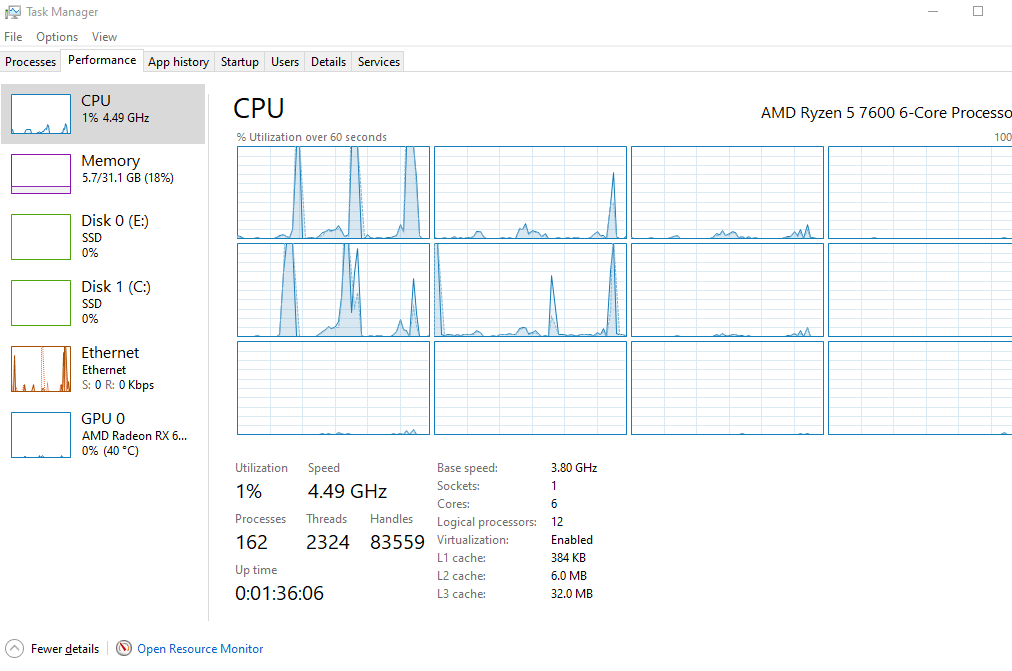
I experience this strange issue where my PC after some time working just fine, starts to freeze for 5 to even 10 seconds. While the freeze lasts my CPU usage goes up with "System" and some, not all, threads (logical processors) spike to 100%. The other threads (logical processors) don't seem to be affected at all (Its always the same, max 4 threads that spike). While my PC is frozen it still takes input; I can type and after it unfroze the text would appear, I can also close programs. So every action I do is delayed, but still registered, till the freeze ends. My PC never crashes, shots down or bluescreens after its frozen.

As far as I'm aware this doesn't affect games. I played some titles for extended time and never had a problem in game, but the moment I ALT-TAB out, it would freeze. I have also done some benchmarks (userbenchmark and cinebench r23), in which my PC preformed admirably. In cinebench my CPU was just fine at 100% load for 10 minutes without a freeze (though I did not try to do anything while the test ran).

Usually on YouTude while pausing, playing and watching videos no freezes occur, but the moment I start scrolling, or doing almost anything a freeze would happen.

My PC is relatively new (about a month old), I upgraded my previous system and only kept the GPU, SSD (SATA) and PSU (i went from AM4 to AM5). My PC specs:

  • CPU: Ryzen5 7600 (non-X)
  • GPU: Radeon RX 6600 (non-XT)
  • Memory: Kingston Fury Beast 32Gt DDR5 5600MHz CL36 (AMD EXPO 6000MHz OC)
  • MB: Asrock A620M Pro RS (latest BIOS)
  • OS: Windows 10 Pro
  • Drives: Kingston 1T NVMe SSD (Boot drive), Samsung 860 QVO 1T (SATA)
  • PSU: Corsair 550W 80+ Gold

Here is what i have tried already:

  • Did Windows Memory Check
  • Ran sfc /scannow
  • Ran Dism /Online /Cleanup-Image /RestoreHealth
  • Ran msdt.exe /id PerformanceDiagnostic
  • Ran chkdsk /r
  • Change power plan form Balanced to High Preformance
  • Reseted the PC
  • Did a clean Windows install (twice)
  • (Might have missed something)

None of these helped. I had at least 5 freezes while writing this (which took about 20 minutes).

I'm completely out of ideas and the freezes very frustrating and hinder my productivity.

Any help would be appreciated.

(In the images the spikes are when my PC froze)
Windows for home | Windows 10 | Performance and system failures

Locked Question. This question was migrated from the Microsoft Support Community. You can vote on whether it's helpful, but you can't add comments or replies or follow the question.

0 comments No comments

6 answers

Sort by: Most helpful
  1. John Jefferson Doyon 71,690 Reputation points Independent Advisor
    2023-09-30T12:18:33+00:00

    You're welcome, and I appreciate your patience.

    Reaching out to AMD's support directly could be a good next step. They might have specific insights or tools to further assist you.

    Additionally, considering the recent upgrade to AMD 5 and potential PSU-related issues, it might be beneficial to double-check the compatibility with your motherboard and PSU. You can visit the AMD website or your motherboard's support page to reconfirm compatibility and even reach out to their support for further guidance.

    I'm here to assist you further if needed. Please let me know!

    Was this answer helpful?

    0 comments No comments
  2. Anonymous
    2023-09-30T11:46:30+00:00

    Did both, neither helped unfortunately.

    Thanks for trying tho.

    Was this answer helpful?

    0 comments No comments
  3. John Jefferson Doyon 71,690 Reputation points Independent Advisor
    2023-09-29T22:19:22+00:00

    Hi there, thank you for getting back to me.

    Have you tried disabling AMD FreeSync?

    This can sometimes cause issues like the ones you're experiencing. You can do this by going to the Adrenaline Edition app > Gaming > Display. Also, ensure that the graphics settings are set to Performance under Graphics.

    Was this answer helpful?

    0 comments No comments
  4. Anonymous
    2023-09-29T21:53:32+00:00

    Hey, thanks for the reply.

    I have been monitoring my CPU temps for the past week and they don't rise while the freeze happens.

    For me the hardware acceleration is on automatically.

    I have tried other browsers but nothing changed. Also the freezes happen outside to Edge too, like steam, settings and on the desktop.

    What do you mean by updating my CPU with Adrenalin? I already have it but I can only keep my GPU drivers up to date for there.

    Was this answer helpful?

    0 comments No comments
  5. John Jefferson Doyon 71,690 Reputation points Independent Advisor
    2023-09-29T13:00:50+00:00

    Hi there, I am John J.D., a fellow Microsoft user like you.

    Thank you for sharing all the details about the issue you're facing with your PC. It's clear you've made quite an effort to troubleshoot.

    If you haven't already, you may need to update your CPU from AMD using the AMD Software: Adrenaline Edition, which can be found here: https://www.amd.com/en/support/apu/amd-ryzen-pr...

    Additionally, since the freezing appears to be browser-related, trying a different web browser and enabling hardware acceleration in Edge (if you haven't already) could be a good step. You can do this by going to Edge Settings > System and performance > Use hardware acceleration when available > toggle On.

    Check if your processor is overheating. High temperatures can lead to reduced clock speeds. Ensure proper ventilation and clean any dust from the cooling system.

    Hopefully, these steps will help alleviate the frustrating freezes you've been experiencing. If not, please don't hesitate to share any further details or concerns.

    John J.D.


    Note: This is a non-Microsoft website. The page appears to be providing accurate, safe information. Watch out for ads on the site that may advertise products frequently classified as a PUP (Potentially Unwanted Products). Thoroughly research any product advertised on the site before you decide to download and install it.

    Was this answer helpful?

    0 comments No comments

