Share via

How Do I Fix Discord Distorting Other Applications' Audio

Anonymous
2023-08-27T21:34:45+00:00

Ive been having this issue for almost a year now and it has been driving me crazy trying to fix this.

So anytime Discord is playing audio (this can be from videos or from a VC), the distorts/muffles the audio from other applications.

~"You should fix your audio drivers", I have been. I have reinstalled, updated, etc, my audio drivers for 11 months now and NOTHING has fixed my issue.
~"Maybe it is your headset," I have bought many headsets, NOTHING has fixed my issue, it is not the headset.
~"Reinstall Discord" tried that, nothing seems to be working.

Most solutions I see only apply to Windows 10 and never even Windows 11. I feel stuck and trapped since basically nothing really works or even applies to me, and the solutions that DO actually apply to me never seem to work.

At this point I am desperate to get a solution that works, since every suggestion people have been giving me just never works and/or only makes things worse. Ive put up with this for 11 months and Im tired of it, I just want this to be fixed.

Windows for home | Windows 11 | Devices and drivers

Locked Question. This question was migrated from the Microsoft Support Community. You can vote on whether it's helpful, but you can't add comments or replies or follow the question.

0 comments No comments

38 answers

Sort by: Most helpful
  1. Anonymous
    2024-01-23T14:57:01+00:00

    Guys, are you using bluetooth headsets? If that's the case then this is the problem. BT have limited bandwidth so when it's required to also transfer voice (using discord or other software) it splits its bandwidth which results in lower quality audio.

    Inherent problem to Bluetooth connection. cannot be fixed.

    60+ people found this answer helpful.
    0 comments No comments
  2. Anonymous
    2023-09-15T21:00:05+00:00

    None of those helped fix my issue.

    40+ people found this answer helpful.
    0 comments No comments
  3. JosephT71 9,210 Reputation points
    2023-12-28T17:23:26+00:00

    If you have a windows 11 laptop and you have muffled sound, 99% of the problem is AI noise reduction. AI can do 2 way noise reduction (reducing noise from your friend's side as well). They are not in the usual places like realtek audio console so nobody can find them to turn it off.

    For Dell computers,

    https://www.dell.com/support/kbdoc/en-us/000215376/distorted-multimedia-audio-in-voip-conference-applications?lwp=rt

    For Acer computers,

    https://support.zspace.com/s/article/Acer-Purified-Voice-Console-How-to-Disable?language=en_US

    For Asus computers,

    https://www.asus.com/us/support/FAQ/1046946/

    For Lenovo computers,

    https://forums.lenovo.com/t5/Gaming-Laptops/Lenovo-Smart-Noise-Cancellation-App/m-p/5169055

    30+ people found this answer helpful.
    0 comments No comments
  4. Anonymous
    2023-12-28T17:03:25+00:00

    I have the same issues with a new Dell XPS 8960 running Windows 11 Pro. Whenever I run Discord and games on Steam it distorts the audio making the game audio break and become muffled as soon as anything resembling a voice speaks in the game.

    Microsoft and Discord don't seem to want to resolve the issue unable to fix the issue, from the several posts I have seen. It would be nice to get this fixed as it seems to affect a large amount of people using Windows 11.

    20+ people found this answer helpful.
    0 comments No comments
  5. Anonymous
    2023-08-28T05:53:03+00:00

    Hello,Iron Cutlass

    Welcome to Microsoft Community.

    Based on the current description, it seems like you're eliminating audio from other apps whenever you use Discord to play audio, to better help you, please share some details to allow us to better target the issue.

    1. What troubleshooting solutions have you tried as of now? This will help us to try these duplicate scenarios.
    2. Is the audio issue only on Discord? Does everything behave normally if you run other audio apps?

    Here are a few solutions that might help you fix the issue of Discord distorting other applications' audio on Windows 11, If you have already tried one of the options below, continue with the other steps:

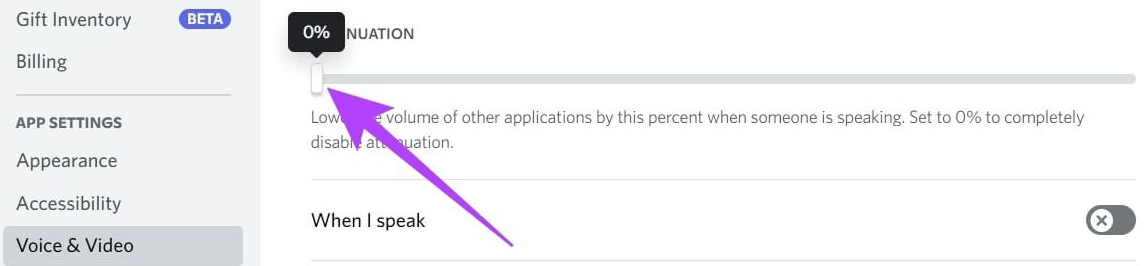
    Disable Attenuation in Discord: Discord has a feature called Attenuation that lowers the volume of other applications when someone is speaking in Discord. You can disable this feature by following these steps:

    • Open Discord and click on the gear icon at the bottom left to go to Settings.
    • Select 'Voice & Video' in the sidebar.
    • Scroll down to find Attenuation and slide it to 0%. As shown here:

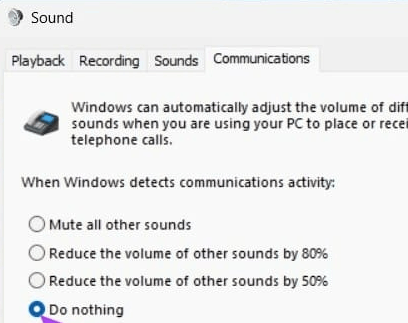
    Disable Windows Communications Activity: This setting in Windows decides what to do with other sources once Windows detects active communication via an application. Here's how to disable it:

    • Open Settings using Windows Search.
    • Under System, click on Sound.
    • Scroll down and click on 'More sound settings.'
    • In the Sound dialog box, go to the Communications tab.
    • Select Do nothing, click on Apply, and then hit OK.

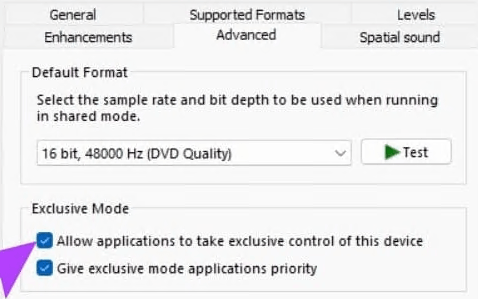
    Turn Off Exclusive Control: Some applications that require Windows sound access have been given exclusive control over the sound output. This can sometimes result in the volume of the app being lowered. Here's how to fix it:

    • Open Settings using Windows Search.
    • Under System, click on Sound.
    • Scroll down and click on 'More sound settings.'
    • In the Sound dialog box, right click and select the properties.
    • In the tab of Advanced, uncheck the options of Allow applications to take exclusive control of this device & Give exclusive mode applications priority.

    I hope this helps! Let me know if you have any other questions.

    Best regards,

    Chandy |Microsoft Community Support Specialist

    20+ people found this answer helpful.
    0 comments No comments