Hello all,
I have a problem with my wireless keyboard (see below for my previous attempts at a solution and hardware / software specifications):
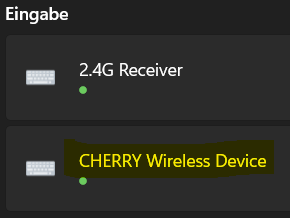
The USB receiver of my keyboard was worn out at some point, so it didn't fit properly in the USB port anymore. As a result, my laptop hardly recognized my keyboard anymore, so I had the keyboard company send me a new USB receiver. It fits tightly and my laptop recognizes it reliably. In the device settings, the keyboard is displayed under "Input" with a green dot (see Figure 1).
However, when I type on the switched-on wireless keyboard, no input is made.
What I have tried so far (in various permutations):
- Unplugging and replugging USB receiver, on different USB ports (always the same: keyboard is recognized flawlessly, but no input possible).
- Computer reboot.
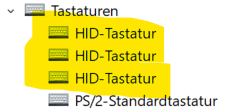
- Remove and re-add the keyboard in the Device Settings and (see Figure 2) the Device Manager.
- Automatically check for keyboard driver updates in Device Manager (there are none).
- Replace keyboard batteries.
- Pray.
Specifications:
- Windows version: Windows 11 Education (23H2).
- Keyboard: Cherry Stream Keyboard Wireless (JK-8550DE-2).
- Laptop: Dell Inspiron 7577.
Since my laptop is slightly battered and the built-in keyboard is starting to fail in some places, I depend on an external keyboard. Therefore, already many thanks for the help and best regards
***** moved from german to english Community *****
' cx='32' cy='32' r='32' /%3E%3Ctext x='50%25' y='55%25' dominant-baseline='middle' text-anchor='middle' fill='%23FFF' %3EA%3C/text%3E%3C/svg%3E)
