Share via

Windows 11, No Wifi Connect Option

Anonymous
2023-05-07T00:17:19+00:00

Opening my PC this morning, I was unable to connect to any wifi. When selecting the icon in the bottom right there is no option for wifi networks, only being 5 boxes: Bluetooth, airplane mode, battery saver, night light, and accessibility. After running the network troubleshooting, I was given the following summary:
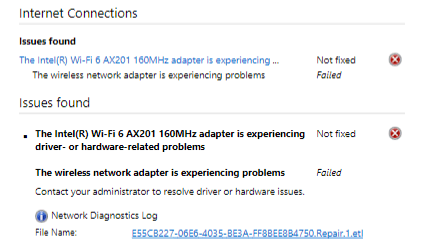
After researching this issue I tried the following solutions with no success:

  1. Using ethernet to update my Windows 11
  2. Updating/Reinstalling this driver from local files
  3. Resetting my network settings
  4. Resetting my PC overall

Please let me know if there is any other options or if I need to have the hardware checked at a local repair shop.

MY SOLUTION:

This post gets replies occasionally so figure I’d share what worked. I was able to update my operating system after connecting my computer to my phones hotspot using a wired connection. Others may find help in the responses below.

Windows for home | Windows 11 | Devices and drivers

Locked Question. This question was migrated from the Microsoft Support Community. You can vote on whether it's helpful, but you can't add comments or replies or follow the question.

0 comments No comments

31 answers

Sort by: Most helpful
  1. Anonymous
    2023-09-15T16:36:57+00:00

    Opening my PC this morning, I was unable to connect to any wifi. When selecting the icon in the bottom right there is no option for wifi networks, only being 5 boxes: Bluetooth, airplane mode, battery saver, night light, and accessibility. After running the network troubleshooting, I was given the following summary:

    Image Image

    Image

    After researching this issue I tried the following solutions with no success:

    1. Using ethernet to update my Windows 11
    2. Updating/Reinstalling this driver from local files
    3. Resetting my network settings
    4. Resetting my PC overall

    Please let me know if there is any other options or if I need to have the hardware checked at a local repair shop.

    This is an old question but I had this same issue this morning. I looked it up on the Microsoft help forums and nobodies been able to figure it out it seems.

    I did every suggestion given and none of them worked.

    While trying to fix it myself, I noticed there was an optional update under

    WINDOWS UPDATE > ADVANCED OPTIONS >OPTIONAL UPDATES

    It was an update for the Internet driver that wasn't installed in the latest update for some reason.

    In order to install it I needed Internet access 😑

    I hooked my phone up to my computer via USB-C and selected the option on my phone for usb tethering ( sharing wifi, with a USB connected device)

    I then downloaded the driver update. The Wi-Fi option in the bottom right was then visible and working!

    100+ people found this answer helpful.
    0 comments No comments
  2. Anonymous
    2024-02-29T00:17:59+00:00

    how can I possible download anything without an Internet connection

    30+ people found this answer helpful.
    0 comments No comments
  3. Anonymous
    2023-12-01T15:30:17+00:00

    I had the same exact issue this morning when I opened my laptop. I just fixed it by doing a network reset. And to my amazement it worked.

    20+ people found this answer helpful.
    0 comments No comments
  4. EmilyS726 227.5K Reputation points Independent Advisor
    2023-05-07T01:53:09+00:00

    Hello, this is Emily.

    Did you try downloading the driver from Intel directly? https://www.intel.com/content/www/us/en/downloa...

    If this driver doesn't work, please type msinfo32.exe in the search on the taskbar. Look for the System model. Then go to your computer's manufacturer support website and find this model's driver support page. Download their version of wifi adapter driver as the Intel one is more generic, sometimes OEM has customize the driver, thus downloading from manufacturer can sometimes make a difference.

    If the driver itself still doesn't resolve the issue, please also install BIOS and chipset while you are on the manufacturer site.

    If that still doesn't work, then there's a chance it is a hardware issue with the adapter itself.

    10+ people found this answer helpful.
    0 comments No comments
  5. Anonymous
    2023-12-14T16:31:48+00:00

    This didn't work for me. After selecting usb tethering, no connection was made. I am at lost here.

    9 people found this answer helpful.
    0 comments No comments
