Share via

Cannot install needed fonts in Windows 11

Anonymous
2023-03-15T14:37:52+00:00

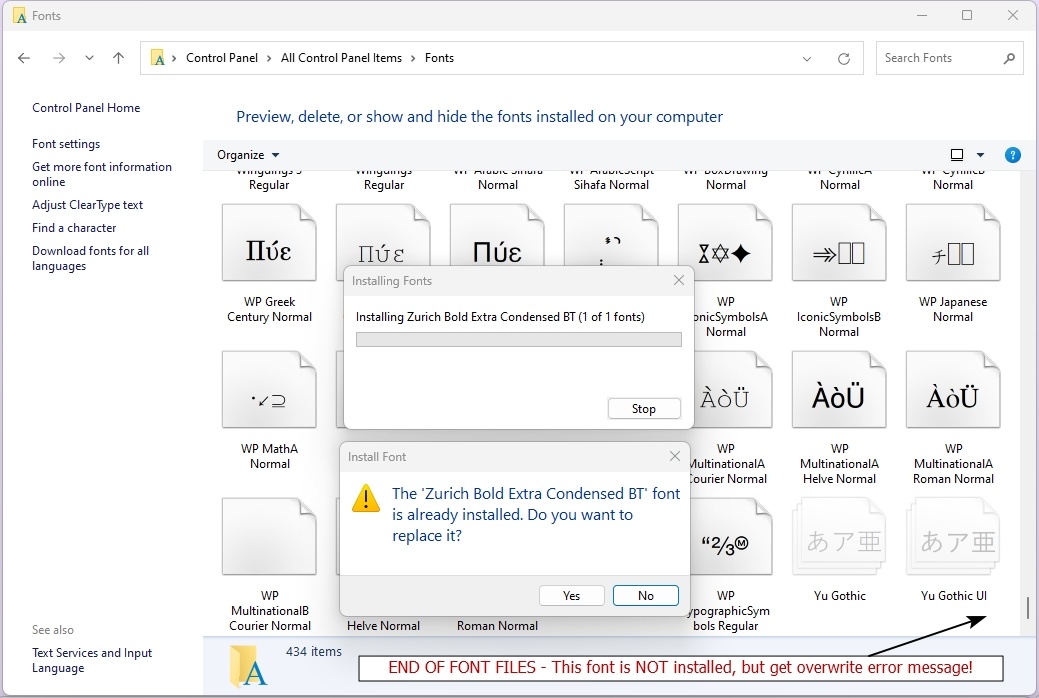
One of our graphic applications is reporting that some of the fonts used in a prior design are not available when opening the file.  We have checked our Windows 11 font folder and sure enough the required fonts are not listed.  Unfortunately, if we try to install the required fonts we receive an overwrite warning that the font is already installed.  Each missing font we attempt to install receives this same warning.  See the attached image.

In one case above, there isn’t even a font with a similar name.  In another case, there is a font with a similar name but, since the Windows 11 font folder does not show filenames or extensions, we are not sure if overriding the warning will replace a standard font we need or not.  In this latter case, we are trying to install an Eras Contour font when another Eras font is installed (not the same font).  We would appreciate any assistance in troubleshooting this issue!
Windows for home | Windows 11 | Display and graphics

Locked Question. This question was migrated from the Microsoft Support Community. You can vote on whether it's helpful, but you can't add comments or replies or follow the question.

0 comments No comments

4 answers

Sort by: Most helpful
  1. Anonymous
    2023-11-13T17:38:24+00:00

    Hi Honest Abe

    I am Dave, I will help you with this.

    Windows installs fonts into two locations, application specific fonts may be installed into the folder below, check if those fonts are already installed in this folder:

    C:\USERS\OWNER\APPDATA\LOCAL\MICROSOFT\WINDOWS\FONTS

    What if I'm unable to install a font? Here's the error I'm getting.

    10+ people found this answer helpful.
    0 comments No comments
  2. DaveM121 869.7K Reputation points Independent Advisor
    2023-03-15T15:14:38+00:00

    Hi Honest Abe

    I am Dave, I will help you with this.

    Windows installs fonts into two locations, application specific fonts may be installed into the folder below, check if those fonts are already installed in this folder:

    C:\USERS\OWNER\APPDATA\LOCAL\MICROSOFT\WINDOWS\FONTS

    1 person found this answer helpful.
    0 comments No comments
  3. DaveM121 869.7K Reputation points Independent Advisor
    2023-03-17T07:39:12+00:00

    Hi Honest Abe,

    Sorry, I was offline, if you find the font(s) in that folder, can you move them to the C:Windows\Fonts folder, or does that cause an error?

    0 comments No comments
  4. Anonymous
    2023-03-17T00:25:25+00:00

    Thank you, Dave, that was an incredibly useful tip of which we were unaware. However, it still doesn't seem to answer the question as to why the application reported the fonts missing. We assume, perhaps incorrectly, that Windows 11 would make this path available to the application when choosing fonts.

    0 comments No comments
