Share via

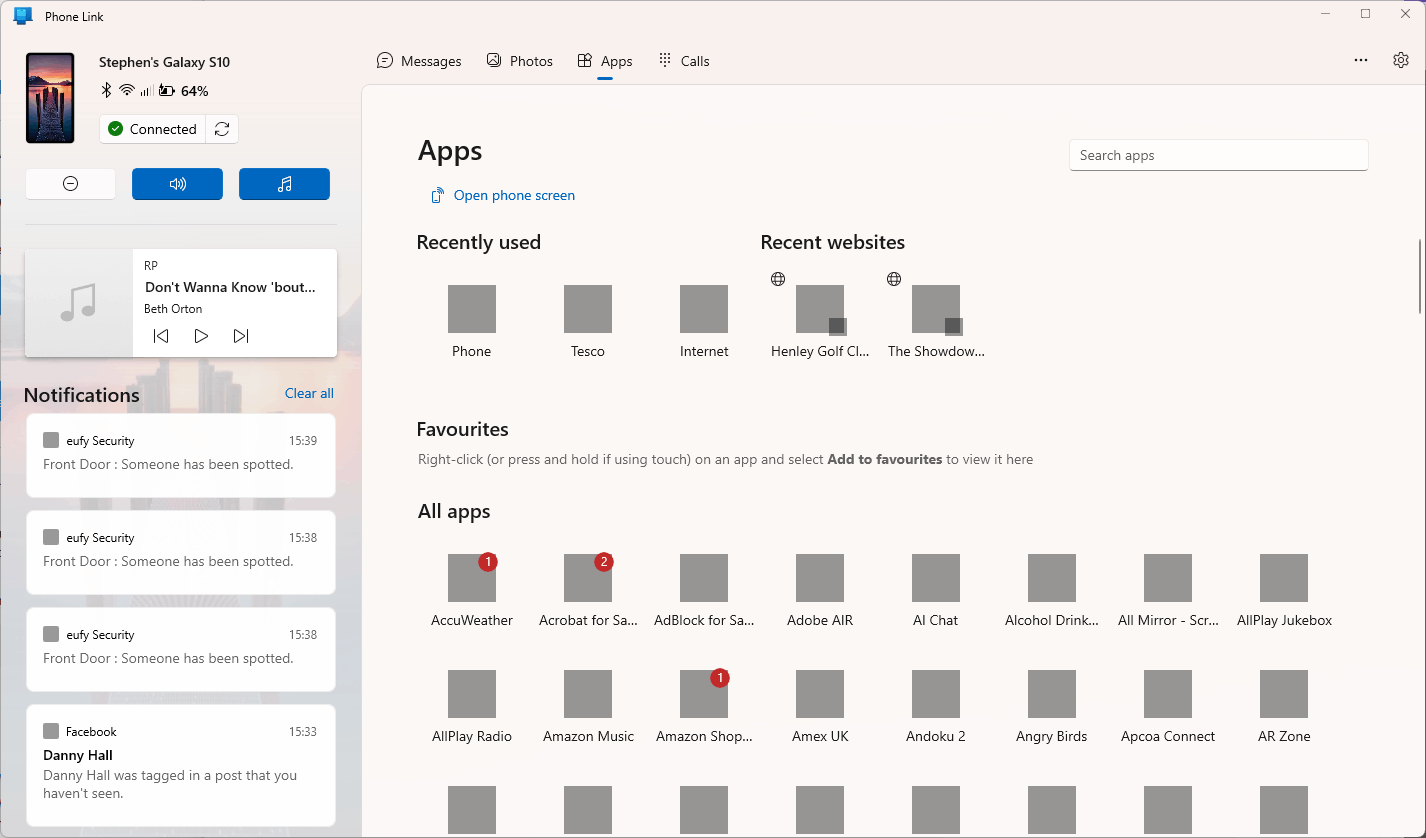
Phone Link apps icons turn to gray squares - but the apps still launch

Anonymous
2023-11-03T15:54:11+00:00

Hi

I'm finding that in the Phone Link Apps panel my app icons gradually all turn from the proper coloured icons into gray squares. Initially just a few, eventually all of them, see screenshot.

Any idea why this is happening? and how to stop it? Memory is not particularly stressed (50-60% in use), CPU less than 20%, disk (SSD) not busy.

If I shut down Windows and restart it goes back to normal, then gradually loses them again

Phone Link 1.23092.151.0

Windows 11 Home

Version 22H2

Installed on ‎29/‎11/‎2022

OS build 22621.2506

Experience Windows Feature Experience Pack 1000.22677.1000.0

regards
Steve
Windows for home | Windows 11 | Connect Phone and PC

Locked Question. This question was migrated from the Microsoft Support Community. You can vote on whether it's helpful, but you can't add comments or replies or follow the question.

0 comments No comments

5 answers

Sort by: Most helpful
  1. Sumit D - IA 170.4K Reputation points Independent Advisor
    2023-11-03T16:30:42+00:00

    Hi Steve,

    I'm Sumit, here to answer your query at the Microsoft Community.

    That is a super weird bug.

    Odd guess: Do the following things and let me know if any of these helps.

    1. Change the theme from Settings > Personalization > Theme
    2. Change the scaling factor in Settings > System > Display.

    Good luck!

    Was this answer helpful?

    1 person found this answer helpful.
    0 comments No comments
  2. Anonymous
    2024-01-27T10:53:03+00:00

    Happening for me too.

    Was this answer helpful?

    0 comments No comments
  3. Anonymous
    2024-01-26T22:08:20+00:00

    Happening the same thing here. So it is not rare thing.

    ANd I am sick of the asking same question when starting app from phone that I sould touch my phone in that situation.. what the heck? WHat is purpose for this software if I am forced to touch my phone even it is in other room.. and computer in another, just a piece of **** this software.

    And if there are some things about security... I think it is more security issue if someone is my home to use that.

    And why these manufacturers and makers thinks they know things better than consumer, how is that possible, how you can decide what iuss the best for me and why

    Sick windows world.

    Was this answer helpful?

    0 comments No comments
  4. Sumit D - IA 170.4K Reputation points Independent Advisor
    2023-11-05T12:21:13+00:00

    Thanks for letting me know Steve. I am here if the issue arises again :)

    Was this answer helpful?

    0 comments No comments
  5. Anonymous
    2023-11-04T18:56:31+00:00

    Thanks Sumit

    I agree, very weird.

    I did as you suggested and it appeared to make no difference so I changed back to the old theme and scaling, killed the Phone Link tasks again and ran it again - and all the app icons are now OK. So far it is staying stable so I'm hoping it is cured but only time will tell.

    regards
    Steve

    Was this answer helpful?

    0 comments No comments
