Microsoft 365 and Office | SharePoint | For business | Windows
A group of Microsoft Products and technologies used for sharing and managing content, knowledge, and applications.

This browser is no longer supported.
Upgrade to Microsoft Edge to take advantage of the latest features, security updates, and technical support.
' cx='32' cy='32' r='32' /%3E%3Ctext x='50%25' y='55%25' dominant-baseline='middle' text-anchor='middle' fill='%23FFF' %3ESG%3C/text%3E%3C/svg%3E)
Getting the following error in Edit Mode when we add more quick links in Communication Site.
ERROR:
Cannot have two HTML5 backends at the same time.
CALL STACK:
Error: Cannot have two HTML5 backends at the same time.
at e.value (https://modernb.akamai.odsp.cdn.office.net/files/sp-client/chunk.vendors~gridlayout-drag-drop-wrappers_none_d5b09cce066617e30b5f.js:2:60126)
at handleRefCountChange (https://modernb.akamai.odsp.cdn.office.net/files/sp-client/chunk.vendors~gridlayout-drag-drop-wrappers_none_d5b09cce066617e30b5f.js:2:26671)
at Object.h [as dispatch] (https://modernb.akamai.odsp.cdn.office.net/files/sp-client/chunk.vendors~gridlayout-drag-drop-wrappers_none_d5b09cce066617e30b5f.js:2:8169)
at e.value (https://modernb.akamai.odsp.cdn.office.net/files/sp-client/chunk.vendors~gridlayout-drag-drop-wrappers_none_d5b09cce066617e30b5f.js:2:23645)
at i (https://modernb.akamai.odsp.cdn.office.net/files/sp-client/chunk.vendors~gridlayout-drag-drop-wrappers_none_d5b09cce066617e30b5f.js:2:72157)
at https://modernb.akamai.odsp.cdn.office.net/files/sp-client/chunk.vendors~gridlayout-drag-drop-wrappers_none_d5b09cce066617e30b5f.js:2:3018
at ns (https://modernb.akamai.odsp.cdn.office.net/files/sp-client/sp-pages-assembly_en-us_2548dff9353f4dfa701500989e0eb887.js:70:89106)
at as (https://modernb.akamai.odsp.cdn.office.net/files/sp-client/sp-pages-assembly_en-us_2548dff9353f4dfa701500989e0eb887.js:70:89209)
at uc (https://modernb.akamai.odsp.cdn.office.net/files/sp-client/sp-pages-assembly_en-us_2548dff9353f4dfa701500989e0eb887.js:70:107135)
at t.unstable_runWithPriority (https://modernb.akamai.odsp.cdn.office.net/files/sp-client/sp-pages-assembly_en-us_2548dff9353f4dfa701500989e0eb887.js:70:5230)
A group of Microsoft Products and technologies used for sharing and managing content, knowledge, and applications.

Hi @Sajith Gopalakrishnan Hema , this is a quick note to let you know that we are looking into this issue. We did some tests and did not reproduce your issue. Is there some custom code on your site?
' cx='32' cy='32' r='32' /%3E%3Ctext x='50%25' y='55%25' dominant-baseline='middle' text-anchor='middle' fill='%23FFF' %3ERL%3C/text%3E%3C/svg%3E)
Also occurring in Australian tenant. Quick Links web parts show the error in Edit mode. There is no custom code on the site, though the Crisis Management template has been applied. Due to comment character limit I will provide snippet of error code below...
CALL STACK:
Error: Cannot have two HTML5 backends at the same time.
at e.value (https://modernb.akamai.odsp.cdn.office.net/files/sp-client/chunk.vendors~gridlayout-drag-drop-wrappers_none_d5b09cce066617e30b5f.js:2:60126)
at handleRefCountChange (https://modernb.akamai.odsp.cdn.office.net/files/sp-client/chunk.vendors~gridlayout-drag-drop-wrappers_none_d5b09cce066617e30b5f.js:2:26671)
at Object.h [as dispatch] (https://modernb.akamai.odsp.cdn.office.net/files/sp-client/chunk.vendors~gridlayout-drag-drop-wrappers_none_d5b09cce066617e30b5f.js:2:8169)
at e.value (https://modernb.akamai.odsp.cdn.office.net/files/sp-client/chunk.vendors~gridlayout-drag-drop-wrappers_none_d5b09cce066617e30b5f.js:2:23645)
at i (https://modernb.akamai.odsp.cdn.office.net/files/sp-client/chunk.vendors~gridlayout-drag-drop-wrappers_none_d5b09cce066617e30b5f.js:2:72157)
at https://modernb.akamai.odsp.cdn.office.net/files/sp-client/chunk.vendors~gridlayout-drag-drop-wrappers_none_d5b09cce066617e30b5f.js:2:3018
at ns (https://modernb.akamai.odsp.cdn.office.net/files/sp-client/sp-pages-assembly_en-us_abbfeb453a3dfa43b4974c36c6143051.js:70:89106)
at as (https://modernb.akamai.odsp.cdn.office.net/files/sp-client/sp-pages-assembly_en-us_abbfeb453a3dfa43b4974c36c6143051.js:70:89209)
at uc (https://modernb.akamai.odsp.cdn.office.net/files/sp-client/sp-pages-assembly_en-us_abbfeb453a3dfa43b4974c36c6143051.js:70:107135)
at t.unstable_runWithPriority (https://modernb.akamai.odsp.cdn.office.net/files/sp-client/sp-pages-assembly_en-us\_ ERROR: Cannot have :Char limit exceeded
' cx='32' cy='32' r='32' /%3E%3Ctext x='50%25' y='55%25' dominant-baseline='middle' text-anchor='middle' fill='%23FFF' %3ESB%3C/text%3E%3C/svg%3E)
I can confirm we are seeing this error in the quick links webparts when editing pages on comms site too. Also an Australian tenant.
' cx='32' cy='32' r='32' /%3E%3Ctext x='50%25' y='55%25' dominant-baseline='middle' text-anchor='middle' fill='%23FFF' %3ECB%3C/text%3E%3C/svg%3E)
I have the same issue. Newly created Communications Site, no template applied, Added Quick Links webpart and added a link.
In Edit mode the Quick link webpart shows the exact same error message as OP.
When saving the page the Quick Link shows normally.
Cannot add more than one Quick Link due to this error.
Tenant is Dutch.
Edit: Existing Communications Sites that had Quick Links (4~15 links per site) configured also have the same error in Edit mode.
Edit2: Cannot reproduce anymore after 30 min. Not on existing sites and not on the new site.
Edit3: The issue has arisen again on a newly created site 1 hour after posting last edit.
' cx='32' cy='32' r='32' /%3E%3Ctext x='50%25' y='55%25' dominant-baseline='middle' text-anchor='middle' fill='%23FFF' %3EPJ%3C/text%3E%3C/svg%3E)
Same problem here in US this afternoon. Editing web part on communications site. No custom coding involved. Web part has a quick link -- when we try and edit it, we get the error.
' cx='32' cy='32' r='32' /%3E%3Ctext x='50%25' y='55%25' dominant-baseline='middle' text-anchor='middle' fill='%23FFF' %3EJN%3C/text%3E%3C/svg%3E)
Exactly the same issue here on a UK tenant. Editing the same web part on the same communications site a week ago worked without issue. Nothing has changed on our side.
' cx='32' cy='32' r='32' /%3E%3Ctext x='50%25' y='55%25' dominant-baseline='middle' text-anchor='middle' fill='%23FFF' %3ERM%3C/text%3E%3C/svg%3E)
Same problem we are facing with the Links webpart, on a normal Teams Site - no customization at all. Has this issue been reported as an Incident to the Microsoft team ?
' cx='32' cy='32' r='32' /%3E%3Ctext x='50%25' y='55%25' dominant-baseline='middle' text-anchor='middle' fill='%23FFF' %3EVK%3C/text%3E%3C/svg%3E)
Its happening with our customer in Newzealand as well. Do we have any fix for this? issue is very intermittent and unable to reproduce so frequently.
' cx='32' cy='32' r='32' /%3E%3Ctext x='50%25' y='55%25' dominant-baseline='middle' text-anchor='middle' fill='%23FFF' %3EMK%3C/text%3E%3C/svg%3E)
Yes, still the issue persists
' cx='32' cy='32' r='32' /%3E%3Ctext x='50%25' y='55%25' dominant-baseline='middle' text-anchor='middle' fill='%23FFF' %3EM%3C/text%3E%3C/svg%3E)
This was happening to me too in the UK.
I managed to sort the issue, but think it still needs addressing somehow.
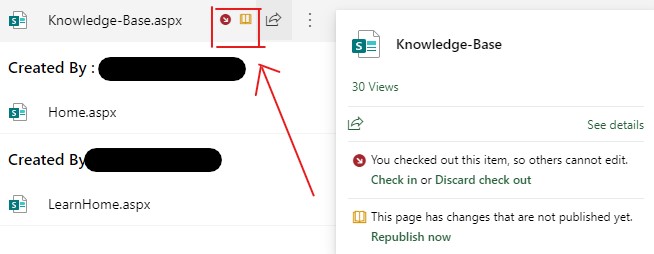
I found it was because there was another page with "quick links" inserted on it, within my site that was sitting at "republish" state. Once I republished this page I could then add new Quick Links on the new page that was receiving the error. It now works fine again.
So in short, make sure there are no other pages with quick links displayed that is in a republished state.
' cx='32' cy='32' r='32' /%3E%3Ctext x='50%25' y='55%25' dominant-baseline='middle' text-anchor='middle' fill='%23FFF' %3EGS%3C/text%3E%3C/svg%3E)
Strangely, this seems to fix the problem. I had another page in edit mode by another person. Thank you!
' cx='32' cy='32' r='32' /%3E%3Ctext x='50%25' y='55%25' dominant-baseline='middle' text-anchor='middle' fill='%23FFF' %3EPP%3C/text%3E%3C/svg%3E)
Yes, it did the trick for me too, thanks Mark-k for the suggestion.
' cx='32' cy='32' r='32' /%3E%3Ctext x='50%25' y='55%25' dominant-baseline='middle' text-anchor='middle' fill='%23FFF' %3ENK%3C/text%3E%3C/svg%3E)
How were you able to identify the pages that were unpublished? (Other than going thru them 1 by 1.)
' cx='32' cy='32' r='32' /%3E%3Ctext x='50%25' y='55%25' dominant-baseline='middle' text-anchor='middle' fill='%23FFF' %3EAA%3C/text%3E%3C/svg%3E)
Hi @Nancy Kugel , to see checked out / unpublished pages: go to Site Contents-> Site Pages. there you'll be able to see and manage all pages that were created on your site. Pages that are marked with a yellow book icon have unpublished changes.
Hi @Sajith Gopalakrishnan Hema ,
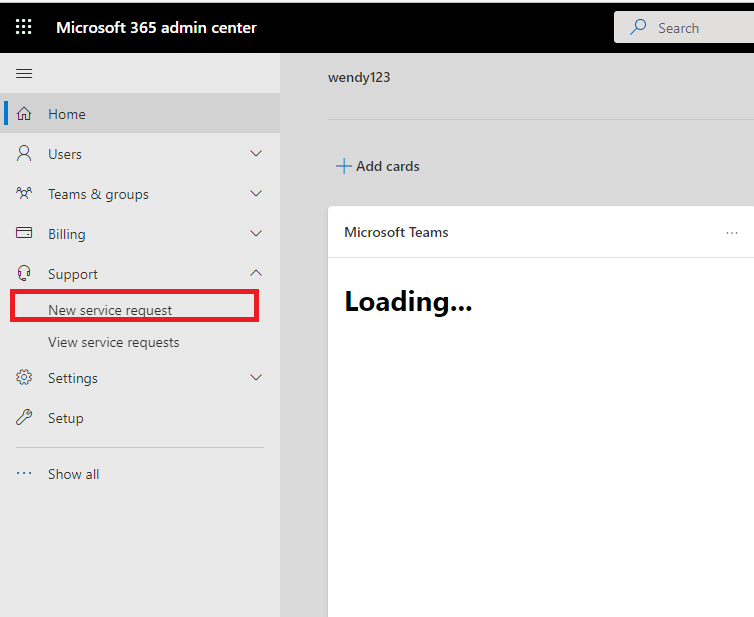
I have tested in my end and I am not able to reproduce this issue, I would suggest you open a service request to contact Microsoft for more direct help.
If the answer is helpful, please click "Accept Answer" and kindly upvote it. If you have extra questions about this answer, please click "Comment".
Note: Please follow the steps in our documentation to enable e-mail notifications if you want to receive the related email notification for this thread.
This issue comes when we add two hero web parts in a page (Edit Mode). After sometime, it disappears.
' cx='32' cy='32' r='32' /%3E%3Ctext x='50%25' y='55%25' dominant-baseline='middle' text-anchor='middle' fill='%23FFF' %3EEA%3C/text%3E%3C/svg%3E)
I have just had the same issue - try to add a quick links web part to the communication site page and error appears as above. Has there been a solution offered?
' cx='32' cy='32' r='32' /%3E%3Ctext x='50%25' y='55%25' dominant-baseline='middle' text-anchor='middle' fill='%23FFF' %3EDM%3C/text%3E%3C/svg%3E)
Hi @Elsie Lu_MSFT , this issue is still happening. I am based in UK. I am unsure how to contact Microsoft for more help, can you please help?
' cx='32' cy='32' r='32' /%3E%3Ctext x='50%25' y='55%25' dominant-baseline='middle' text-anchor='middle' fill='%23FFF' %3ELO%3C/text%3E%3C/svg%3E)
I'm having this problem as well.
I tried deleting and recreating the QuickLink web part, and continued to experience the error.
I look forward to advice regarding the solution.
Australian tenant, no customisations, Google Chrome Version 98.0.4758.102 (Official Build) (64-bit), link is to government site: https://www.ato.gov.au/Tax-professionals/Prepare-and-lodge/Tax-agent-lodgment-program/Tax-returns-by-client-type/Individuals-and-trusts/