Share via

Getting multiple Event ID error 131 Device Set-up Manager

Anonymous
2023-12-04T23:12:29+00:00

Hello all. I have an HP Omen desktop with Win10 Home 22H2 Build 19045.3693 and my wife has an HP Envy Laptop with Win10 Home 22H2 Build 19045.3693. I was wondering if users were getting multiple Event ID error 131 Device Set-up Manager and getting the little clocks beside my installed devices in Control Panels Devices and Printers that come and go. I have done everything from running SFC, DISM, Virus Scans you name it to try and solve this problem but nothing. According to one of the Independent Advisors here in the Forum it was being caused by Update KB5032278 and to uninstall it which I did and still no change. I do not know what is going on and what Microsoft has done but this is clearly a Microsoft problem and Microsoft needs to fix it. This will be the last Optional Update that will be installed on our computers unless it is a driver update. This does not seem to cause any computer problems but what problems will this cause later on if it is not fixed. This is totally ridiculous.

Don

UPDATE: The only way I have found to stop these error 131 and clear the timer clocks from my devices is to go into System Properties then Hardware and turn off Device Installation Settings and also cleared the Device Setup Manager in Events Log and disabled the log until MS gets this fixed.

Windows for home | Windows 10 | Devices and drivers

Locked Question. This question was migrated from the Microsoft Support Community. You can vote on whether it's helpful, but you can't add comments or replies or follow the question.

0 comments No comments

39 answers

Sort by: Most helpful
  1. Anonymous
    2024-07-22T21:08:33+00:00

    what a ridiculous situation; you're acknowledging it could very well be windows updates, but it doesn't seem that there is anything to do except wait until the next update and see. if someone worked for me and told me this they would immediately be fired. fix the thing immediately...

    2 people found this answer helpful.
    0 comments No comments
  2. lmacri 2,500 Reputation points
    2024-04-20T19:39:07+00:00

    I have the same issue. The package to be installed was already in place. I chose not to continue installing the KB5034763 update. I will try to turn off the checks manually for now. Hopefully, Microsoft will correct the issue in the next decade.

    Hi vyache:

    What is your current Win 10 version and OS build number shown at Setting | System | About | Windows Specifications? You can also find this information if you open a Run dialog box (Windows key + R) and enter winver.

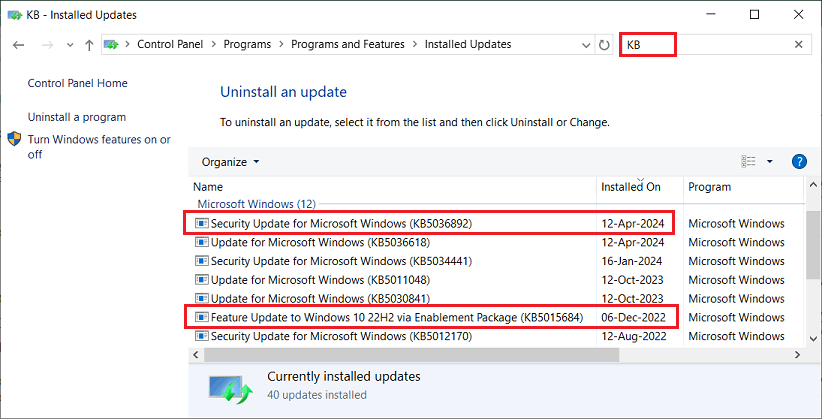
    This topic was started by DonT5 in December 2023, which is about the same time many Win 10 v2H22 users first noticed these DeviceSetupManager Event ID 131 errors in their Event Viewer. You referenced KB5015684 in your post, but if I search my installed updates for "KB" it shows this update was delivered to my system a year earlier on 06-Dec-2022 (see the image below). I'm not sure how the KB5015684 enablement package to turn on the Win 10 v22H2 Feature Update could be related to your Event ID 131 errors unless you are still using Win 10 v21H2.
    Image

    I'm also unclear why you said you've chosen not to install KB5034763 (the February 2024 monthly Quality Update released 13-Feb-2024 that installed OS builds 19044.4046 / 19045.4046). The image of your installed updates suggests you've already installed KB5036892 (the latest April 2024 monthly Quality Update released 09-Apr-2024 that installs OS builds 19044.4291 / 19045.4291). Monthly Quality Updates are cumulative [i.e., every new Quality Update released on Patch Tuesdays on the 2nd Tuesday of each month supersedes (replaces) all previous monthly Quality Updates] so if Windows Update has already installed the April 2024 KB5036892 Quality Update then the older February 2024 KB5034763 is no longer required on your system and would fail with a "The update is not applicable to your computer" error message if you tried to install KB5034763 manually.

    If you haven't already done so, I would advise you allow Windows Update to patch your Win 10 OS to the current Version 22H2 / OS build 19045.4291 (rel. 09-Apr-2024). If you find that the DeviceSetupManager Event ID 131 errors are causing issues on your system (e.g., high CPU consumption, etc.) then simply apply the workaround shown in the 12-Apr-2024 post <above> and change your Device Installation Settings to "No" until Microsoft releases a bug fix.

    Dell Inspiron 15 5584 * 64-bit Win 10 Pro v22H2 build 19045.4291 * Firefox v125.0.1 * Microsoft Defender v4.18.24030.9-1.1.24030.4 * Malwarebytes Premium v5.1.3.110-1.0.1219 * Macrium Reflect Free v8.0.7783

    2 people found this answer helpful.
    0 comments No comments
  3. lmacri 2,500 Reputation points
    2024-03-21T02:06:38+00:00

    ... I have applied the workaround. But I share the concerns of others who must choose between continuing automatic downloads and eliminating those 131 errors. It's not reassuring to have to resort to such workarounds ...

    Hi Special_Character_8:

    Just to clarify, changing the Device Installation Settings to "No" in your Advanced System settings as instructed <above> will only prevent automatic updating of drivers for your hardware devices. Windows Update will continue to install available updates for your Windows operating system, Microsoft .NET Framework, etc.

    Dell Inspiron 5584 * 64-bit Win 10 Pro v22H2 build 19045.4170 * Microsoft Defender v4.18.24020.7-1.1.24020.9 * Intel i5-8265U CPU * 8 GB RAM * 256 GB Toshiba KBG40ZNS256G NVMe SSD * Intel UHD Graphics 620

    2 people found this answer helpful.
    0 comments No comments
  4. Anonymous
    2023-12-10T20:59:56+00:00

    I updated 2 computers and have got this same error 131 and the fix to turn off the check has worked. The link in the registry does not work when trying manually. Guess I will just leave the check turned off, don't know how to stop errors from logging or what that little clock is that was mention. I did do an image prior to updating I could go back to, but doubt I will do that for this issue. I use Macrium Reflect and have restored images in the past and it works fine, but this isn't that serious of an issue.

    1 person found this answer helpful.
    0 comments No comments
  5. Anonymous
    2023-12-08T01:05:57+00:00

    Hi Don,

    Thank you for your feedback. I have submitted this issue for you through internal channels. In addition, you can also submit your problem through the Feedback Hub (if convenient, please provide as much detail as possible, including pictures, repro videos, etc.). 

    Send feedback to Microsoft with the Feedback Hub app - Microsoft Support

    Please share the feedback link here after submitting as it will allow others on the forum to vote for your submission, including me. More votes will lead to more visibility and higher priority to the development team.

    Your Sincerely

    Hahn - MSFT | Microsoft Community Support Specialist

    1 person found this answer helpful.
    0 comments No comments

