Developer technologies | VB
An object-oriented programming language developed by Microsoft that can be used in .NET.
This browser is no longer supported.
Upgrade to Microsoft Edge to take advantage of the latest features, security updates, and technical support.
I wanted to try making my own web browser, although I can't find WebBrowser Control in the toolbox. Does anyone know how to get WebBrowser Control?
An object-oriented programming language developed by Microsoft that can be used in .NET.
Thank you to @Castorix31 & @Viorel for your help!
' cx='32' cy='32' r='32' /%3E%3Ctext x='50%25' y='55%25' dominant-baseline='middle' text-anchor='middle' fill='%23FFF' %3ECF%3C/text%3E%3C/svg%3E)
Try webview2 from microsoft:
https://learn.microsoft.com/en-us/microsoft-edge/webview2/get-started/winforms
Answer accepted by question author

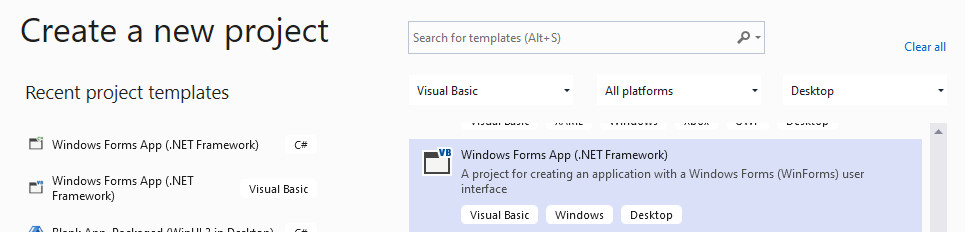
Probably you are making an application that is based on .NET 5 or 6 (Core). The WebBrowser control is available in case of .NET Framework. Try creating a new “Windows Forms App (.NET Framework)” project.
However, there is a new improved control — WebView2 — which supports the modern Web sites. See: https://learn.microsoft.com/en-us/microsoft-edge/webview2/get-started/winforms. You can also use it in WPF application.
Thanks for the help! Ended up following the link you provided me on how to get webview2. Thanks a lot for your help!

You must create a .NET Framework project, not .NET Core
But WebBrowser control has been replaced by WebView2
Thanks for the help! Ended up following the answer from Viorel-1. Thanks for your help!
' cx='32' cy='32' r='32' /%3E%3Ctext x='50%25' y='55%25' dominant-baseline='middle' text-anchor='middle' fill='%23FFF' %3EB%3C/text%3E%3C/svg%3E)
I still tried to make "Browse-AJOUR" and there is no: neither WebBrowser nor WebView2. What to do?